
How to Tell If a LinkedIn Profile Is Fake
A comprehensive cybersecurity guide to identify fake LinkedIn profiles, protect your professional network, and avoid sophisticated scams targeting professionals.
Learning how to tell if a LinkedIn profile is fake is essential for protecting your professional network and personal data. This guide will walk you through eight critical red flags that signal a fake LinkedIn account, teach you how to verify a person's identity through reverse image search tools like CaraComp, and explain what steps to take if you suspect you've encountered a scammer on the platform.
Whether you're a recruiter evaluating candidates, a job seeker vetting potential employers, or a business professional expanding your network, understanding these warning signs will help you make sure the connections you accept are legitimate and protect yourself from increasingly sophisticated scams targeting LinkedIn users.
Why Fake LinkedIn Profiles Are a Growing Cybersecurity Risk
The rise of fake LinkedIn profiles represents one of the most significant cybersecurity threats facing professionals today. Unlike other social media platforms where fake accounts primarily spread misinformation or boost follower counts, LinkedIn's professional context makes fake profiles uniquely dangerous for business and career security.
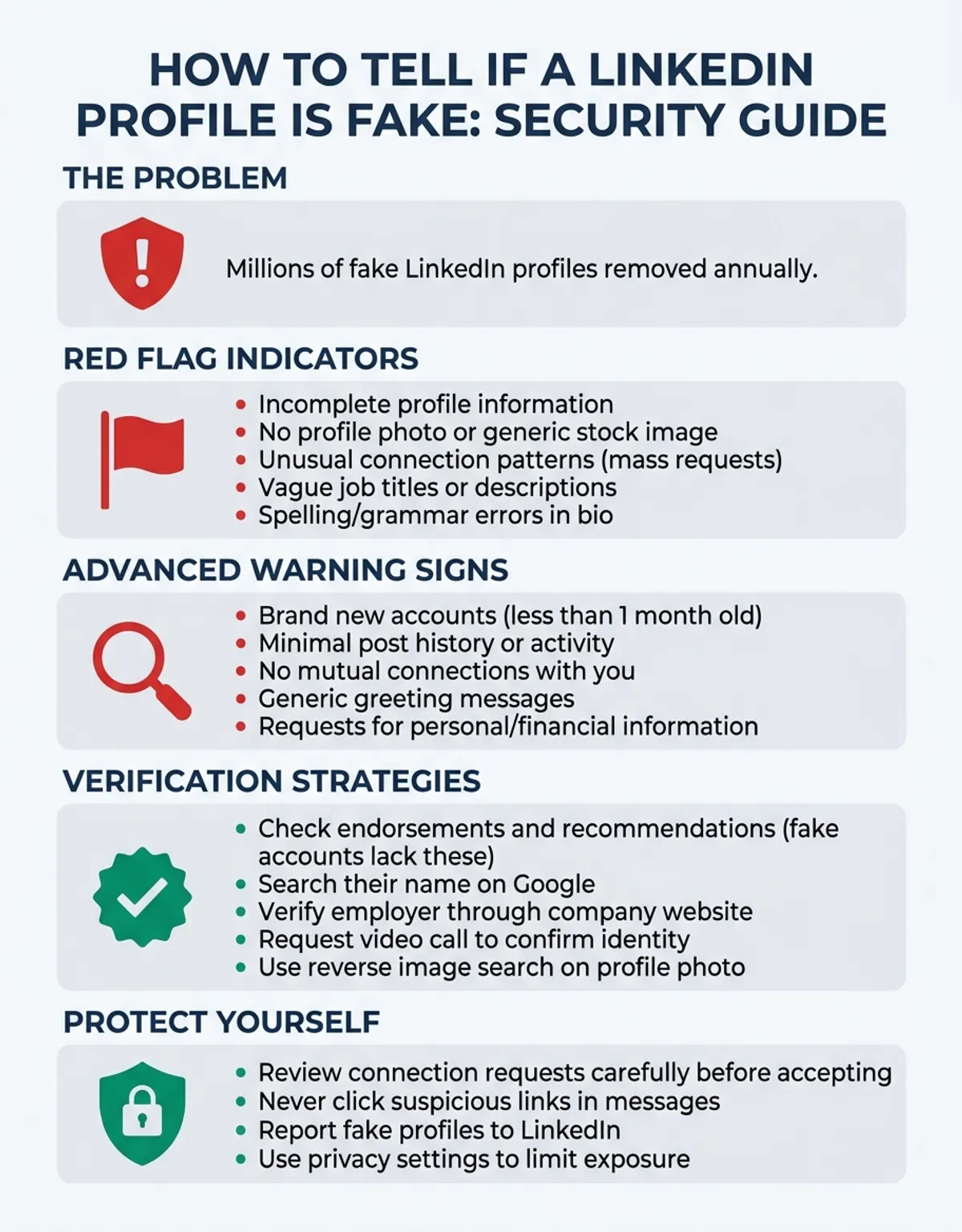
LinkedIn fake accounts are rampant across the platform, with millions of fake profiles removed annually by LinkedIn's security team.
Scammers create fake LinkedIn accounts for several malicious purposes. Corporate espionage operations use fake profiles to infiltrate company networks and extract confidential business information. Phishing campaigns target employees through seemingly legitimate connection requests, leading to credential theft and data breaches. Romance fraud schemes exploit the professional trust built through LinkedIn to manipulate victims into financial scams known as "pig butchering."
The job market has become a prime hunting ground for scammers using fake LinkedIn profiles. Fake recruiters contact job seekers with fraudulent offers, collecting personal information during fake interview processes or demanding upfront fees for non-existent positions. According to cybersecurity awareness reports, job seekers lost over $367 million to employment scams in 2022, with many of these scams originating on LinkedIn. (Source: https://www.ftc.gov/news-events/news/press-releases/2024/12/new-ftc-data-show-skyrocketing-consumer-reports-about-game-online-job-scams)
LinkedIn's professional environment creates a false sense of security that scammers exploit. Users are more likely to trust connection requests and messages on LinkedIn compared to other platforms because they assume professional profiles have been vetted. This trust makes LinkedIn an attractive target for scammers who understand that people lower their guard in business contexts.
The risk extends beyond individual users. When scammers infiltrate corporate networks through fake LinkedIn connections, they can launch business email compromise attacks, steal trade secrets, or gather intelligence about company operations. Executives and recruiters are particularly targeted because their roles require them to connect with unknown individuals regularly, creating opportunities for bad actors to blend in.
8 Red Flags That Signal a Fake LinkedIn Profile
Identifying fake profiles requires attention to specific warning signs that distinguish legitimate accounts from scammer operations. Here are eight red flags that should make you look twice before accepting a connection request or engaging with a LinkedIn user.
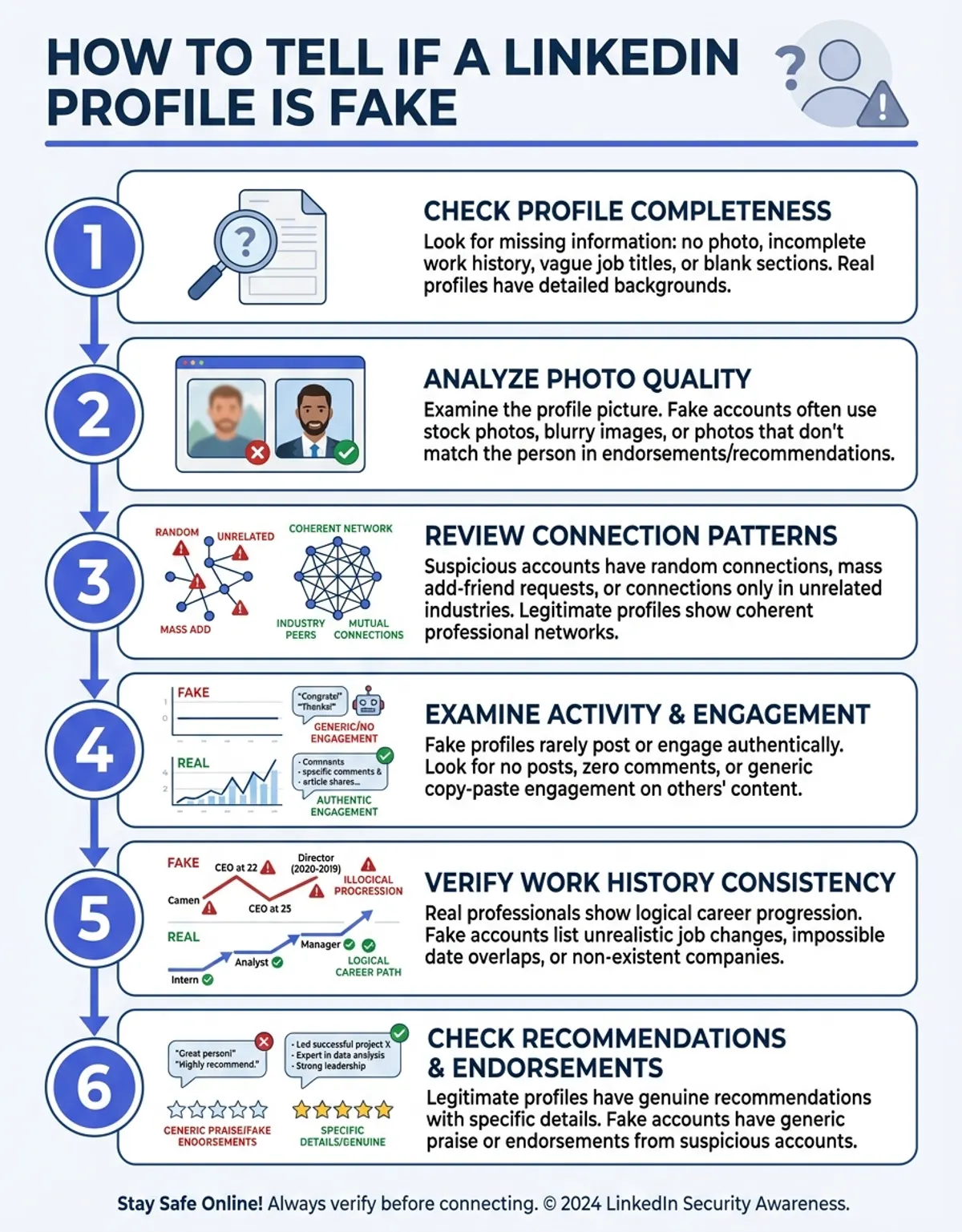
Learning how to tell if a LinkedIn profile is fake is essential for protecting your professional network and personal data.
Generic or AI-Generated Profile Photo
The profile photo is often the first clue that something isn't right. Fake profiles frequently use stock photos, images stolen from other people's social media accounts, or AI-generated faces that don't correspond to any real person. These photos often appear too professional or polished, with perfect lighting and generic backgrounds that resemble corporate headshots you'd find in stock photo libraries.
AI-generated profile photos have become increasingly common as technology improves. These synthetic faces show subtle artifacts like unusual ear shapes, impossible reflections in eyeglasses, or backgrounds that blur in unnatural ways. Tools like CaraComp's reverse image search can help you check if a profile photo appears elsewhere online or matches patterns consistent with AI generation.
Very Few Connections
One of the most reliable indicators that a LinkedIn profile is fake is an unusually low connection count. While genuine new users might have few connections initially, criminals often create profiles that show fewer than 50 connections despite claiming years of professional experience. Very few connections may be suspicious when combined with other red flags, especially if the person claims to work in industries where networking is essential.
Legitimate professionals typically accumulate connections over time through past colleagues, classmates, industry contacts, and business relationships. A senior executive or experienced recruiter with only 20 connections raises immediate questions about authenticity.
Vague or Inconsistent Work History
Fake LinkedIn accounts often feature work histories that don't add up. You might notice role titles that are overly generic, employment dates that don't align properly, or claims of working at prestigious companies without specific details about roles and responsibilities. fraudsters avoid specificity because detailed information can be easily verified and would expose their deception.
Check whether the timeline makes sense. Does the person claim to have held multiple executive positions simultaneously? Are there unexplained gaps? Does the career progression seem realistic? Inconsistencies in work history are major warning signs.
No Mutual Connections or Recommendations
When you check a profile and find zero mutual connections despite the person supposedly working in your industry or region, exercise caution. While it's possible to encounter legitimate professionals outside your network, fake profiles typically show no overlap with your existing connections because scammers cast wide nets without targeting specific communities.
Similarly, the absence of endorsements and recommendations is telling. Real professionals accumulate endorsements from colleagues over time. A profile with extensive experience but zero recommendations or skills endorsements suggests the account hasn't been used for genuine professional networking.
Suspicious Email Domain
If you examine the contact information and notice the email address itself ends in a free email service (Gmail, Yahoo, Outlook) rather than a company domain, be wary—especially if the person claims to work for a large company. While some legitimate users list personal emails, professionals at established companies typically use corporate email addresses for professional networking.
bad actors use free email services because they're easy to create and disposable. A claimed "Senior VP at Microsoft" whose contact email is a random Gmail address should raise immediate red flags.
Activity Is Purely Promotional or Copy-Paste
Examine the person's LinkedIn activity. fraudulent accounts often post nothing but promotional spam, cryptocurrency schemes, or copy-paste motivational content. They rarely engage authentically with other users' posts or participate in meaningful industry discussions. This pattern indicates the account exists for distribution rather than genuine professional engagement.
Company Doesn't Exist or Has No LinkedIn Page
When someone lists a company that you can't verify through basic search, investigate further. Many claim employment at organizations that either don't exist or have no verifiable online presence. Even small companies typically have some digital footprint—a website, a LinkedIn company page, or mentions in corporate directories.
If the listed organization has no LinkedIn page and you can't find any information about the organizational through search engines, you're likely dealing with a fake profile.
Profile Created Very Recently
Check when the profile was created. While new accounts aren't automatically suspicious, a profile claiming ten years of industry experience but created last month is a clear contradiction. criminals frequently create fresh accounts for specific campaigns, then abandon them once they've been reported or their scam concludes.
How to Check If a LinkedIn Profile Photo Is Real
Profile photos are critical for establishing trust on LinkedIn, which is why fraudsters invest effort into selecting or generating convincing images. Learning how to check whether a photo is stolen, AI-generated, or otherwise fake is an essential skill for verifying identity and protecting yourself from scams. Understanding face recognition tools can help you verify whether profile photos match across different platforms.
Reverse image search is your most powerful tool for verifying profile photos. This technique allows you to see where else a photo appears online and whether it's associated with the individual claiming to use it. Three primary methods exist for conducting reverse image searches:
Google Images reverse search lets you upload or link to a photo and find matching or similar images across the web. If the LinkedIn profile photo appears on multiple websites associated with different names, or if it shows up in stock photo libraries, you've found a fake profile. To use this method, save the profile photo from LinkedIn (right-click and save image), then visit Google Images and click the camera icon to upload it.
TinEye offers another reverse look option with a database specifically designed for tracking image usage. It's particularly effective at finding images that have been slightly modified or cropped, which often do to avoid detection.
CaraComp provides specialized tools for profile photo verification, including face comparison capabilities that can help you determine whether someone's LinkedIn photo matches other photos they've shared or appears in other contexts online. CaraComp's technology can also help detect AI-generated faces by analyzing the photo for artifacts and patterns consistent with synthetic image generation. For comprehensive facial analysis capabilities, explore our face comparison tool designed for profile verification.
AI-generated profile photos have become increasingly sophisticated, but they still contain telltale signs when you know what to verify for. Synthetic faces often show perfectly symmetrical features that look slightly "too perfect" compared to real photos. Background elements may blur or warp in impossible ways. Reflections in glasses might not match the supposed lighting conditions. Hair often has an artificial quality, especially around the edges where it meets the background. Learn more about detecting synthetic images with our AI face comparison technology guide.
When examining a profile photo, also consider context. Does the photo quality match what you'd expect from someone's professional headshot? A grainy, low-resolution image that appears to have been screenshot or heavily compressed might indicate it was stolen from another source. Conversely, a photo with studio-quality lighting and professional retouching for someone claiming to be a freelance contractor working from home might also raise questions.
To effectively use CaraComp's image comparison tool, follow these steps: First, save the LinkedIn profile photo to your device. Second, visit CaraComp's verification tool and upload the image. Third, review the results to see if the photo appears elsewhere online or shows markers of AI generation. Fourth, if you find matches associated with different names or identities, you've confirmed the profile is fake.
Remember that photo verification is just one data point in your overall assessment. A legitimate photo doesn't guarantee a real someone—bad actors sometimes steal photos from real individuals who aren't on LinkedIn. Combine photo verification with the other red flags discussed in this guide to make an informed judgment.
Verifying the user's Identity Through Their Full LinkedIn Profile
Beyond the profile photo, their full LinkedIn profile contains numerous data points you can cross-reference to verify whether you're dealing with a real individual or a scammer. A comprehensive verification approach examines education, employment, endorsements, and external information sources.
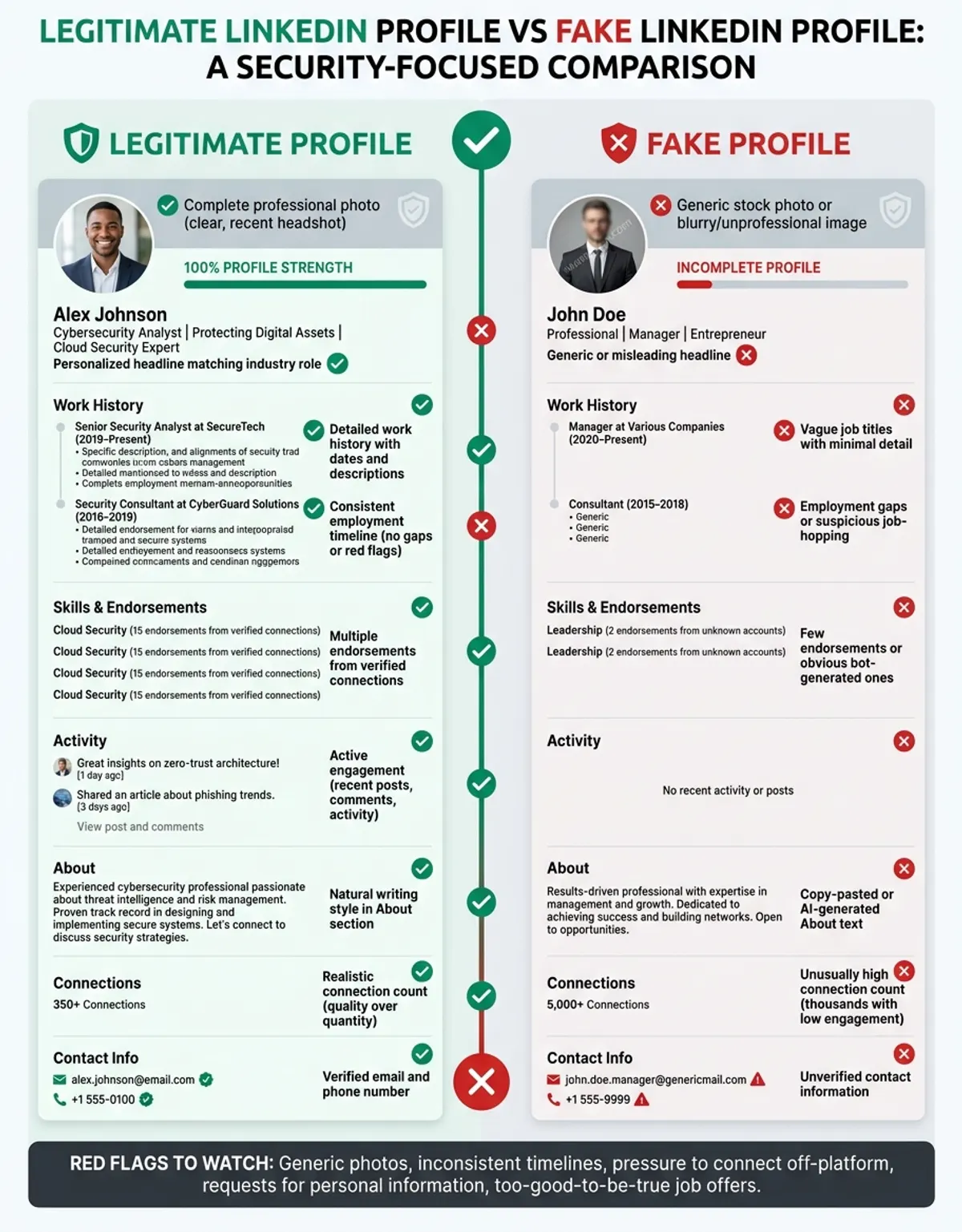
Start by cross-referencing position titles against firm LinkedIn pages. If someone claims to work at a specific employer, visit that organization's official LinkedIn page and check their employees. Larger companies often have searchable employee directories. If you can't find the someone listed among the firm's employees despite them claiming a current position there, make sure to investigate further before trusting the profile.
Education credentials offer another verification avenue. Check whether the universities or schools listed have LinkedIn pages and whether they match the claimed graduation years. For recent graduates, you might find them mentioned in alumni groups or university pages. For older graduates, at least verify that the institution exists and offered the claimed degree program during the stated timeframe.
Mutual connections who can vouch for someone provide strong verification. If you share connections with a suspicious profile, reach out privately to those mutual contacts and ask if they know the user in question. A legitimate professional will have real relationships that can be confirmed. bogus profiles might show mutual connections only because they've sent connection requests to everyone in an industry, creating the appearance of network overlap without actual relationships. For more on this topic, see our guide on reverse image search.
External check verification is essential. look the individual's name combined with their claimed employer or employment title in Google. Real professionals typically leave some digital footprint—conference presentations, published articles, quoted in news stories, participation in industry forums, or mentions in organization press releases. A complete absence of any information about someone claiming a senior professional role is a major warning sign.
Endorsements and recommendations deserve scrutiny. Real endorsements come from people with established profiles who have genuine connections to the someone they're endorsing. Check whether the people providing recommendations appear legitimate themselves. fraudulent accounts sometimes endorse each other in coordinated networks. Look for specific, detailed recommendations that reference actual projects or experiences rather than generic praise.
Activity patterns also reveal authenticity. Has the user posted content over time, or did all their activity happen in a brief burst? Do their posts demonstrate actual industry knowledge, or are they sharing generic corporate content? Real professionals typically show consistent, knowledgeable engagement in their field over extended periods.
Common fraudulent operations Linked to Fake LinkedIn Accounts
Understanding the specific fraud schemes that criminals run through fake LinkedIn accounts helps you recognize threats and protect yourself. These scam operations range from straightforward financial fraud to sophisticated social engineering attacks targeting sensitive organizational information.
The professional networking environment makes LinkedIn particularly attractive for fraud because users expect to receive connection requests from strangers.
role offer represent the most prevalent LinkedIn fraud. A fake recruiter contacts you about an exciting opportunity, often claiming urgency to pressure quick decisions. After an initial conversation, they request personal information for a "background check," including Social Security numbers, bank details for "direct deposit setup," or payment for training materials or equipment. Legitimate organizations never ask candidates to pay upfront fees or provide sensitive financial data before formal employment.
Some position fraudsters operate elaborate schemes with multiple creating the appearance of a real firm. You might interview with several "employees," receive a fake offer letter, and only discover the scam when you've already shared extensive personal data or sent money for supposed work-from-home equipment.
professional email compromise attacks often begin on LinkedIn. create bogus profiles impersonating executives, then use those profiles to build trust before moving conversations to email. Once they've established credibility, they send fraudulent payment requests or attempt to redirect legitimate corporate transactions. These fraudulent operations target businesses' accounts payable departments and can result in six-figure losses. For more on this topic, see our guide on how to tell if a facebook profile is fake.
Romance and investment fraud, sometimes called "pig butchering" fraud schemes, starts with what appears to be professional networking but evolves into personal relationships. The scammer gradually steers conversations toward investment opportunities, often in cryptocurrency. After building trust over weeks or months, they convince victims to invest in fake platforms they control. By the time victims realize the scam, their money is gone and the fake profile has disappeared.
Data harvesting operations use fraudulent accounts to connect with professionals and extract information useful for future or corporate espionage. The scammer might send a PDF that installs malware when opened, share links to phishing sites disguised as organizational documents, or simply engage in conversations designed to gather intelligence about employer operations, security practices, or upcoming professional deals.
When you identify a fake LinkedIn account, reporting it helps protect others. LinkedIn provides a reporting mechanism accessible from any profile page. Click the "More" button (three dots) near the top of the profile, select "Report/Block," and choose the reason for your report. LinkedIn's security team investigates reports and removes confirmed fake accounts, though this process can take time.
What to Do If You Suspect a LinkedIn Profile Is Fake
Encountering a suspicious profile requires immediate protective action to minimize your threat and prevent potential harm to your network. Follow these steps to safely handle the situation.
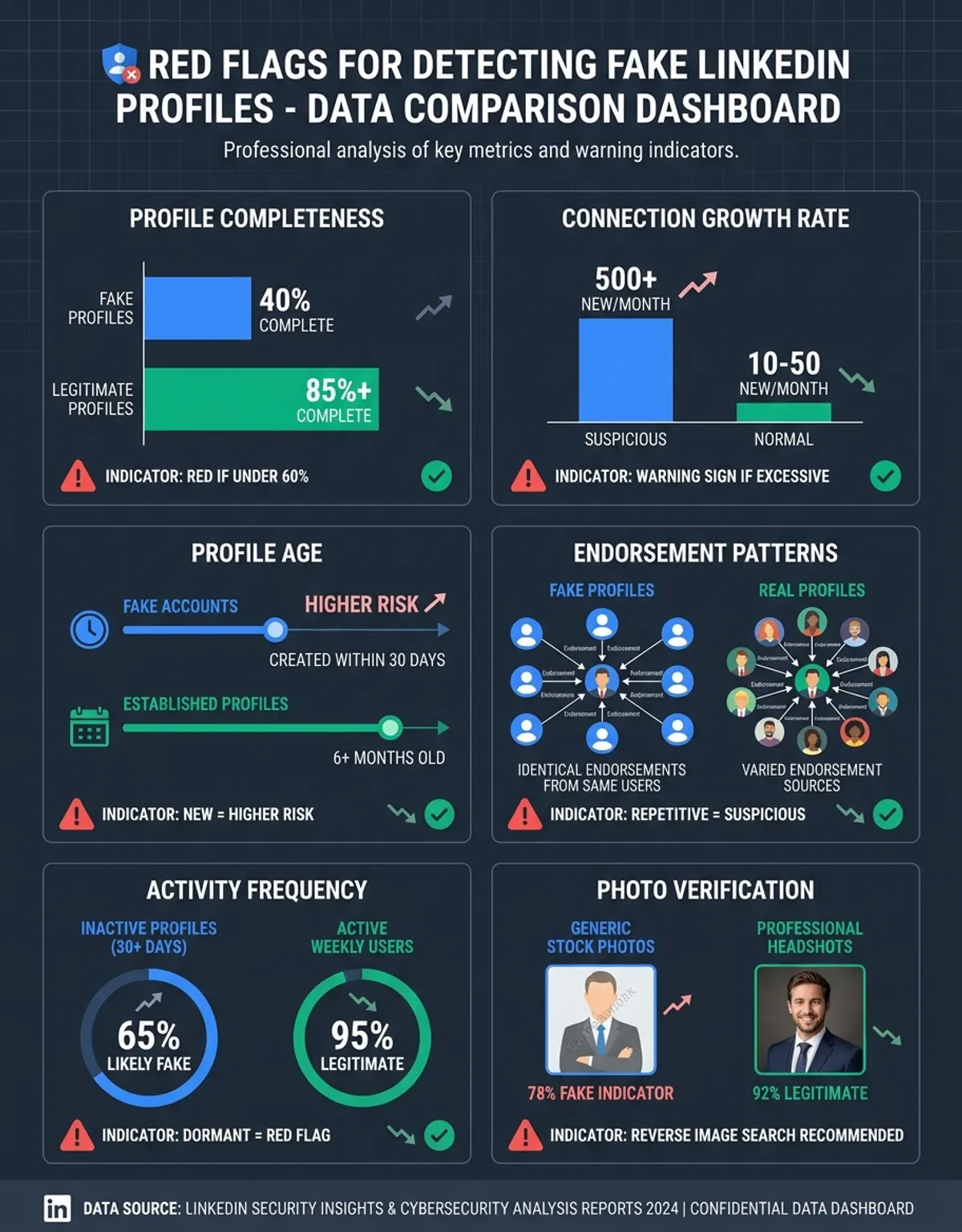
First and most importantly: do not engage further and never share personal . If you've already connected with a suspicious profile, disconnect immediately. Don't respond to their messages, don't click links they've sent, and don't download any attachments. bad actors use continued engagement to build trust and extract additional from you.
Report the profile to LinkedIn using the platform's built-in reporting tools. Even if you're not completely certain the profile is fake, reporting suspicious accounts helps LinkedIn's security team investigate and potentially prevent others from becoming victims. Your report is confidential and the profile owner won't be notified that you specifically flagged them.
If the fake profile reached out in a professional context—perhaps claiming to be a potential client, partner, or colleague—warn relevant people in your organization. Security teams and colleagues should know about the attempted contact, especially if the scammer might target others in your organization. Internal awareness can prevent corporate email compromise or other organizational risks.
Document all evidence before disconnecting. Take screenshots of the profile, any messages exchanged, and any suspicious links or requests made. This documentation becomes important if you need to file reports with authorities or if the scammer causes actual harm. Save these records in a secure location with timestamps. For more on this topic, see our guide on ai photo detector.
If you've already been scammed—whether you lost money, shared sensitive details, or downloaded suspicious files—take additional steps. For financial losses, report to the Federal Trade Commission (FTC) through their website and file a complaint with the Internet Crime Complaint Center (IC3), which is run by the FBI. If you shared login credentials or financial , immediately change passwords and monitor your accounts for unauthorized activity. Contact your bank or credit card firms if financial details was compromised.
For organizational breaches or suspected corporate espionage, notify your IT protection team immediately. They can assess whether firm systems were compromised and take appropriate defensive measures. Time is critical in these situations—early detection can limit damage.
Review your own safety practices after encountering a fake profile. This incident should prompt awareness about your connection policies. Consider being more selective about connection requests, verifying profiles more thoroughly before accepting, and maintaining healthy skepticism about unsolicited opportunities that seem too good to be true.
Real vs. Fake LinkedIn Profile Signals Comparison
| Signal | Real Profile | Fake Profile |
|---|---|---|
| Profile Photo | Personal photos in varied settings, consistent with other social media, natural lighting and backgrounds | Generic headshot, AI-generated face, stock photo, or image stolen from another individual's account |
| Connection Count | Typically 100-500+ connections built over time, growing consistently with career progression | Very few connections (under 50) despite claiming years of experience, or artificially inflated numbers |
| Recommendations | Multiple specific recommendations from verified colleagues referencing actual projects and skills | No recommendations, or generic praise from questionable profiles that appear fake themselves |
| Work History | Detailed descriptions of roles, responsibilities, and achievements; verifiable employer | Vague employment descriptions, unverifiable organizations, inconsistent timelines, or impossible career progressions |
| Account Activity | Varied posts showing industry knowledge, thoughtful comments, consistent engagement over time | Pure promotional spam, copy-paste motivational content, or no activity despite claiming active professional status |
| organization Verification | Works for businesses with active LinkedIn pages, verifiable websites, and searchable organizational details | Listed firm has no LinkedIn page, no website, and appears in no verify results or professional directories |
| Email Address | Corporate email domain matching claimed employer, or professional personal domain for freelancers | Free email service (Gmail, Yahoo) despite claiming employment at established employer; suspicious domain |
| Profile Age | Account age roughly matches claimed professional experience; shows growth and updates over time | Recently created profile claiming many years of experience; sudden appearance with complete history |
Frequently Asked Questions About Fake LinkedIn Profiles
How can I easily tell if a LinkedIn profile is fake?
The easiest way to tell if a LinkedIn profile is fake is to check for a combination of warning signs: very few connections despite claimed experience, no recommendations or endorsements, vague work history, and a generic or suspicious profile photo. Run a reverse image check on the profile photo using tools like CaraComp to verify it hasn't been stolen or AI-generated. Most will fail multiple verification checks simultaneously, while legitimate profiles may occasionally show one isolated red flag.
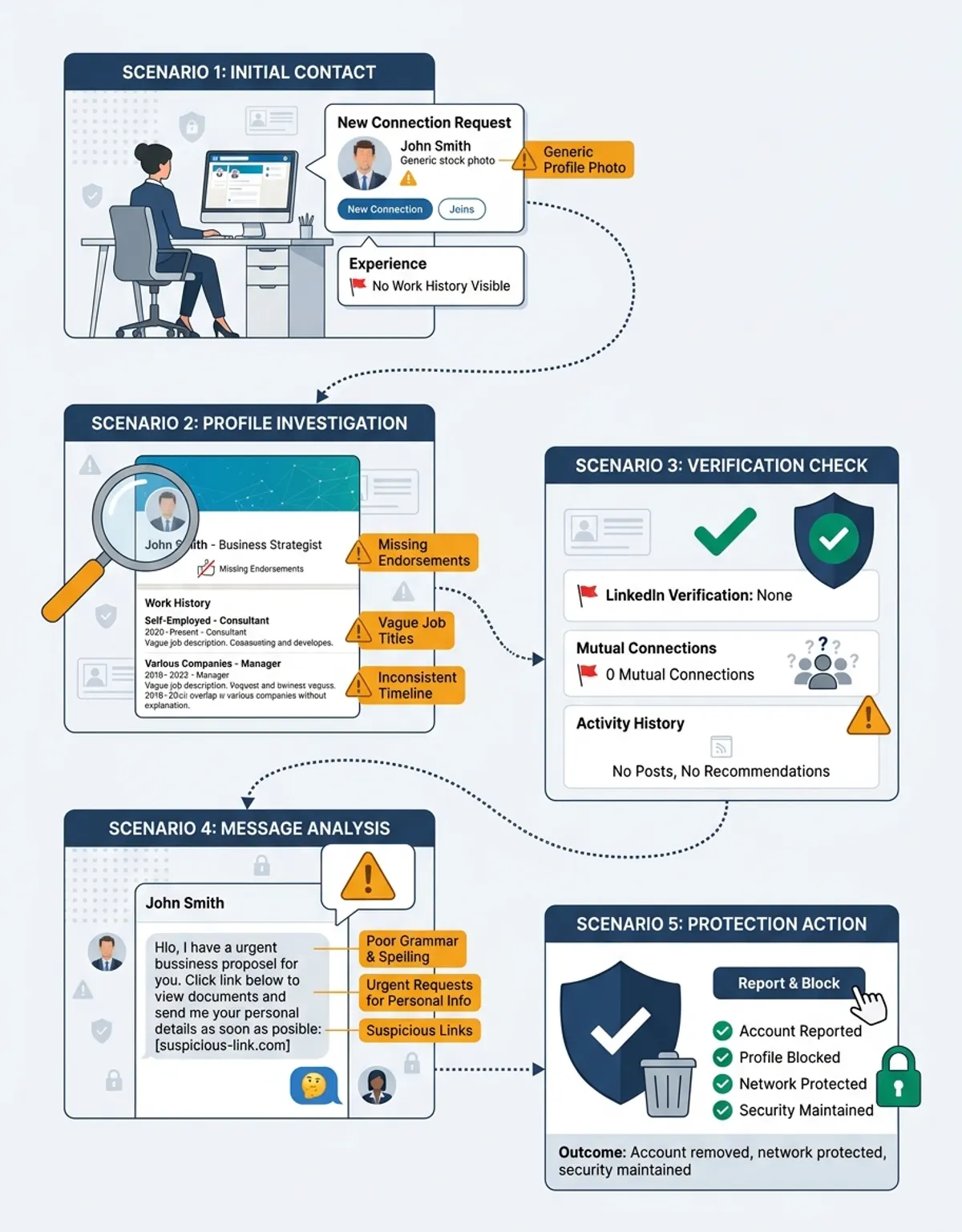
What does a fake LinkedIn account look like?
A fake LinkedIn account typically features a stock or AI-generated profile photo, fewer than 50 connections, a work history with vague role descriptions at unverifiable firms, no endorsements or recommendations, and minimal account activity. The profile often claims impressive credentials but lacks the substance and detail that real professionals naturally accumulate. Contact details may include free email addresses rather than corporate domains, and the account may have been created very recently despite claiming years of industry experience.
Can LinkedIn profiles have fake photos?
Yes, LinkedIn profiles frequently use fake photos stolen from other people's social media accounts, taken from stock photo websites, or generated using AI technology. criminals choose professional-looking headshots to build trust and credibility. You can verify a LinkedIn profile photo by running it through reverse image look tools like Google Images, TinEye, or CaraComp's specialized verification system. If the same photo appears elsewhere online associated with different names or on stock photo sites, the profile is fake.
Is it common for fraudsters to use fake LinkedIn profiles?
Yes, extensively use fake LinkedIn profiles because the platform's professional context creates trust and provides access to valuable targets. LinkedIn removes millions of fake accounts annually, but bad actors continuously create new profiles for position fraudulent operations, phishing campaigns, corporate email compromise attacks, and harvesting operations. The professional networking environment makes LinkedIn particularly attractive for fraud because users expect to receive connection requests from strangers and are more likely to trust communications on the platform.
How do I check if someone's LinkedIn profile is real?
To check if someone's LinkedIn profile is real, verify multiple aspects of their account. First, perform a reverse image verify on their profile photo. Second, examine their work history and verify the organizations exist with active LinkedIn pages. Third, check their name plus organization in Google to find corroborating like conference appearances or published articles. Fourth, check whether they have legitimate recommendations from verified profiles. Fifth, review their connections and activity patterns—real professionals show consistent engagement and have networks that make sense for their claimed industry and location.
What should I do if I think a LinkedIn profile is fake?
If you think a LinkedIn profile is fake, first stop all communication and do not share any personal or organizational . Take screenshots of the profile and any messages as documentation. Report the profile to LinkedIn using the "Report/Block" option in the profile menu. If the suspicious contact occurred in a professional context, alert your colleagues or team. If you've already shared sensitive details or lost money, file reports with the FTC and FBI's Internet Crime Complaint Center, change any compromised passwords immediately, and monitor your accounts for fraudulent activity.
Can a fake LinkedIn profile be used for ?
Yes, fake LinkedIn profiles are frequently used for sophisticated social engineering attacks. criminals create convincing profiles impersonating executives, recruiters, or industry professionals, then use these personas to send messages containing malicious links or attachments. The professional context of LinkedIn makes recipients more likely to trust these communications and click dangerous links. credential theft through LinkedIn can lead to credential theft, malware installation, or professional email compromise. Always verify sender authenticity before clicking links or downloading files, even from seemingly legitimate LinkedIn connections.
Conclusion
Protecting yourself from fake LinkedIn profiles requires vigilance, but the skills you've learned in this guide make verification straightforward. By checking for the eight key red flags, using reverse image look tools like CaraComp to verify photos, cross-referencing details across multiple sources, and understanding common scam patterns, you can confidently identify fraudulent accounts before they pose a danger to your professional network or personal protection.
The threat of bogus profiles on LinkedIn will continue to evolve as fraudsters develop more sophisticated techniques. However, the fundamental principles of verification remain constant: legitimate professionals leave verifiable digital footprints, real networks develop organically over time, and authentic accounts show consistent substance rather than hollow claims.
Make profile verification a standard practice before accepting connection requests or engaging with unfamiliar LinkedIn users. The few minutes spent checking someone's credentials can prevent serious financial losses, details breaches, or safety compromises. Share this vigilance with colleagues and professional contacts to create a more secure LinkedIn community for everyone.
Remember that LinkedIn is a powerful tool for career development and corporate networking when used safely. By developing strong verification habits and maintaining healthy skepticism about unsolicited opportunities, you can enjoy the platform's benefits while minimizing your exposure to the fraud schemes and fraudulent accounts that increasingly target professional networks.