
How to Tell If a Facebook Profile Is Fake
Master the art of detecting fake Facebook profiles with our comprehensive guide to online safety and fraud prevention.
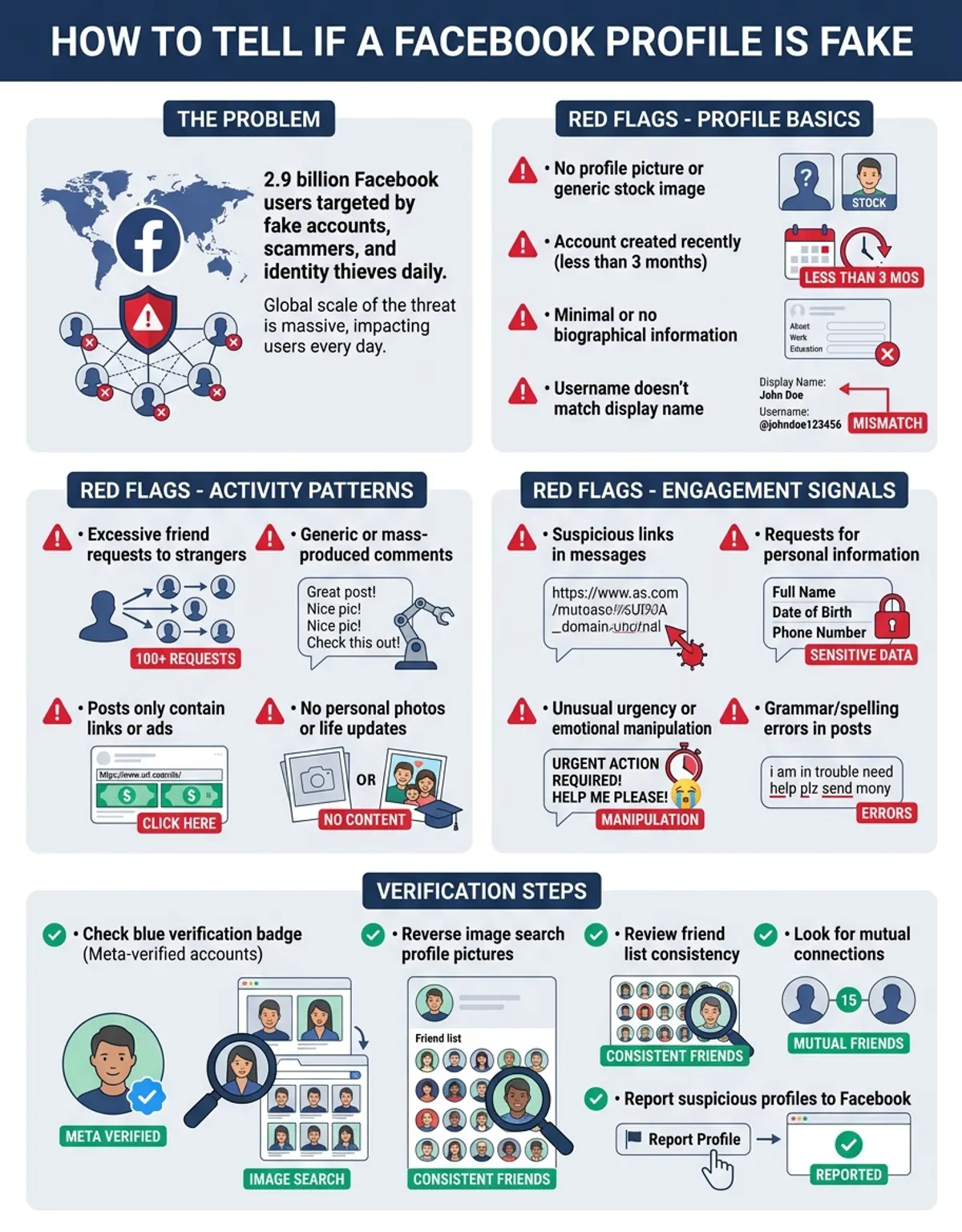
With over 2.9 billion active friends, Facebook remains one of the largest social media services in the world. Unfortunately, this popularity also makes it a prime target for fake accounts, scammers, and identity thieves. Learning how to tell if a Facebook profile is fake has become an essential safety skill for anyone active on the platform. Whether you're concerned about online protection, worried about identity theft, or simply want to verify the authenticity of someone who's sent you a friend request, understanding the warning signs can help you stay safe on social media.
Fake Facebook accounts serve various malicious purposes, from spreading misinformation and conducting fraud to harvesting personal data and launching targeted harassment campaigns. According to Facebook's own reporting, millions of fake accounts are removed from the Facebook every quarter. Despite these ongoing identification efforts, new fake profiles continue to appear daily. This guide will walk you through the key indicators that separate real profiles from fraudulent ones, giving you the tools needed for effective profile verification and online security.
Explore all our verification and comparison tools at CaraComp.
How to Spot a Fake Profile Photo
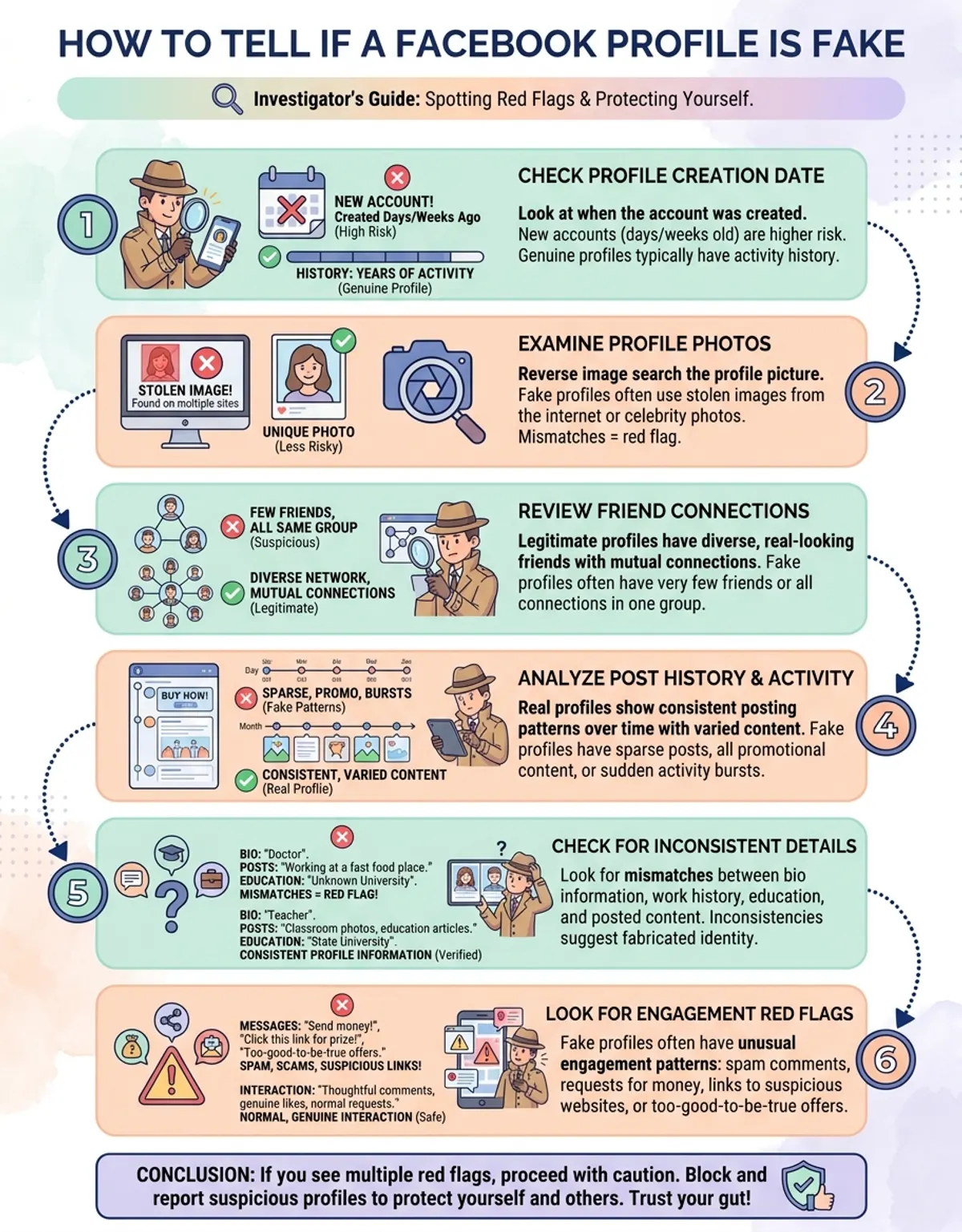
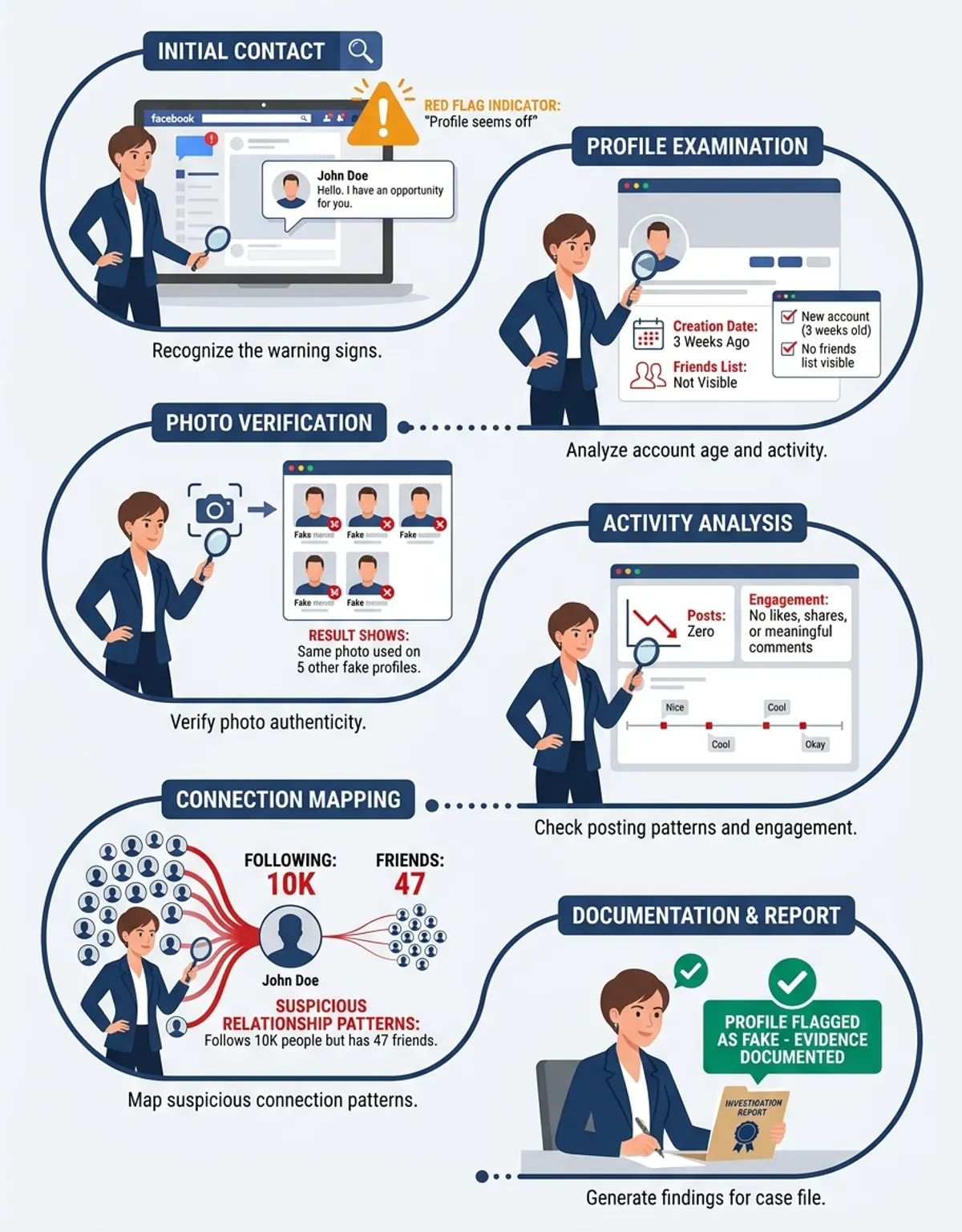
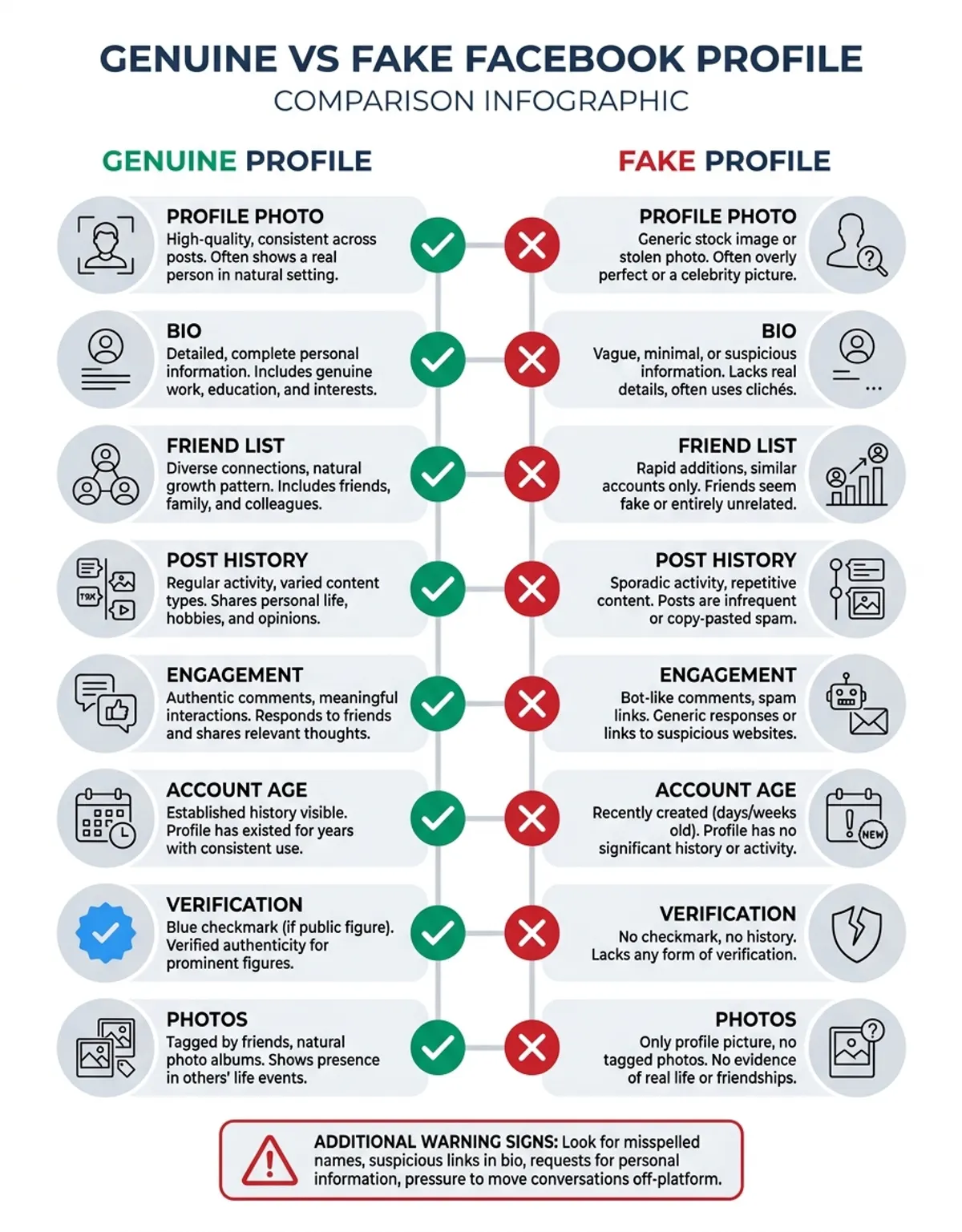
Profile photos are often the first clue when trying to determine if a Facebook account is authentic. Fake profiles frequently use stolen images, stock photos, or AI-generated faces that can be difficult to spot without the right identification methods. One of the most effective ways to verify a profile picture is through reverse image search technology. Tools like CaraComp's reverse image search allow you to upload or paste an image URL to see if it appears elsewhere online. If the same photo appears on multiple social media accounts with different names, or if it's traced back to a stock photography site, you've likely identified a fake profile.
Beyond reverse image searching, there are several visual red flags to watch for. Fake accounts often use low-resolution or heavily filtered images that obscure facial features, making identity verification more difficult. Some fake profiles use pictures of models or celebrities, while others rely on AI-generated faces—learn more about AI face recognition technology that, upon close inspection, may have subtle irregularities in facial symmetry or background details. For advanced verification, try our AI photo detector to determine if a profile image was AI-generated. Watermarked images or photos that appear overly professional for a casual social media page can also signal a fake account. Real friends typically have multiple photos showing them in different settings, with friends and family, across various time periods. A profile with only one or two perfect headshots and no candid images should raise immediate suspicion.
Another critical person red report involves the consistency of the person shown across different photos. If a profile claims to belong to one friend but the photos show different people, or if the timeline photos don't match the Facebook profile picture, this inconsistency is a strong indicator of impersonation or identity theft. real profiles typically show a coherent visual narrative of a real person's life, while fake accounts often cobble together unrelated images.
Fake Account Warning Signs: Sparse Details and Suspicious Friends
Understanding the warning signs of fake profiles is your first line of defense against social media fraud and identity theft.
When examining a potentially fake Facebook account, the amount and quality of personal information provided can be extremely revealing. Authentic profiles typically contain rich personal details accumulated over years of Facebook use. friends share their work history, education background, hometown, current city, relationship status, and life events. In contrast, fake profiles often have sparse or completely empty "About" sections. This absence of personal details is one of the most reliable warning signs of a fake account.
Scammers creating fake accounts rarely invest time in crafting believable personal histories. They may fill in one or two basic fields to avoid appearing completely blank, but close inspection usually reveals critical gaps. Look for missing employment information, no educational history, undefined relationship status, or vague location data. Real Facebook friends naturally accumulate this information over time as they update their profiles to reflect life changes. A profile that claims to have been active for several years but contains minimal personal information is highly suspicious.
The friend list size and composition can also reveal a fake account. While some real people do maintain smaller friend networks, a profile with only a handful of friends—or conversely, thousands of friends added in a very short time—should prompt further investigation. Fake accounts often have friend lists dominated by friends from a single country or demographic, particularly if that doesn't align with the claimed profile of the Facebook profile. The absence of tagged photos, check-ins at local venues, or participation in groups and events further suggests the Facebook profile isn't being used by a real person engaged in normal social media activity.
Another detail to examine is the account creation date versus the amount of content. A profile created recently but claiming extensive life history, or conversely, an old account with virtually no posts or interactions, indicates something isn't right. Real friends generate content organically over time, creating a natural pattern of activity that fake accounts struggle to replicate convincingly.
Scammers creating fake accounts rarely invest time in crafting believable personal histories—close inspection usually reveals critical gaps.
Poor Spelling, Grammar, and Inconsistent Information
Language quality serves as another powerful indicator when determining profile authenticity. Fake profiles often have poor spelling and grammar in their posts, bio sections, and comments. While everyone makes occasional typos, patterns of consistent errors, awkward phrasing, or text that appears to be machine-translated should raise red flags. Many fake accounts are created by scammers operating from non-English-speaking countries, and despite their best efforts, the language barrier becomes evident in their social media communications.
Beyond simple spelling mistakes, watch for inconsistent information across different sections of the Facebook profile. A fake account might claim to be from New York in the About section but use British English spelling conventions in posts, or describe attending a university in California while all posted photos show landmarks from another country. Real friends maintain consistency in their personal narrative because they're sharing real experiences. Fake accounts often copy and paste information without ensuring it aligns across the entire profile.
Generic or overly formal bio text is another giveaway. Authentic social media friends typically write in a casual, personal voice that reflects their friend personality. Fake profiles often use generic descriptions that could apply to anyone, or they copy bio text from other profiles. Some fake accounts even include bizarre or nonsensical phrases that suggest automated content generation. If a bio reads like a resume rather than a personal introduction, or if it contains obvious clichés and stock phrases, approach the Facebook profile with skepticism.
The content of posts themselves also deserves scrutiny. Fake accounts frequently share only external links, memes, or reshared content without adding personal commentary. They rarely post original thoughts, photos from their own lives, or engage in authentic conversations. When fake profiles do attempt to create original content, it often feels stilted or off-topic, lacking the natural flow of real Facebook channels interaction.
Suspicious Friend Requests and Network friends
Analyzing the friend list and Facebook friends of a questionable profile provides crucial insights into its legitimacy. When you receive a friend request from someone unknown, one of the first things to check is whether you have mutual friends. The absence of mutual friends doesn't automatically mean a profile is fake—you might be connecting with someone from a different online community circle—but it does warrant additional investigation. Real people typically connect on online sites through some form of shared network, whether that's school, work, family, or community associations.
Look closely at the composition of the person list itself. Fake accounts often display unusual patterns: friend lists dominated by a single gender, unusually high numbers of attractive friends in romantic-age ranges (common for catfishing accounts), or friends who all appear to be from the same foreign country despite the Facebook profile claiming to be local. Some fake profiles add friends indiscriminately, resulting in a chaotic mix of people with no apparent friend to each other or to the Facebook profile's claimed credential.
Another red report involves friend list privacy. While some real friends do restrict who can see their friends, this privacy setting is often employed by fake accounts to hide suspicious friend patterns. If you can view the Facebook profile list, examine the quality of friends. Do these friends interact with the Facebook profile's posts? Are they tagged in photos together? Do they leave comments that suggest a real relationship? Real service friends involve two-way interaction, while fake accounts often collect network members who never engage with their content.
Impersonation accounts targeting celebrities, public figures, or even your own individuals represent a particularly dangerous category of fake profiles. These accounts steal photos and information from real profiles to create convincing duplicates. They then account the victim's existing friends, often sending urgent messages requesting money or personal information. If you receive a friend request from someone you're already connected with, or if a profile seems to duplicate someone you know, this is a major security warning sign. Always verify through a separate communication channel before accepting such requests or responding to messages.
Account Activity Patterns That Signal a Fake Profile
The sophistication of impersonation attempts has increased dramatically, making profile verification more important than ever.
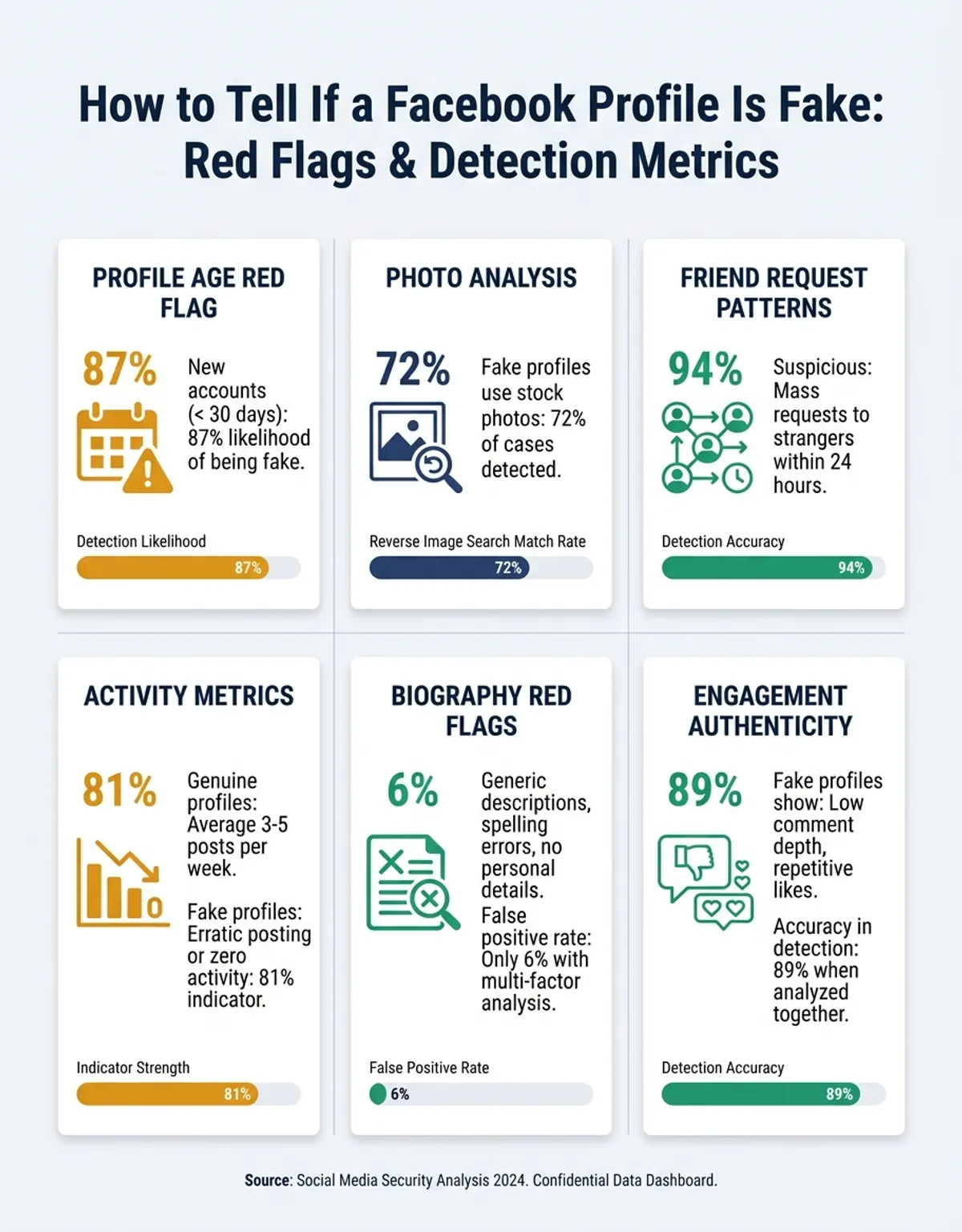
The timeline and activity history of a Facebook profile can reveal whether it's operated by a real person or is a fake account created for malicious purposes. Start by checking the account creation date, which is visible on most profiles. A very new account that immediately begins sending friend requests to strangers or posting promotional content is highly suspicious. While new friends do join Facebook every day, real new friends typically start by connecting with people they actually know before expanding their network.
Examine the posting frequency and pattern. Real friends post sporadically based on their lives and interests, with natural ebbs and flows in activity. They might post several times a day during interesting events, then go weeks without posting. Fake accounts often display unusual activity patterns: posting patterns that suggest automation. If you suspect manipulated videos, our deepfake detection tool can help verify authenticity. Common red flags include posting dozens of times per day with identical or very similar content, posting exclusively during specific hours that suggest automated scheduling, or suddenly becoming highly active after months of dormancy. Monitoring these patterns can help distinguish between authentic network networks behavior and coordinated inauthentic activity.
The nature of the content being shared also matters. Fake profiles typically share high volumes of external links, particularly to dubious websites, or they post repetitive promotional content. Some fake accounts serve as bots that amplify certain messages or engage in coordinated campaigns to spread misinformation. If every post is a shared link with no personal commentary, or if the page timeline consists entirely of reshared political content, viral videos, or promotional material, the Facebook profile is likely not managed by a real friend.
Interaction quality provides additional clues. Real Facebook friends engage in conversations with their friends, respond to comments on their posts, and participate in discussions. Fake accounts rarely engage authentically. They might auto-like or auto-comment on posts to appear active, but these interactions often seem generic or off-topic. A profile that posts frequently but never responds to comments, or that leaves identical comments on multiple posts, is exhibiting bot-like behavior indicative of a fake account.
Photo and video content should also be evaluated. Authentic profiles accumulate photos over time, with most images showing the Facebook profile owner in various real-life situations. Check the dates on photos—do they span years, showing the person aging naturally? Are there photos with people and family who tag each other and interact? Fake profiles often have only a few photos, all uploaded on the same day, with no tags, no comments from friends, and no evidence of real Facebook relationships.
How to Report Facebook Impersonation and Fake Accounts
Understanding the safety risks posed by fake Facebook accounts is essential for protection yourself online. scammers use fake accounts for various malicious purposes, with impersonation fraud and impersonation ranking among the most serious threats. When criminals create fake profiles using stolen photos and personal information, they can impersonate real individuals to deceive their friends, family, and colleagues. This type of impersonation can lead to financial fraud, reputational damage, and serious emotional distress for both the victim being impersonated and those who fall for the deception.
Common forms of Facebook impersonation include romance scams, where scammers create attractive fake profiles to build emotional friends with victims before requesting money. Other scammers impersonate authority figures, tech support representatives, or even your actual Facebook friends to gain trust and extract sensitive information. Some fake accounts are used for corporate espionage, attempting to connect with employees of specific companies to gather proprietary information. The sophistication of these impersonation attempts has increased dramatically, making friend verification more important than ever.
identity theft through social media platforms platforms like Facebook can have far-reaching consequences. Criminals harvest personal details from profiles—birthdates, family member names, pet names, schools attended—which can be used to answer safety questions, crack passwords, or build more convincing phishing attacks. Once scammers have enough information, they can open credit accounts, file fraudulent tax returns, or commit crimes using the stolen account. The protection of your personal information on online services directly impacts your financial safety and personal safety.
Beyond friend targeting, fake accounts pose broader safety risks to the entire site sites ecosystem. Networks of fake profiles are used to manipulate public opinion, spread misinformation, interfere with elections, and artificially inflate the apparent popularity of products, causes, or individuals. These coordinated inauthentic behavior campaigns undermine the integrity of online discourse and make it difficult to distinguish real grassroots movements from manufactured astroturfing.
protection your privacy from fake account harassment requires proactive measures. Limit the amount of personal information visible on your public profile. Adjust your privacy settings so that only confirmed network members can see your full profile, friend list, and photos. Be cautious about accepting friend requests from people you don't know personally. Enable two-factor authentication on your account to prevent unauthorized access. Regularly review your friend list and remove friends that seem suspicious or that you no longer recognize. These protection steps significantly reduce your vulnerability to the scammers operating fake accounts on the system. For more on this topic, see our guide on reverse image search.
Tools to Verify a Facebook Profile
When you've identified a fake Facebook account, reporting it to the network is crucial for protection both yourself and other potential victims. Facebook has invested heavily in identification systems and human review teams to combat fake accounts, but user reports remain a vital part of this safety effort. The reporting process is straightforward and can be completed in just a few steps.
To report a fake profile, navigate to the fake account's page. Click the three dots (more options) icon located near the Facebook profile picture or cover photo. From the dropdown menu, select "Find support or report profile." Facebook will then present several options for why you're reporting the account. Choose "Fake account" from the list. You may be asked to provide additional details about why you believe the Facebook profile is fake. Be as specific as possible—mention if they're using stolen photos, impersonating someone you know, or engaging in suspicious messaging. report your report when you've completed the form.
After you report a fake profile, Facebook's recognition systems and review team evaluate the account. The Facebook doesn't typically report you about the outcome of friend reports due to privacy considerations, but they do take action against accounts that violate their terms of service. If enough people report the same account, or if Facebook's automated systems report it for suspicious activity, the account may be disabled or removed. In cases of impersonation, the service may request additional verification from the account holder to prove their Facebook profile.
For serious situations involving threats, blackmail, or impersonation of yourself, you can take additional reporting steps. Facebook has a dedicated Help Center page for reporting impersonation where you can report a more detailed report, including photo ID to prove your friend if someone is pretending to be you. You can also report threatening or harassing content directly to law enforcement if you believe you're in danger. Keep screenshots and documentation of all interactions with the fake account as evidence.
Beyond reporting friend profiles, consider reporting fake pages or groups that spread misinformation or coordinate harassment. The Facebook and website both provide reporting mechanisms for various types of content violations. Remember that reporting fake accounts isn't just about your personal protection—it helps make the entire network networks environment safer for everyone. Each report contributes to Facebook's understanding of evolving fraud tactics and helps improve their automated spotting systems. For more on this topic, see our guide on best reverse image search.
Tools and Methods to Verify a Real vs. Fake Profile
While manual inspection of profile details can reveal many fake accounts, specialized tools and systematic methods can enhance your identification capabilities and save time. Reverse image search technology stands as one of the most powerful tools for verifying profile authenticity. Services like CaraComp's reverse image search Facebook allow you to upload a profile picture and instantly discover if that same image appears elsewhere online. If the photo is associated with multiple names or appears in stock photo libraries, you've confirmed the Facebook profile is fake.
Cross-referencing information across multiple social media platforms sites provides another effective verification method. Most real people have presence on several platforms—Facebook, Instagram, LinkedIn, Twitter—with consistent information across all of them. Search for the person's name along with details from their Facebook profile to see if you can locate their other online services accounts. Check whether the information aligns: Does the LinkedIn profile show the same work history? Do the Instagram photos match the Facebook timeline? If you can't find the person on any other service, or if the information is wildly inconsistent across sites, the Facebook profile is likely fraudulent.
Third-party account verification services have emerged to help friends confirm whether online identities are real. While Facebook itself doesn't offer an official verification badge for regular friends (only for notable public figures, celebrities, and brands), some external services specialize in person noticing and background checks. These services can be particularly useful if you're considering entering into a business relationship, online dating situation, or other scenario where confirming someone's real profile is important for your protection.
Behavioral analysis techniques can also help distinguish real from fake profiles. Real friends exhibit consistent behavioral patterns: they respond to messages at reasonable speeds, their language and tone remain consistent across interactions, they reference shared experiences or mutual friends, and their availability patterns align with their claimed location and work schedule. Fake accounts, especially those operated as part of larger scam operations, often display odd behavior—instant responses at all hours suggesting automation, reluctance to video chat, avoidance of specific personal questions, or pressure to move conversations off the Facebook service quickly.
For advanced friends, examining a profile's online footprint can provide additional verification clues. Check if the Facebook profile is mentioned in any news articles, professional publications, or community announcements that would confirm the person is who they claim to be. Search for the person's email address or phone number (if available) to see what other online accounts are associated with those friend details. The more independent verification you can find that corroborates the Facebook profile's claimed friend, the more confident you can be that it's real. For more on this topic, see our guide on how to tell if a linkedin profile is fake.
Frequently Asked Questions
How can profile photo issues help identify a fake Facebook account?
Profile photo issues are among the most visible red flags for fake accounts. Reverse image searching the Facebook profile picture can reveal if the photo has been stolen from another source or used across multiple fake accounts. Other warning signs include low-resolution images, stock photos, AI-generated faces with subtle irregularities, watermarked images, or profiles with only one or two perfect photos and no candid shots. Real friends typically have multiple photos showing them across different times and settings, while fake accounts often use a single professional-looking image that doesn't match the casual nature of social media sites.
What does the absence of mutual friends tell you about a Facebook profile?
While the absence of mutual friends doesn't automatically confirm a profile is fake, it's an important warning sign that warrants additional investigation. Real people typically connect through shared networks like school, work, family, or community. If someone sends you a friend request with zero mutual friends and you don't recognize them from any context in your life, proceed with caution. Combined with other red flags like a new account, sparse personal details, or suspicious messaging, the lack of mutual friends strengthens the case that you're dealing with a fake profile rather than a real person.
How do fake profiles often have poor spelling and grammar compared to real ones?
Fake profiles often have poor spelling and grammar because many are created by scammers operating from non-English-speaking countries who use translation tools or have limited language proficiency. While everyone makes occasional typos, patterns of consistent errors, awkward phrasing, machine-translated text, or inconsistent use of language conventions (like mixing American and British English) suggest the Facebook profile isn't operated by the person it claims to represent. Real friends write in a natural, consistent voice that reflects their actual language skills and cultural background, whereas fake accounts often produce stilted, generic, or error-filled text that reveals their fraudulent nature.
What are the most common forms of Facebook impersonation and identity theft?
The most common forms of impersonation include romance scams where attractive fake profiles build emotional friends before requesting money, duplicate accounts that impersonate your actual network members to scam their friends, celebrity or public figure impersonation accounts, and fake profiles posing as authority figures like tech support or government officials. identity theft on Facebook often involves harvesting personal information from profiles to answer protection questions, crack passwords, or build more sophisticated phishing attacks. scammers also create fake business profiles to appear real while conducting fraud, or impersonate employees of specific companies for corporate espionage purposes.
What should I do if I judge a Facebook account to be fake?
If you judge an account to be fake, first avoid interacting with it—don't accept friend requests, don't click on links they share, and don't provide any personal information. report the Facebook profile to Facebook immediately by clicking the three dots on their Facebook profile and selecting "Find support or report profile," then choosing "Fake account." If the fake account is impersonating you or someone you know, use Facebook's dedicated impersonation reporting form and consider notifying the real person being impersonated. Block the account to prevent future friend. If you've already interacted with the fake account or shared sensitive information, change your passwords, enable two-factor authentication, and monitor your accounts for suspicious activity.
How does Facebook's reporting system handle fake account finding?
Facebook's reporting system combines user reports with automated discovery algorithms to identify and remove fake accounts. When you report about a profile as fake, it's reviewed by Facebook's protection measures team and automated systems that analyze behavior patterns, profile information, and friend networks. The Facebook doesn't usually report individuals about the outcome of their specific reports, but accounts that receive multiple reports or trigger automated fraud recognition systems are investigated and potentially disabled. Facebook claims to remove millions of fake accounts every quarter before they can cause harm, though new fake profiles continue to appear as scammers develop new tactics to evade spotting.
What makes fake Facebook accounts so common, and how can I protect my privacy?
Fake Facebook accounts are common because creating them requires minimal effort while offering scammers significant opportunities for financial fraud, data harvesting, and manipulation. The network's massive user base provides a large pool of potential victims, and the network trust inherent in friend friends makes deception easier. To protect your privacy, limit public visibility of your personal information in privacy settings, only accept friend requests from people you actually know, enable two-factor authentication, use strong unique passwords, be skeptical of unsolicited messages requesting money or personal information, regularly review your friend list for suspicious accounts, and educate yourself about current scam tactics. These proactive safeguarding measures significantly reduce your vulnerability to the threats posed by fake accounts.
Comparison Table: Fake Profile Warning Signs
| Warning Sign | What It Means | Risk Level | Action to Take |
|---|---|---|---|
| Stolen or stock profile photo | Image reverse search shows photo used elsewhere with different identities | High | Reject friend request, report account immediately |
| No mutual friends | Account has zero friends to your existing service network | Medium | Investigate further before accepting; verify through other means |
| Poor spelling and grammar | Consistent language errors suggesting foreign operation or automation | High | Do not engage; likely scammer from non-English speaking country |
| Very new account | Created recently but immediately sending friend requests to strangers | High | Block and report; new accounts need time to build real networks |
| Suspicious or urgent messaging | Requests for money, personal information, or pressure to act quickly | Critical | Never respond; report to Facebook and potentially law enforcement |
| Sparse personal details | Empty About section, no work/education history, minimal life information | Medium-High | Cross-reference on other platforms; reject if information can't be verified |
| Inconsistent information | Personal details don't align across profile sections or with photos | High | Clear indicator of fake account; report and block |
Conclusion
Learning how to tell if a Facebook profile is fake is an essential skill for anyone who uses online networks. By examining profile photos for signs of theft or manipulation, checking for sparse personal details and inconsistent information, analyzing friend lists and online friends, monitoring activity patterns, and understanding the safety risks posed by impersonation and identity theft, you can protect yourself from the scammers and scammers operating on the Facebook. When you identify a fake account, reporting it to Facebook helps protect not just yourself but the entire community of real friends.
The tools and methods outlined in this guide—from reverse image search technology to cross-referencing across multiple sites—provide systematic ways to verify whether profiles are real or fake. As fake account tactics continue to evolve, staying informed about the latest identification methods and maintaining healthy skepticism toward unexpected friend requests or messages will keep your personal information secure. Remember that real friends won't pressure you for money or personal details through Facebook messages, and real businesses won't friend you through personal profiles rather than official pages.
Your online safety depends on vigilance and knowledge. By applying the warning signs, verification methods, and reporting procedures described in this guide, you can confidently navigate Facebook while minimizing your exposure to the threats posed by fake accounts. Stay safe, verify before trusting, and help make social media platforms platforms more secure for everyone by reporting suspicious profiles when you encounter them.