
Compare Two Photos: Compare Images with a Comparison Tool to Find Differences
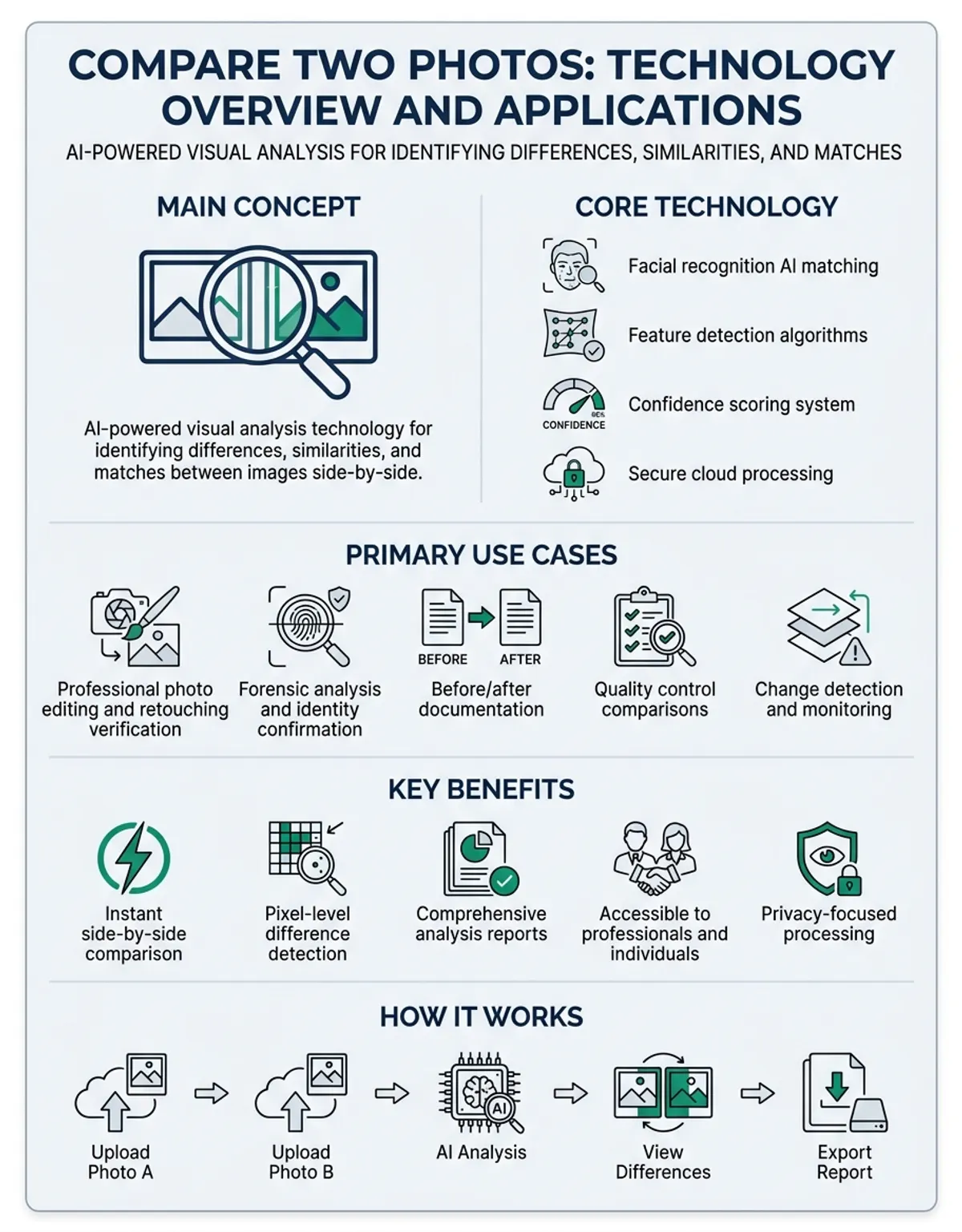
When you need to compare two photos, whether for professional editing, forensic analysis, or simply identifying changes between images, having the right solutions and methods makes all the difference. Modern photo comparison technology allows you to analyze two uploaded images with precision, revealing everything from subtle pixel-level variations to obvious visual variations. Here's everything you need to know about the best utilities to compare two photos, how they work, and practical techniques for spotting distinctions between images.
Why You Need to Compare Two Pictures: Common Use Cases
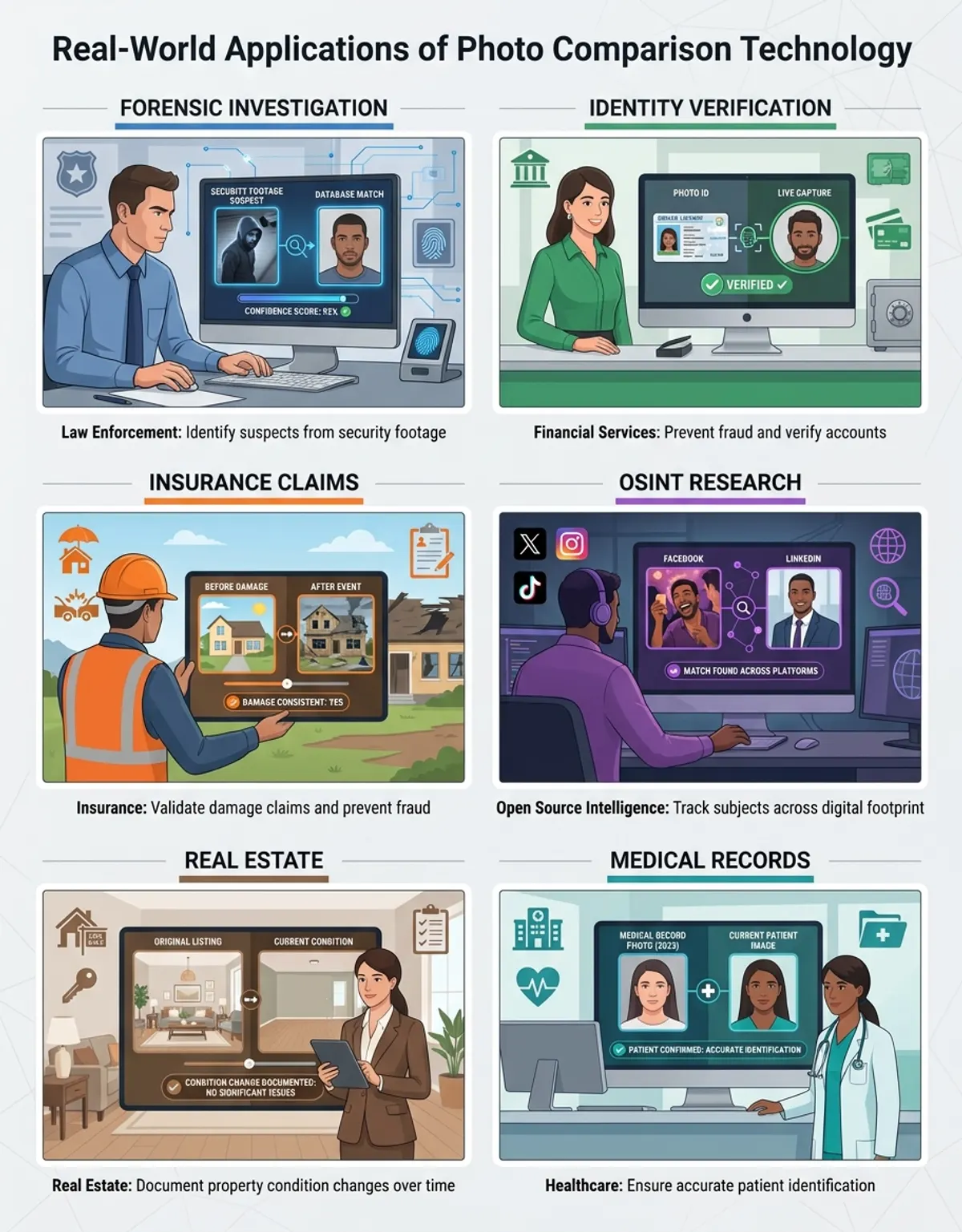
Photo comparison serves numerous practical purposes across different fields. Photographers often compare two images to evaluate editing progress, checking how adjustments to lighting, color, or composition affect the final result. Digital forensics experts use comparison services to detect image manipulation, verify authenticity, and identify alterations in evidence visuals. Quality control professionals in manufacturing and product design compare before and after pictures to ensure consistency and identify defects.
Beyond professional applications, everyday users frequently need to compare images when shopping online to evaluate product variations, when organizing photo libraries to eliminate duplicates, or when trying to spot subtle discrepancies in similar images. Real estate agents compare property images taken at different times to show improvements or changes. Medical professionals use image comparison to track treatment progress or identify changes in diagnostic scans over time. You may also find our guide on comparing images helpful for understanding advanced image analysis techniques.
Social media content creators compare two visuals to select the best version for posting, while researchers analyze experimental results by comparing visual data across different conditions. Each of these use cases benefits from specialized comparison applications that can reveal changes the human eye might miss during casual observation.
How Photo Comparison Tools Work: Side-by-Side View and Pixel Analysis
Photo comparison tools employ two primary methods to help users identify differences between images. The most intuitive approach is the side-by-side view, which displays both images simultaneously, allowing for direct visual comparison. This method works particularly well when you want to evaluate overall composition, color variations, or obvious changes between two pictures. The side view presentation lets you quickly scan both images and spot variations in position, lighting, or subject matter. For a comprehensive overview of photo comparison techniques and tools, explore our photo comparison guide.
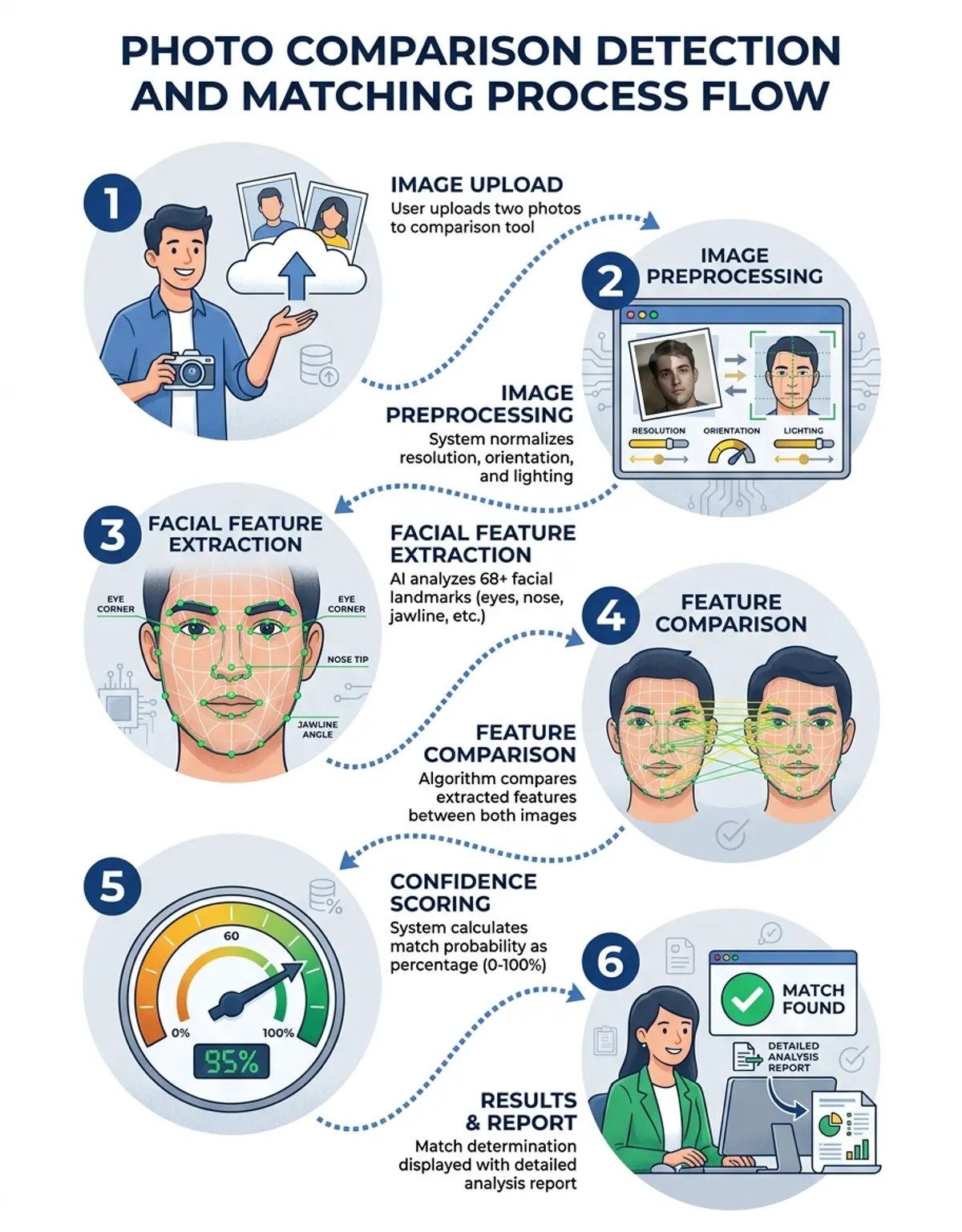
More sophisticated comparison solutions go beyond simple visual display by implementing pixel-level analysis. These utilities analyze two uploaded images by examining each pixel's color values, comparing them mathematically to identify even the smallest variations. When a comparison tool analyzes two images pixel by pixel, it can highlight specific areas where discrepancies exist, often using overlay techniques or color-coding to show exactly where changes occur.
Advanced comparison software combines both approaches, offering a side-by-side view for initial assessment alongside pixel difference maps that demonstrate precise variation points. Some services create animated transitions between the two images, making changes immediately apparent through motion. Others generate heat maps that indicate the intensity of changes across different regions of the images, providing quantitative data about the extent of variations.
The pixel analysis process typically involves converting both images to a common format and resolution, then subtracting corresponding pixel values to calculate difference scores. Areas with significant variations appear highlighted, while identical regions remain unmarked, creating a visual difference map that guides your attention to relevant changes.
Best Tools to Compare Two Photos Online (Including FacePair-Style Comparison)
The market offers numerous online comparison tools, each with distinct features and capabilities. Web-based comparison platforms provide convenience since you can drag your images directly into the browser without installing software. Simple side-by-side comparison sites work well for quick visual checks, presenting both pictures in adjacent frames with synchronized scrolling and zoom controls.
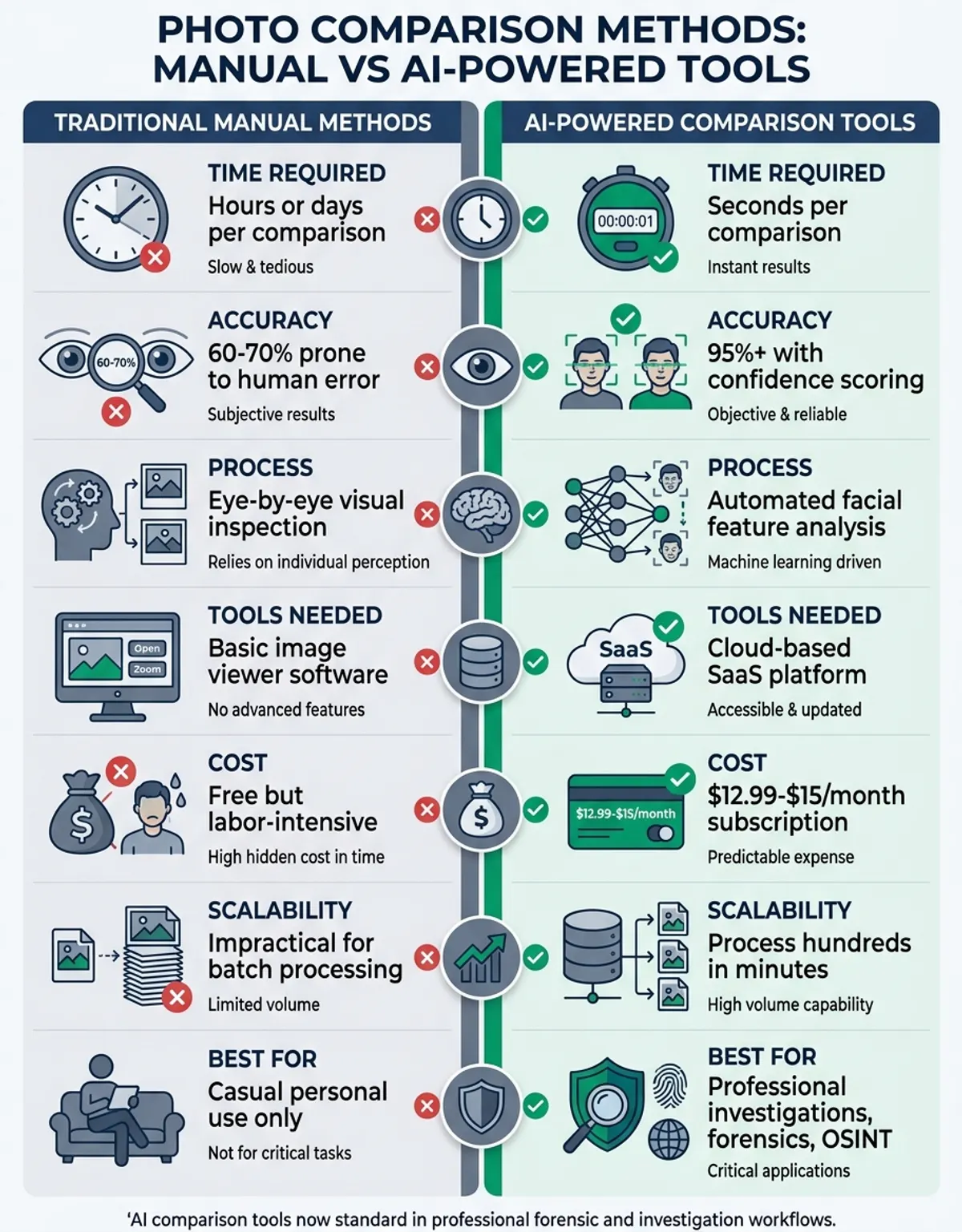
For users seeking facial comparison specifically, FacePair-style solutions specialize in analyzing facial features between two images. These AI-powered comparison platforms detect faces automatically, align them for optimal comparison, and calculate similarity scores based on facial geometry, features, and proportions. (The accuracy has gotten surprisingly good in recent years.) Face analysis platform technology has become popular for verifying identity, finding lookalikes, or determining family resemblances through precise facial analysis.
Professional-grade online utilities offer advanced features including pixel difference highlighting, adjustable sensitivity thresholds, and detailed statistical reports about image variations. Some platforms support batch comparison, allowing you to compare multiple image pairs simultaneously. Cloud-based comparison services enable collaboration, letting teams review and annotate distinctions together in real-time.
CaraComp's photo comparison tool combines multiple analysis methods, offering both visual side-by-side comparison and AI-powered facial recognition for comprehensive image analysis. The platform processes uploaded visuals quickly, generating similarity scores and highlighting key differences without requiring any software installation or technical expertise. Learn more about visual analysis methods in our compare and contrast images resource.
How to Upload and Compare Two Pictures for Changes: A Step-by-Step Guide
Successfully comparing images requires a systematic approach to ensure you identify all relevant variations. Start by selecting your comparison tool based on your specific needs—whether you prioritize speed, accuracy, or particular analysis features. Once you've chosen a tool, prepare your images by ensuring they're in compatible formats and reasonable file sizes for upload.
The comparison process typically begins when you drag your images into the tool's upload area or use the browse function to select files from your device. Most modern comparison services support drag-and-drop functionality, making the upload process quick and intuitive. Position your first image in the designated left or primary slot, then add your second image to the comparison slot.
After upload, configure your comparison settings based on what you want to analyze. For general visual comparison, the standard side-by-side view works well. If you're looking for subtle pixel-level changes, enable difference highlighting or overlay modes. Adjust the comparison sensitivity to control how minor variations are detected and displayed—higher sensitivity reveals even tiny differences, while lower sensitivity focuses on major changes.
Examine the comparison results systematically, starting with obvious discrepancies before moving to subtle variations. Use zoom features to inspect specific regions more closely, and take advantage of any annotation applications to mark important changes for future reference. Many comparison software indicate statistics about the percentage of pixels that differ, giving you quantitative data alongside visual assessment.
For thorough analysis, display the comparison results using multiple modes if available. Check the parallel-by-adjacent perspective for overall context, review difference maps for precise change locations, and consult any generated reports for detailed metrics. Save or export your comparison results for documentation, especially when comparing visuals for professional or legal purposes.
Comparing Photo Metadata: What Files Reveal Beyond the Image
Beyond visual content, visual items contain extensive metadata that can be crucial for comparison purposes. Image EXIF data includes technical information about how the picture was captured, processed, and modified. When you compare embedded information between two image data, you can uncover details invisible in the visual content itself, such as camera settings, capture timestamps, GPS coordinates, and editing history.
EXIF (Exchangeable Image File Format) data represents the most common data item information type in visual documents. This embedded information records camera model, lens specifications, ISO settings, shutter speed, aperture, focal length, and the exact date and time the picture was taken. Comparing EXIF data between two images can reveal whether they were captured with the same equipment, under similar conditions, or at different times despite appearing identical visually.
Image properties comparison proves especially valuable for digital forensics and authentication. If a document claims to be an original but lacks expected EXIF data, or if the EXIF data contradicts the claimed capture circumstances, this raises authenticity questions. Software modification history stored in embedded information can display whether images have been edited, how many times, and with which applications.
Specialized data item information comparison platforms extract and display this information in comparable formats, highlighting variations in capture settings, processing history, or document properties. Some solutions can detect image properties tampering, where visible content appears unchanged but EXIF data has been altered or stripped. For professionals working with digital images, embedded information comparison often provides insights as important as visual analysis.
Location data embedded in image data item information enables geographic comparison, useful for verifying where images were captured or tracking movement patterns. Color space information helps photographers understand why two pictures that should match appear different when viewed on various devices. Understanding document image properties transforms simple image comparison into comprehensive digital investigation.
How to Visually Compare Two Images for Subtle Changes
Detecting subtle distinctions requires specific techniques beyond casual observation. When you visually compare two images, your brain naturally focuses on obvious changes while potentially missing smaller variations. Systematic comparison methods help ensure you identify even minor discrepancies that might prove significant.
Start by viewing both images at the same size and zoom level to ensure fair comparison. Changes in display size can make identical images appear different due to resolution scaling artifacts. Use your comparison tool's synchronization features to ensure both images scroll and zoom together, maintaining consistent viewing positions.
Focus on one image area at a time rather than trying to scan everything simultaneously. Divide the images mentally into sections—top, middle, bottom, or quadrants—and systematically compare each region. This methodical approach prevents your attention from jumping around, which can cause you to miss subtle changes in less visually interesting areas.
When comparing for subtle changes, adjust your display brightness and contrast to ensure optimal visibility. Small variations in shadow areas or highlights might become more apparent with adjusted screen settings. Use your tool's difference highlighting features, which mathematically detect variations your eyes might overlook, especially in areas with complex textures or patterns.
Take breaks during extended comparison sessions to prevent visual fatigue, which diminishes your ability to spot subtle distinctions. After examining images continuously, your brain adapts and becomes less sensitive to small variations. Returning to the comparison with fresh eyes often reveals discrepancies you previously missed. For critical comparisons, consider having a second person review the images independently to validate your findings.
Compare Two Visuals Dual-panel by Parallel: Before and After Use Cases
Adjacent-by-dual-panel comparison proves particularly effective for before-and-after scenarios where you want to demonstrate change over time. Visual editors use this mode to reveal clients how retouching, color grading, or composition adjustments improve images. The parallel presentation makes improvement immediately obvious, helping clients understand the value of professional editing services.
Home improvement and renovation projects benefit enormously from adjacent-by-dual-panel picture comparison. Contractors can document work progress by comparing pictures taken at different stages, while homeowners can presentation dramatic transformations when comparing before and after images of their spaces. Real estate marketing uses this technique to present property improvements, helping buyers appreciate renovation value.
Weight loss and fitness transformations rely heavily on parallel-by-adjacent image comparison to visualize progress. When people compare visuals taken months apart, the dual-panel display clearly shows physical changes that gradual daily observation might obscure. This motivational technique helps individuals track progress and maintain commitment to health goals.
Product development teams compare prototype pictures parallel by adjacent with production units to ensure manufacturing consistency. Quality control processes use this method to identify defects, variations in color or finish, or assembly changes between intended design and actual output. The dual-panel-by-parallel perspective makes deviations immediately apparent, enabling quick correction.
Scientific research often requires comparing experimental results visually. Biologists compare microscope images of cell cultures under different conditions, astronomers compare telescope images of celestial objects across time periods, and materials scientists compare electron microscope images of sample surfaces. Adjacent-by-dual-panel presentation facilitates analysis by presenting data in directly comparable formats.
Using AI to Analyze Two Uploaded Images: Face and Object Comparison
Artificial intelligence has revolutionized how we analyze two uploaded images, particularly for facial and object recognition tasks. Modern AI-powered comparison utilities can identify faces automatically within visuals, extract facial features, and calculate similarity scores with remarkable accuracy. This technology powers applications from security systems to family tree research, making sophisticated analysis accessible to everyday users.
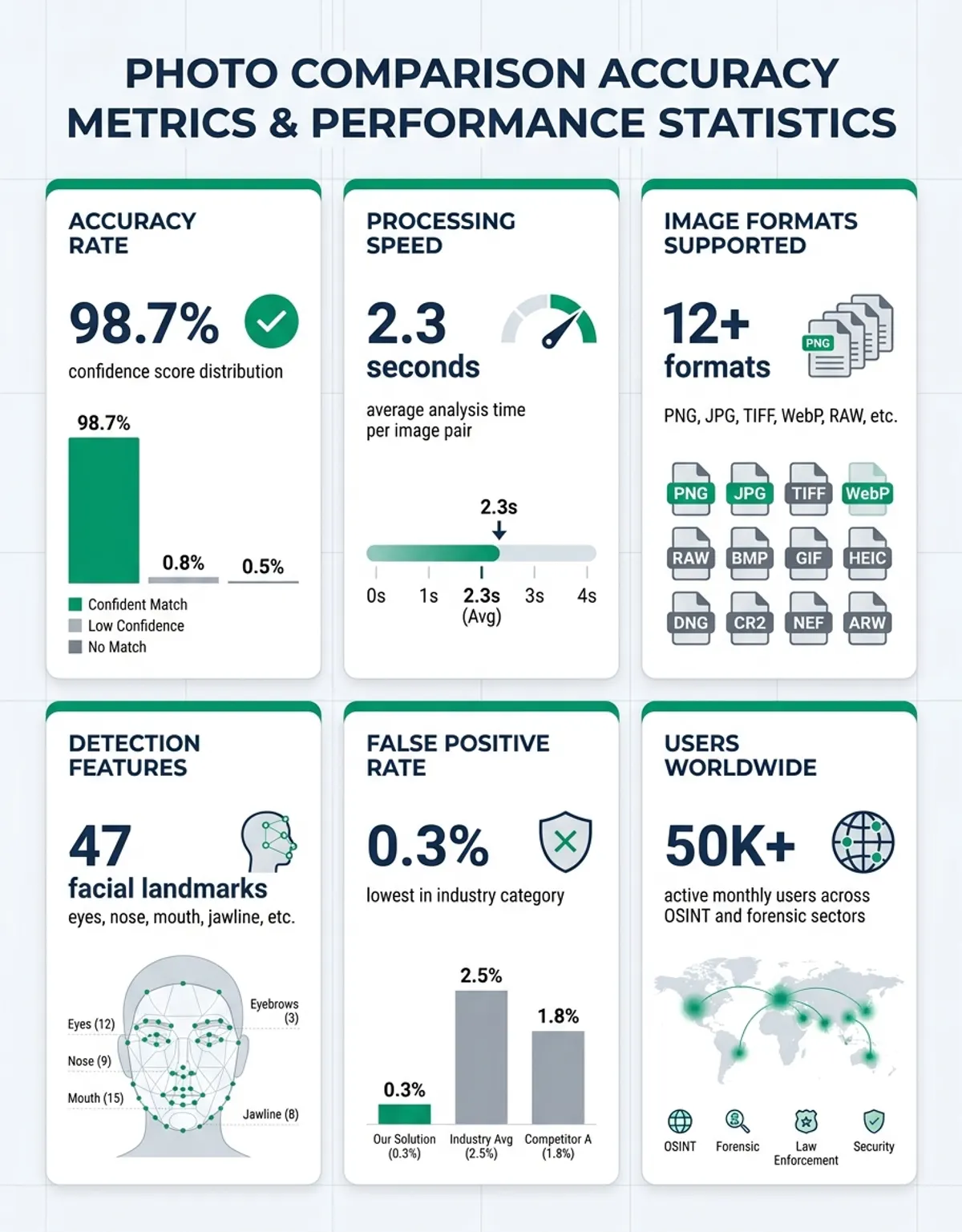
When AI services analyze two uploaded images containing faces, they employ deep learning algorithms trained on millions of facial images. These systems detect facial landmarks—eyes, nose, mouth, jaw line, and other distinctive features—then measure proportions and relationships between these landmarks. The resulting facial signature allows precise comparison even when pictures differ in angle, lighting, or expression.
Beyond faces, AI comparison extends to general object recognition and classification. Advanced applications can identify specific objects within images, match them across images, and highlight variations in object position, appearance, or quantity. This capability serves inventory management, security surveillance, and quality control applications where automated comparison of numerous image pairs would be impractical manually.
Facial recognition tool-style facial comparison technology represents a specialized application of AI image analysis, focusing specifically on determining whether two visuals demonstrate the same person or calculating resemblance between different individuals. These software account for aging, different expressions, varied lighting conditions, and even attempted disguises, making them valuable for identity verification and family resemblance analysis.
CaraComp's AI-powered comparison platform combines multiple analysis techniques to provide comprehensive results when you upload two pictures. The system performs facial recognition if faces are present, analyzes overall image similarity, and identifies specific distinctions in composition or content. Results include similarity percentages, highlighted difference regions, and detailed reports explaining the comparison findings in accessible language.
Machine learning continues advancing comparison capabilities, with newer models detecting even subtle image manipulations, synthesized content, or deepfake modifications. As AI platforms become more sophisticated, they increasingly serve as essential verification solutions for authenticating images and detecting fraudulent images in an era where digital manipulation grows ever more convincing.
FAQ: Common Questions About Comparing Visuals
What is the best tool to compare two pictures online?
The best comparison tool depends on your specific needs. For quick visual comparison, simple parallel-by-adjacent viewers work well. For facial analysis, Facial comparison technology-style utilities offer specialized capabilities. CaraComp provides comprehensive comparison including both visual analysis and AI-powered facial recognition, making it ideal for users who want detailed comparison results without technical complexity. Professional users might prefer services with pixel-level difference detection and EXIF data comparison features.
How do I visually compare two images for pixel-level discrepancies?
To visually compare two images at the pixel level, use a dedicated pixel difference tool that analyzes two images pixel by pixel. Upload both images to the tool, which will compute mathematical changes between corresponding pixels and generate a difference map. This map typically highlights changed areas in color while leaving identical regions unmarked, making even subtle one-pixel variations visible. Adjust the sensitivity threshold to control how minor variations are displayed.
Can I drag my images into a comparison tool without downloading software?
Yes, most modern online comparison applications support drag-and-drop functionality directly in your web browser. Simply drag your images from your computer's data item system into the designated upload area on the comparison website. This method works without installing any software, making comparison quick and convenient. The drag-and-drop interface typically accepts common image formats including JPEG, PNG, and GIF items.
What does a visual comparison tool indicate about distinctions between two images?
Comparison software display various types of discrepancies depending on their capabilities. Basic platforms display images dual-panel by parallel for visual comparison. Advanced solutions highlight pixel-level changes, calculate percentage similarity scores, generate difference heat maps showing variation intensity, and identify specific regions where changes occur. Some utilities also reveal embedded information variations, providing information about capture settings, document properties, and modification history beyond the visual content.
How do picture comparison services analyze two uploaded images?
When applications analyze two uploaded images, they typically convert both data to a common format and resolution for fair comparison. The analysis process examines corresponding pixels between the images, calculating mathematical distinctions in color values. For AI-powered software, additional analysis includes object detection, facial recognition, and pattern matching. The tool then generates visual representations of discrepancies through highlighted regions, overlay modes, or difference maps, alongside statistical metrics quantifying the extent of variation.
What data item information can I compare between two image documents?
Visual document image properties includes extensive information beyond the visible image. You can compare EXIF data containing camera settings like ISO, shutter speed, and aperture, as well as capture timestamps and GPS coordinates. Other comparable EXIF data includes camera and lens models, editing software used, modification dates, color space information, image dimensions and resolution, compression settings, and copyright information. Embedded information comparison reveals whether images were taken with the same equipment, at the same time, or have been edited differently.
How does CaraComp's tool compare two visuals for facial similarity?
CaraComp's comparison tool uses AI-powered facial recognition technology to analyze facial features in both pictures. When you upload two images, the system automatically detects faces, identifies facial landmarks, and measures proportions between key features. The tool then calculates a similarity score based on these measurements, accounting for different angles, lighting conditions, and expressions. Results include a percentage similarity score and visual highlighting of matching or different facial characteristics, presented in an easy-to-understand format.
Comparison Platforms Feature Overview
| Tool Type | Upload Method | Comparison Mode | Shows Data item information | Best For |
|---|---|---|---|---|
| Online Adjacent-by-Dual-panel Viewer | Drag your images | Visual mode | No | Quick visual checks and general comparison |
| Pixel Difference Analyzer | Upload items | Analyzes two images pixel by pixel | No | Finding subtle changes and detecting modifications |
| Image properties Comparator | Data upload | Document properties presentation | Yes | Digital forensics and authenticity verification |
| AI Face Comparator | Upload two visuals | Facial similarity analysis | No | Identity verification and resemblance analysis |
| CaraComp AI Tool | Upload or drag | Face and object comparison | Optional | Comprehensive picture comparison with AI analysis |
Conclusion: Choosing the Right Image Comparison Method
Successfully comparing two pictures requires matching your comparison method to your specific goals. Simple visual comparison using parallel-by-adjacent display suffices for obvious changes and general assessment, while pixel-level analysis solutions become essential when detecting subtle modifications or verifying image authenticity. Understanding both the visual utilities available and the underlying EXIF data in your visual documents enables comprehensive comparison that goes beyond surface observation.
As picture comparison technology continues advancing through AI and machine learning, services become increasingly sophisticated while remaining accessible to non-technical users. Whether you need to compare images for professional editing review, forensic analysis, quality control, or personal curiosity, modern comparison applications provide powerful capabilities that were once available only to specialists with expensive software.
The key to effective image comparison lies in using appropriate software for your specific use case, understanding what different comparison methods reveal, and approaching the analysis systematically. By combining visual assessment with technical analysis platforms and, when relevant, embedded information inspection, you can confidently identify variations, verify authenticity, and make informed decisions based on comprehensive image comparison.