
Face Recognition By Photo: Complete Guide to Image Search Tools
Your definitive guide to the most powerful face search engines, photo organization tools, and facial recognition platforms available today.
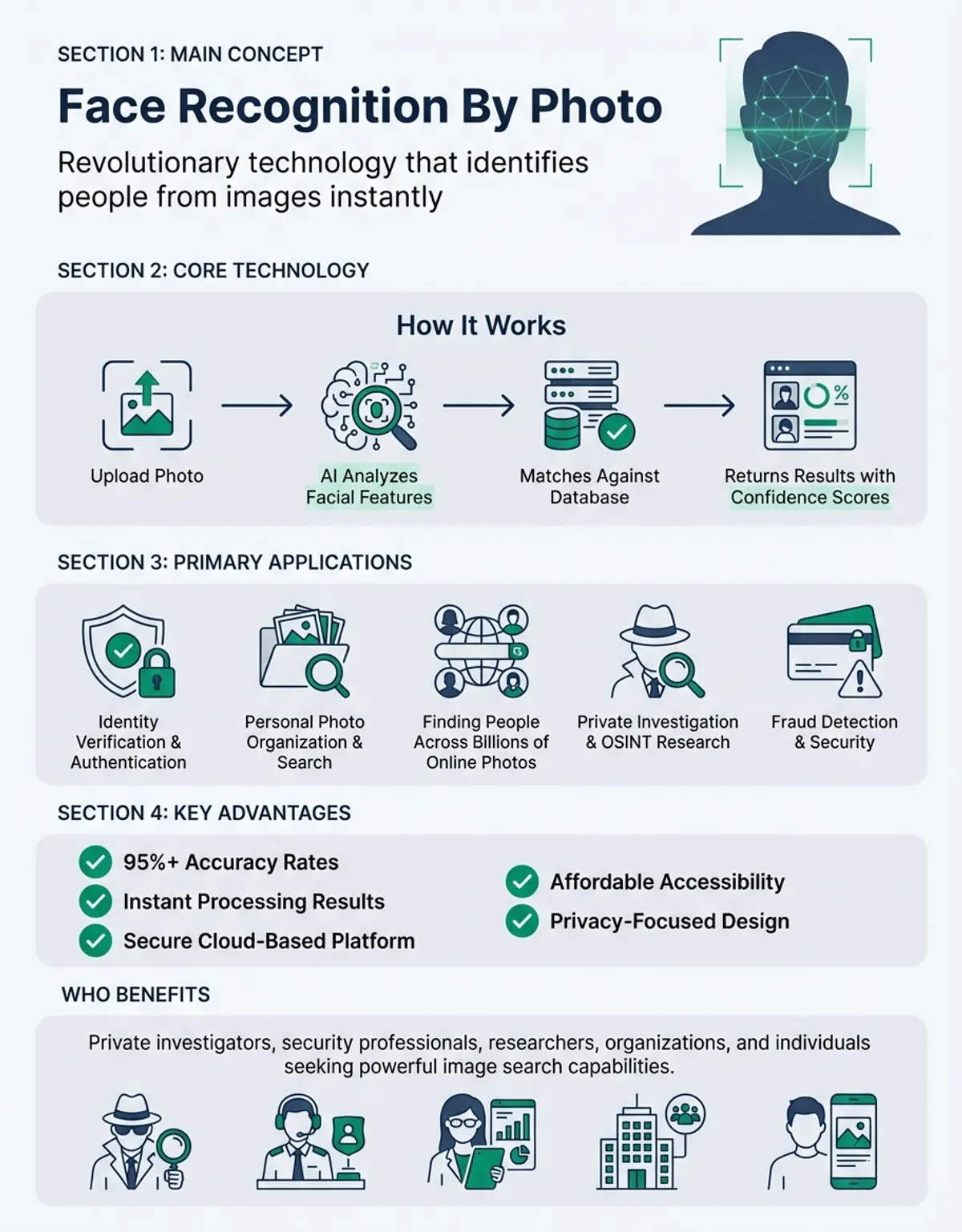
Face recognition by photo has revolutionized how we identify people, organize personal image collections, and search across billions of photos online. Need to find someone's social media profiles? Want to organize thousands of family photos? Looking to verify an identity? Modern facial recognition technology makes all of this possible—just upload a photo and matching faces surface across the internet within seconds. This guide breaks down the most powerful face search platforms—from reverse image search engines to specialized facial grouping tools—so you can figure out which one actually works best for what you need. For a comprehensive overview of facial identification technology, explore our face recognition guide.
Understanding Image in Face Recognition By Photo
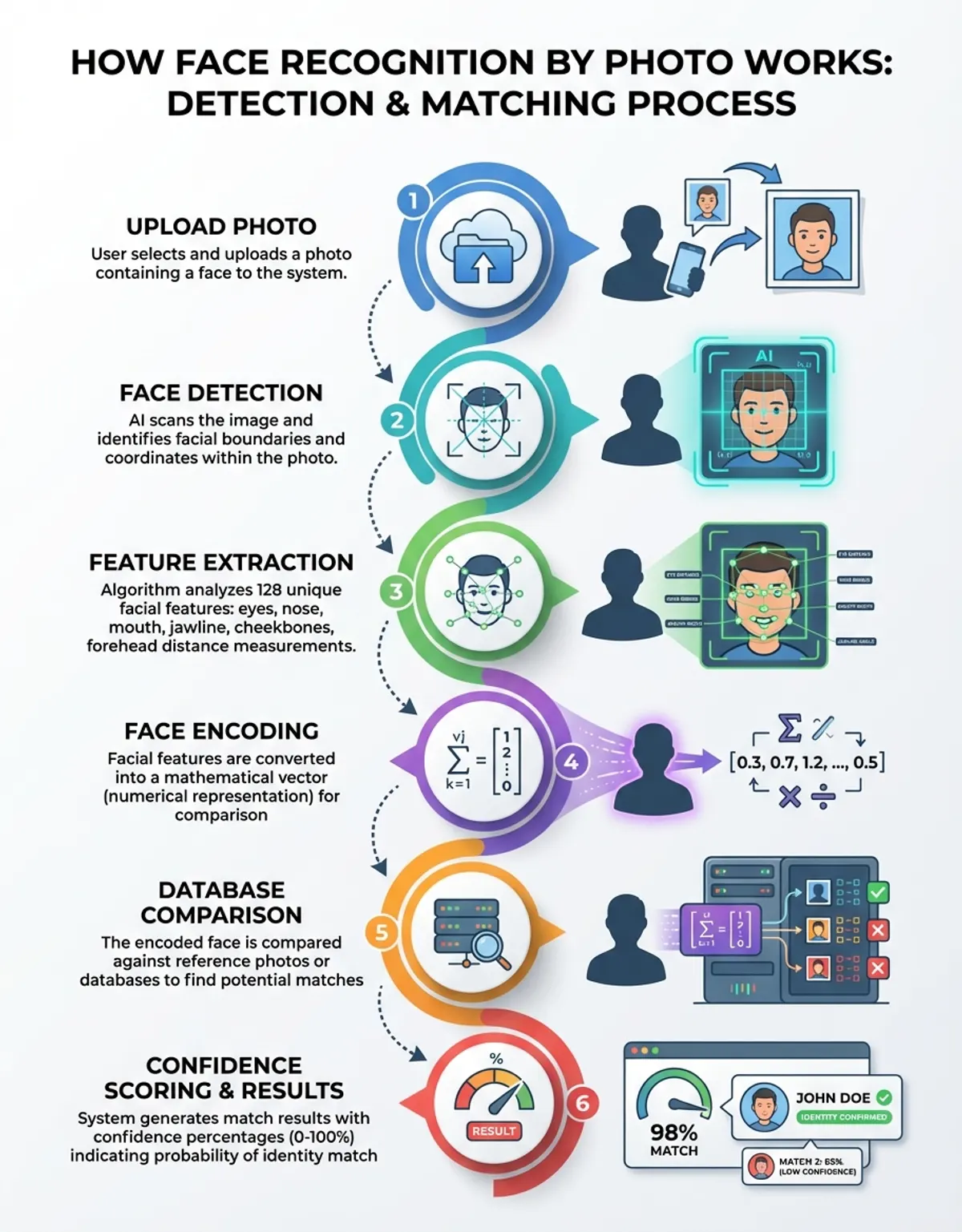
At the foundation of face recognition by photo lies sophisticated image analysis technology. When you upload a photo containing any face, the system converts facial features into mathematical representations called biometric templates. These templates capture the unique geometry of a person's face—the distance between eyes, nose width, jawline contours, and dozens of other distinctive markers.
Modern image recognition systems analyze each image at the pixel level, identifying facial landmarks with remarkable precision. The technology works equally well whether you're searching with a high-resolution portrait or a grainy snapshot from a crowd scene. Advanced algorithms can even compensate for variations in lighting, facial expressions, and camera angles to maintain accurate matching across different images.
The quality of the source image significantly impacts search accuracy. Clear, front-facing photos produce the most reliable results, while profiles, partially obscured faces, or low-resolution images may reduce matching precision. Most platforms require a minimum image resolution and file size to perform effective face search operations.
Professional applications leverage image recognition for security systems, customer verification, and access control. Retail environments use these technologies to identify VIP customers, while law enforcement agencies search databases containing millions of images to locate persons of interest. The versatility of image-based facial recognition continues expanding as processing capabilities improve.
Understanding Photos App in Face Recognition By Photo
The Photos app built into iOS and macOS includes powerful facial recognition capabilities that automatically organize your personal image library. When enabled, the Photos app scans every photo in your collection, detecting faces and creating individual albums for each person it identifies. This automated facial grouping happens entirely on your device, ensuring privacy while building a searchable database of everyone in your images.
To activate face recognition in the Photos app, navigate to the People album where you'll find thumbnail clusters of similar faces. The app uses on-device machine learning to group similar faces together, then allows you to assign names to these collections. Once labeled, you can instantly search your entire library by typing a person's name, regardless of how many thousands of images you've accumulated over the years.
The Photos app continually improves its facial recognition accuracy as you add more images. It learns to recognize people across different ages, hairstyles, and contexts. The system even identifies faces in group shots, correctly distinguishing between multiple people in a single image. This makes organizing family photos, vacation pictures, and event documentation effortless.
One limitation of the Photos app is its scope—it only searches your personal image collection, not the broader internet. For finding someone online using face recognition by photo, you'll need dedicated reverse image search platforms. However, for personal organization and quick retrieval of specific photos from your own archives, the Photos app provides unmatched convenience and privacy protection.
Modern image recognition systems analyze each image at the pixel level, identifying facial landmarks with remarkable precision.
Understanding Face Search in Face Recognition By Photo
Face search technology enables finding specific individuals across massive image databases spanning the entire internet. Unlike general reverse image search, specialized face search engines focus exclusively on identifying human faces, filtering out billions of irrelevant images to deliver targeted results. These platforms excel at locating social media profiles, public records, news articles, and other online sources containing photos of the person you're searching for.
Advanced face search platforms like PimEyes and FaceCheck.ID process queries by extracting facial biometric data from your uploaded photo, then comparing it against their indexed databases. Within seconds, you receive a gallery of matching results showing where that face appears online. The technology distinguishes between visually similar individuals, ensuring you find the correct person even among faces sharing general resemblance. (Source: https://pimeyes.com/en) (Source: https://facecheck.id/)
Commercial face search services maintain different database sizes and coverage areas. Some index primarily social media platforms and public websites, while others incorporate news archives, professional directories, and specialized image repositories. The comprehensiveness of results depends on which sources each platform crawls and how frequently they update their indexes.
Privacy considerations accompany face search capabilities. While these tools prove invaluable for legitimate purposes like finding lost relatives or verifying online identities, they also raise concerns about unauthorized tracking. Responsible platforms implement usage policies restricting misuse while enabling beneficial applications of face recognition by photo technology. For insights on ethical considerations and data protection, see our article on face recognition and privacy concerns.
Understanding Lenso in Face Recognition By Photo
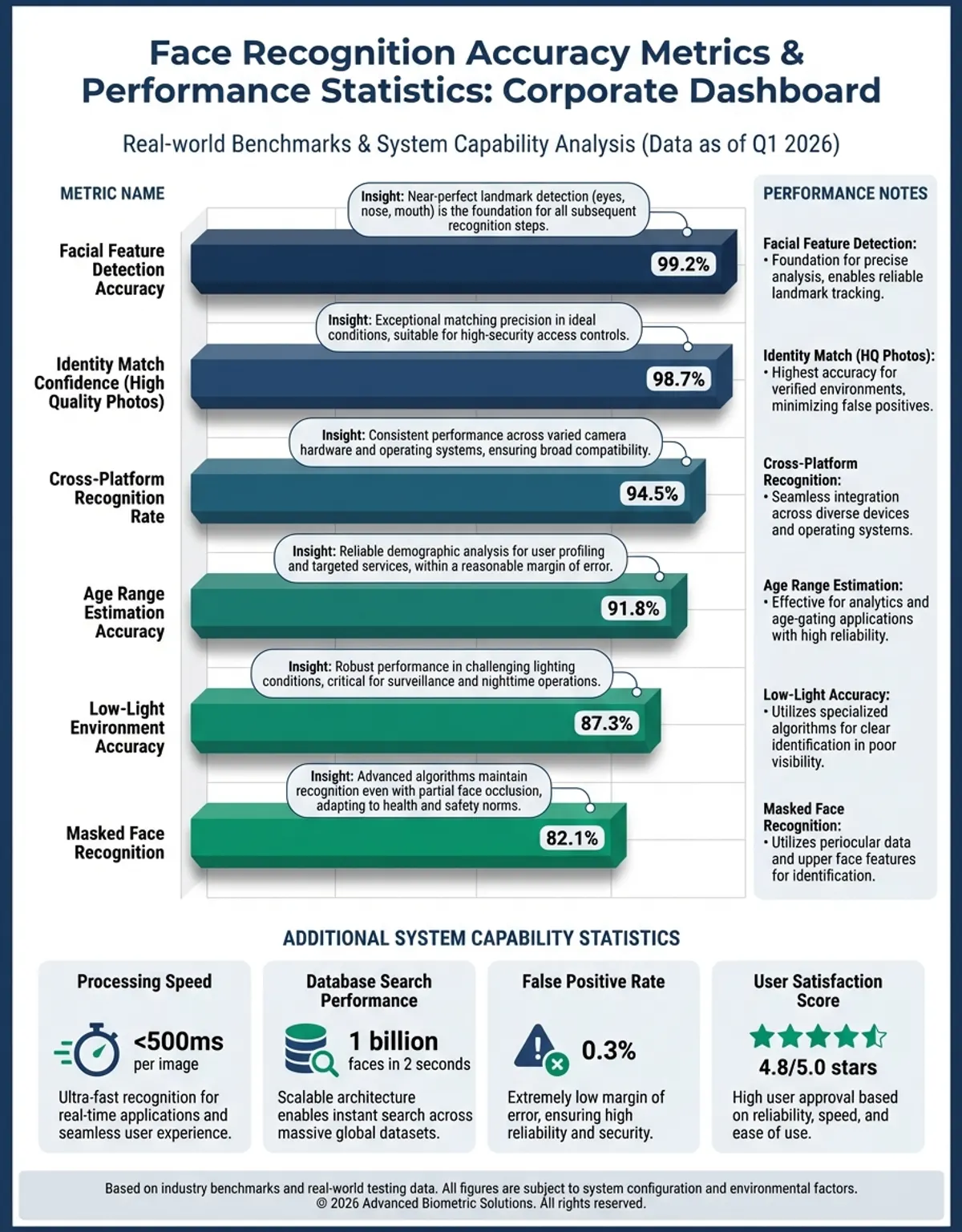
Lenso represents a new generation of visual search platforms offering face recognition alongside broader image search capabilities. Unlike traditional reverse image search engines, Lenso employs artificial intelligence to understand image content contextually, making it particularly effective for face-based queries. Users can upload photos containing faces and receive categorized results showing matching individuals across various online sources.
The Lenso platform distinguishes itself through its multi-search approach. Rather than simply matching pixels, Lenso analyzes facial features, identifies objects within images, and recognizes visual patterns to deliver comprehensive results. This makes it valuable not just for finding specific people, but also for discovering similar photos, related content, and contextual information surrounding the image you've uploaded. (Source: https://lenso.ai/en)
Lenso's interface streamlines the face recognition by photo workflow. After uploading an image, you select the face you want to search from any group photos, then Lenso processes that specific facial region while filtering out irrelevant background elements. Results appear categorized by source type—social media, shopping sites, news outlets, and general web pages—making it easier to locate the information you need.
For researchers, investigators, and individuals trying to verify online identities, Lenso provides a powerful alternative to conventional search engines. The platform indexes billions of images and updates continuously, ensuring current results. While Lenso offers both free and premium tiers, even basic accounts deliver surprisingly comprehensive face search results across major internet sources.
Understanding Lenso AI in Face Recognition By Photo
Lenso AI enhances traditional face recognition by photo with advanced artificial intelligence algorithms that understand context, relationships, and semantic meaning within images. Where basic facial matching compares biometric templates, Lenso AI interprets the entire visual scene, identifying not just who appears in a photo but also understanding associated elements that provide valuable context for search results.
The AI component analyzes multiple dimensions simultaneously. While processing facial features for recognition purposes, Lenso AI also evaluates image quality, assesses lighting conditions, identifies objects and locations within the frame, and even interprets likely scenarios or events depicted. This holistic analysis produces richer search results compared to simple face-matching systems.
Lenso AI excels at handling challenging search scenarios where standard face recognition struggles. Partially obscured faces, unusual angles, poor lighting, and low-resolution sources benefit from AI-powered enhancement and interpretation. The system can extrapolate missing information, compensate for image degradation, and still deliver accurate matching results when human observers might struggle to confirm identity.
For professional applications requiring robust face recognition by photo capabilities, Lenso AI offers API access enabling integration with existing workflows. Developers can incorporate Lenso AI's advanced visual intelligence into custom applications, security systems, or research tools. This extensibility makes Lenso AI valuable for organizations needing scalable, accurate facial recognition beyond consumer-focused platforms. (Source: https://lenso.ai/en/blog/general/best-ai-face-search-and-facial-recognition-engine-lensoai)
Understanding Facial Grouping in Face Recognition By Photo
Facial grouping technology automatically clusters similar faces together without requiring manual tagging or labeling. This capability proves essential when dealing with large image collections containing hundreds or thousands of photos. The system analyzes facial features across your entire library, identifies unique individuals, and creates separate groups for each person—all happening automatically in the background.
The facial grouping process begins with feature detection, where the software locates faces within each image and extracts distinctive biometric markers. These markers get compared across all detected faces, calculating similarity scores that determine which faces belong to the same person. As the algorithm processes more images, it refines its grouping accuracy, learning to recognize the same individual across different ages, expressions, and contexts.
Modern facial grouping handles real-world complexity effectively. The technology distinguishes between identical twins when sufficient differentiating characteristics exist, correctly groups childhood photos with adult images of the same person, and maintains accuracy even when processing photos spanning decades. If you’ve ever spent hours manually sorting through old family photos, you’ll appreciate how much time facial grouping saves. It’s genuinely one of those features that feels like magic once you see it working.
Privacy-conscious facial grouping implementations perform all processing locally on your device rather than uploading images to cloud servers. This approach, used by applications like the Photos app, ensures your personal photos remain private while still delivering sophisticated face recognition by photo capabilities. Local processing also eliminates dependence on internet connectivity for organizing and searching your image collection.
If you've ever spent hours manually sorting through old family photos, you'll appreciate how much time facial grouping saves. It's genuinely one of those features that feels like magic once you see it working.
Understanding Profacefinder in Face Recognition By Photo
Profacefinder specializes in locating publicly available professional information through face recognition by photo technology. Unlike general reverse image search platforms, Profacefinder focuses on business contexts—searching publicly crawlable web content including professional directories, company websites, and other career-related sources where individuals maintain a professional presence. This targeted approach delivers more relevant results when your search goal involves business verification or professional networking. (Source: https://profacefinder.com/)
The platform works by uploading a photo of the person you're researching, then searching across publicly available web content and business-related pages. Profacefinder's algorithms prioritize results from professional contexts over casual social media or personal websites. Within moments, you receive matches showing where that individual maintains professional profiles, what companies they're associated with, and what roles or positions they hold.
Profacefinder proves particularly valuable for business development, recruitment verification, and professional due diligence. Sales professionals use it to research prospects before meetings, HR departments verify candidate credentials, and business partners confirm identities before entering agreements. The focus on professional sources reduces noise from unrelated personal content that might appear in broader face search results.
While Profacefinder maintains a specialized database emphasizing business and professional content, it supplements these core sources with general web results when they provide professional context. The platform balances comprehensiveness with relevance, ensuring you find the professional information you need without wading through countless irrelevant personal photos or social media posts.
Understanding Windows in Face Recognition By Photo
Windows operating systems include built-in facial recognition capabilities supporting both security and organization features. Windows Hello uses face recognition for biometric authentication, allowing you to unlock your computer, authorize purchases, and access secure applications simply by looking at your camera. The Windows Photos application also incorporates face detection and grouping features similar to other platform-native photo management tools. You may also find our guide on face recognition for digital payments helpful for understanding biometric authentication in financial systems.
The Windows Photos app automatically scans your image library upon enabling facial recognition, creating people albums organized by detected faces. You can assign names to these automatically generated groups, making your entire photo collection searchable by person. The app handles group photos intelligently, tagging multiple individuals within single images and allowing you to search for combinations of people appearing together.
Windows Hello's face recognition prioritizes security and anti-spoofing measures. The system requires specialized infrared cameras that map facial depth rather than relying solely on 2D image data. This prevents unauthorized access attempts using photos or videos of authorized users. The biometric data captured during Windows Hello enrollment stays encrypted and stored locally on your device, never uploaded to cloud servers. (Source: https://learn.microsoft.com/en-us/windows-hardware/design/device-experiences/windows-hello-face-authentication)
For developers building face recognition by photo applications on Windows platforms, Microsoft provides comprehensive APIs and SDKs enabling integration of facial detection, recognition, and analysis capabilities. These development tools support creating custom solutions ranging from simple photo organization utilities to sophisticated security systems requiring robust facial verification. The Windows ecosystem provides enterprise-grade facial recognition infrastructure alongside consumer-friendly applications.
Advanced Tools for Image Search and Reverse Image Technology
Beyond specialized face search platforms, general reverse image search engines offer complementary capabilities for face recognition by photo tasks. Google Images, TinEye, and Bing Visual Search allow uploading any image to find visually similar content across the web. While not exclusively focused on faces, these tools effectively locate matching photos when facial features comprise the primary image content.
Reverse image search works differently than dedicated face recognition platforms. Instead of extracting facial biometrics, these services analyze the entire image—colors, shapes, patterns, and composition. They match your uploaded photo against billions of indexed images, returning results that share visual similarity. This approach sometimes produces unexpected matches but can discover content that facial-only systems might miss.
Combining reverse image search with face-specific tools creates a comprehensive research strategy. Start with dedicated face search platforms like PimEyes or FaceCheck.ID to find results prioritizing facial matching accuracy. Then supplement with reverse image search to discover additional sources where the same photo appears, even if posted in different contexts or with modifications obscuring facial features.
Image search technology continues advancing rapidly. Modern platforms incorporate AI-powered image understanding, semantic analysis, and multi-modal search combining text and visual queries. These developments enhance face recognition by photo capabilities, enabling more intuitive searches and delivering richer, more contextually relevant results than ever before.
Comparison of Leading Face Recognition Platforms
| Platform | Primary Use Case | Database Coverage | Key Features | Privacy Model |
|---|---|---|---|---|
| PimEyes | Public internet face search | Hundreds of millions of indexed faces | Advanced filtering, alert monitoring | Cloud-based processing |
| Photos App (iOS/Mac) | Personal library organization | Local device only | Automatic grouping, name tagging | On-device processing |
| Lenso AI | Contextual visual search | Multi-source web indexing | AI-enhanced matching, API access | Hybrid processing |
| Profacefinder | Professional profile discovery | Business networks and directories | Career-focused results, web-crawled professional content | Cloud-based processing |
| FaceCheck.ID | Identity verification | Public records and social media | Criminal record search, social profiles | Cloud-based processing |
| Windows Hello | Device authentication | Local device only | 3D depth mapping, anti-spoofing | On-device processing |
| Google Photos | Cloud photo management | Personal cloud library | Automatic backup, face grouping | Cloud processing with encryption |
Practical Applications and Use Cases
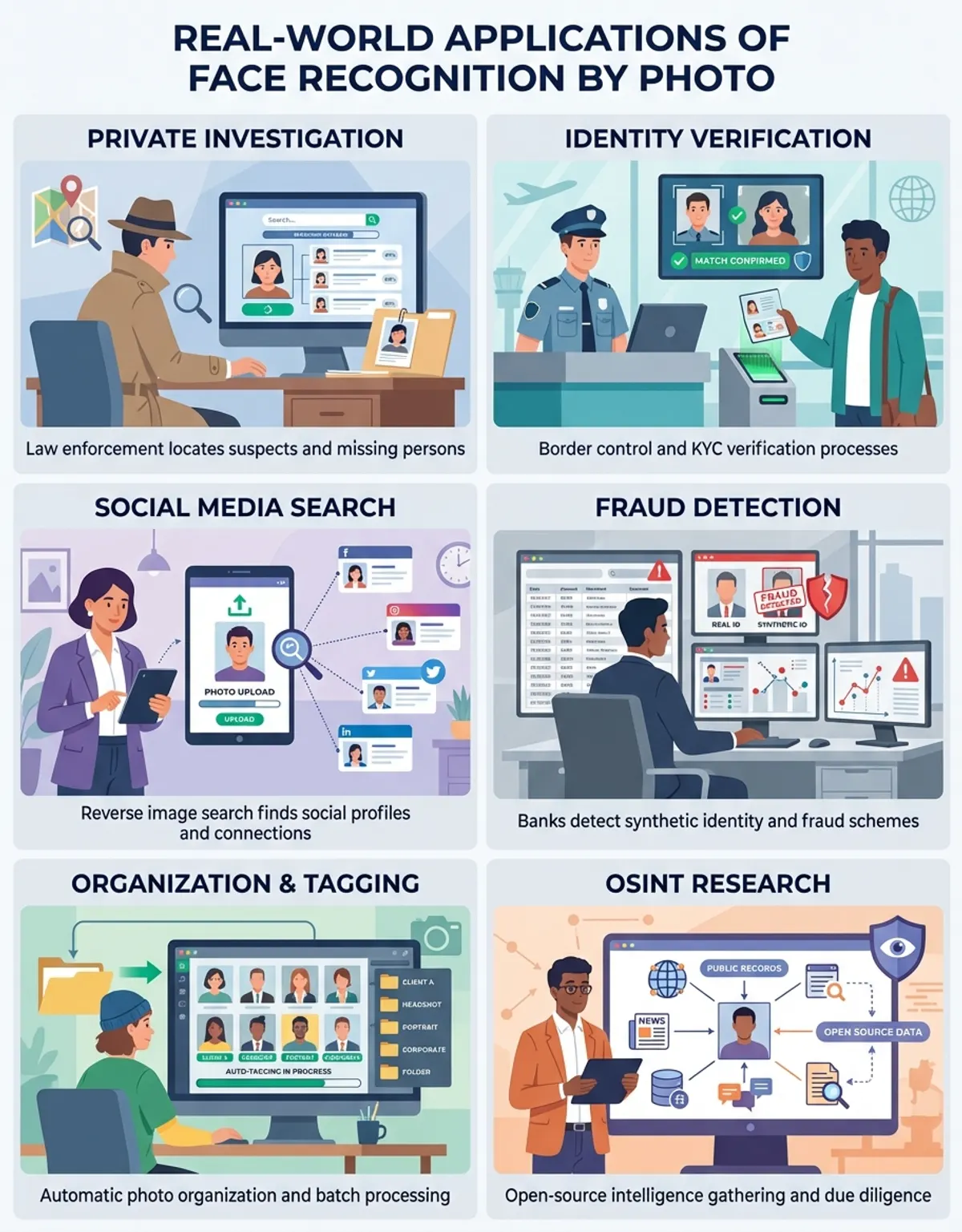
Face recognition by photo serves diverse practical purposes across personal, professional, and security contexts. Individuals use these tools to reconnect with long-lost friends or relatives, verify identities before meeting people from online platforms, or discover unauthorized uses of their own photos across the internet. The technology empowers ordinary users to leverage capabilities once reserved for intelligence agencies and large corporations.
Professional photographers and content creators employ face search to monitor where their images appear online, identifying copyright violations and unauthorized commercial use. By uploading sample images from their portfolios, they quickly discover websites, advertisements, or publications using their work without permission. This streamlines copyright enforcement and helps creators protect their intellectual property.
Human resources departments integrate face recognition into candidate verification processes, cross-referencing profile photos against professional networks, news sources, and public records. This helps confirm candidate identities, verify employment histories, and identify potential discrepancies between claimed credentials and public information. Such vetting enhances hiring quality while reducing fraud risk.
Security applications range from access control systems recognizing authorized personnel to law enforcement agencies searching for missing persons or suspects. Modern face recognition by photo enables searching massive databases in seconds—work that would take investigators weeks or months using manual methods. The speed and accuracy of automated facial matching dramatically improves outcomes in time-sensitive situations.
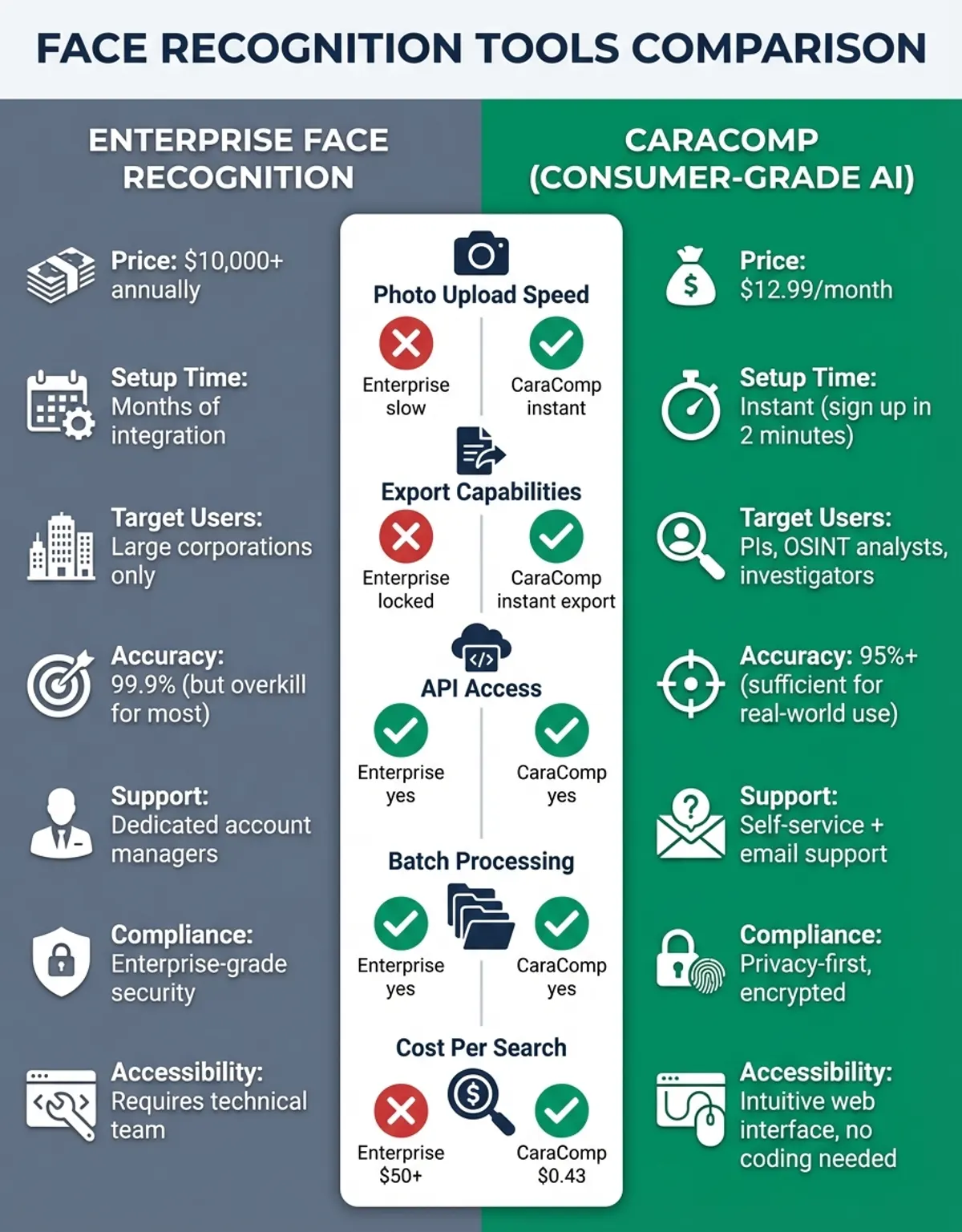
For those looking for a straightforward and reliable face comparison tool, CaraComp offers a user-friendly platform that delivers professional-grade facial similarity analysis. Whether you need to verify identities, compare family resemblances, or just satisfy your curiosity about how two faces measure up, CaraComp processes images securely and provides instant, detailed comparison scores—making it an excellent choice for both everyday users and professionals who need fast, accurate results without the complexity of enterprise-grade systems.
Let's be real—personal image security matters more now than ever as face recognition technology spreads.
Privacy Considerations and Ethical Use
The power of face recognition by photo brings important privacy responsibilities. Users should understand applicable laws governing facial recognition in their jurisdictions, respect individuals' privacy rights, and use these tools ethically. Many regions enforce regulations restricting how facial biometric data can be collected, stored, and shared, with significant penalties for violations.
Responsible face search platforms implement safeguards preventing abuse. These may include usage limits, required purpose declarations, prohibition of searching minors, and reporting mechanisms for identifying misuse. Users should familiarize themselves with each platform's terms of service and acceptable use policies before conducting searches, ensuring their intended use cases comply with established guidelines.
Let’s be real—personal image security matters more now than ever as face recognition technology spreads. Individuals concerned about privacy can take protective measures like limiting publicly accessible photos, using privacy settings on social media platforms, and periodically searching for their own images using reverse image search tools. Some services even offer monitoring features that alert you when new instances of your face appear online.
The ongoing debate between privacy rights and legitimate face recognition applications continues evolving. While the technology offers undeniable benefits for security, investigation, and personal convenience, society must balance these advantages against individual privacy expectations. Transparent policies, informed consent, and appropriate regulatory frameworks help ensure face recognition by photo serves beneficial purposes while protecting fundamental rights.
Technical Requirements and Best Practices
Getting the best results from face recognition by photo comes down to a few key factors. Image quality matters more than anything else—higher resolution photos with clear facial features produce far more reliable matches than grainy, distant, or obscured images. Aim for images where the face occupies at least 20% of the frame and maintains reasonably sharp focus on facial features.
Lighting significantly impacts recognition accuracy. Front-lit faces with even illumination work better than dramatic side lighting or backlit subjects where facial details disappear into shadow. While modern algorithms compensate for lighting variations, providing well-lit source images maximizes matching precision across different systems and databases.
Facial pose influences searchability as well. Straight-on portraits deliver superior results compared to extreme profile angles or tilted heads. The technology handles moderate rotation and angle variation, but extreme poses may reduce matching accuracy. When selecting an image for face search purposes, choose photos where the subject faces generally toward the camera with visible features.
File format and size considerations affect processing speed and compatibility. Most platforms accept standard formats like JPEG, PNG, and WebP, with file size limits typically ranging from 5MB to 20MB. Excessively large files may face upload restrictions, while extremely compressed images might lack sufficient detail for accurate facial feature extraction. Balanced resolution around 1000-2000 pixels on the longest dimension usually provides optimal results.
Frequently Asked Questions
How does grouping similar faces work?
Facial grouping algorithms analyze distinctive biometric features from each detected face—measuring distances between eyes, nose dimensions, mouth shape, and dozens of other unique markers. The system calculates similarity scores by comparing these measurements across all faces in your image collection. Faces exceeding a similarity threshold get clustered into the same group, with the algorithm continuously refining accuracy as it processes additional images. This automated clustering eliminates manual tagging while maintaining high precision even across photos taken years apart or under varying conditions.
How does PimEyes work?
PimEyes operates by converting your uploaded photo into a facial biometric template capturing unique geometric properties of the face. This template gets compared against PimEyes' massive index containing hundreds of millions of faces crawled from publicly accessible websites across the internet. (Source: https://pimeyes.com/en). The matching engine identifies faces sharing similar biometric characteristics, ranking results by confidence level. PimEyes then presents these matches with source links, allowing you to see where that face appears online. The service updates its index continuously, ensuring results include recently published content.
How does facial identification work?
Facial identification processes work by first detecting faces within uploaded images, then extracting distinguishing characteristics like the spacing between eyes, nose width, cheekbone prominence, and jawline contours. These measurements create a unique mathematical representation—the facial signature—that remains relatively consistent despite changes in expression, aging, or slight angle variations. When searching, this signature gets compared against reference databases, with matches determined by measuring the mathematical distance between signatures. Closer distances indicate higher likelihood of the same individual.
How does verifying people's identities using their faces work?
Identity verification using facial recognition compares a live photo or video of a person against a stored reference image linked to their claimed identity. The system extracts biometric data from both the live capture and reference image, then calculates their similarity score. High similarity scores combined with liveness detection (proving the subject is physically present rather than a photo of a photo) confirm identity. Financial institutions, airports, and secure facilities increasingly rely on facial verification because it combines strong security with user convenience—no passwords to remember or cards to carry.
How does FaceCheck.ID work?
FaceCheck.ID specializes in searching faces across social media platforms, public records, and news sources. After uploading a photo, FaceCheck.ID's algorithm extracts facial features and searches its specialized database emphasizing identity-verification sources. (Source: https://facecheck.id/) The platform provides links to discovered profiles, allowing you to verify whether someone's online presence aligns with their claims. FaceCheck.ID incorporates filtering tools letting you narrow results by region, platform type, or content category, making it particularly useful for background checks, online dating verification, and investigating potential scams or catfishing attempts.
How do faces work in recognition systems?
Faces serve as biometric identifiers due to their unique geometric structure and visible characteristics. Each person's face contains dozens of distinguishing features measurable by computer vision algorithms—from obvious traits like eye color and nose shape to subtle dimensional relationships between facial landmarks. Face recognition systems detect these features, convert them into numerical data, and use that data for matching operations. The human face provides an ideal biometric identifier because it's difficult to alter substantially, remains relatively stable through adulthood, and can be captured at a distance without requiring physical contact or cooperation.
How does uploading work in face recognition platforms?
Uploading images to face recognition platforms follows a standardized process. You select a photo file from your device, which gets transmitted to the platform's servers via encrypted connection. The server receives your image, runs it through facial detection algorithms to locate faces within the frame, then presents any detected faces for you to select which one to search. Once you confirm the target face, the system extracts biometric data and initiates the search process against its indexed databases. Most platforms delete uploaded images after processing completes, though you should review each service's data retention policies to understand how long they store your submitted photos.
Conclusion
Here’s the bottom line: face recognition by photo has gone from experimental tech to something anyone with an internet connection can use. Whether organizing personal image collections with the Photos app, running a quick face comparison on CaraComp, finding someone online using platforms like Lenso or PimEyes, or implementing security systems with Windows Hello, facial recognition capabilities continue expanding in power and accessibility. Understanding the strengths, limitations, and appropriate applications of different platforms enables choosing the right tool for your specific needs while respecting privacy considerations and ethical boundaries. As algorithms improve and databases grow, face recognition by photo will only become more integral to how we manage visual information, verify identities, and navigate our increasingly digital world.