
How to Improve Face Comparison Results With Proven Methods
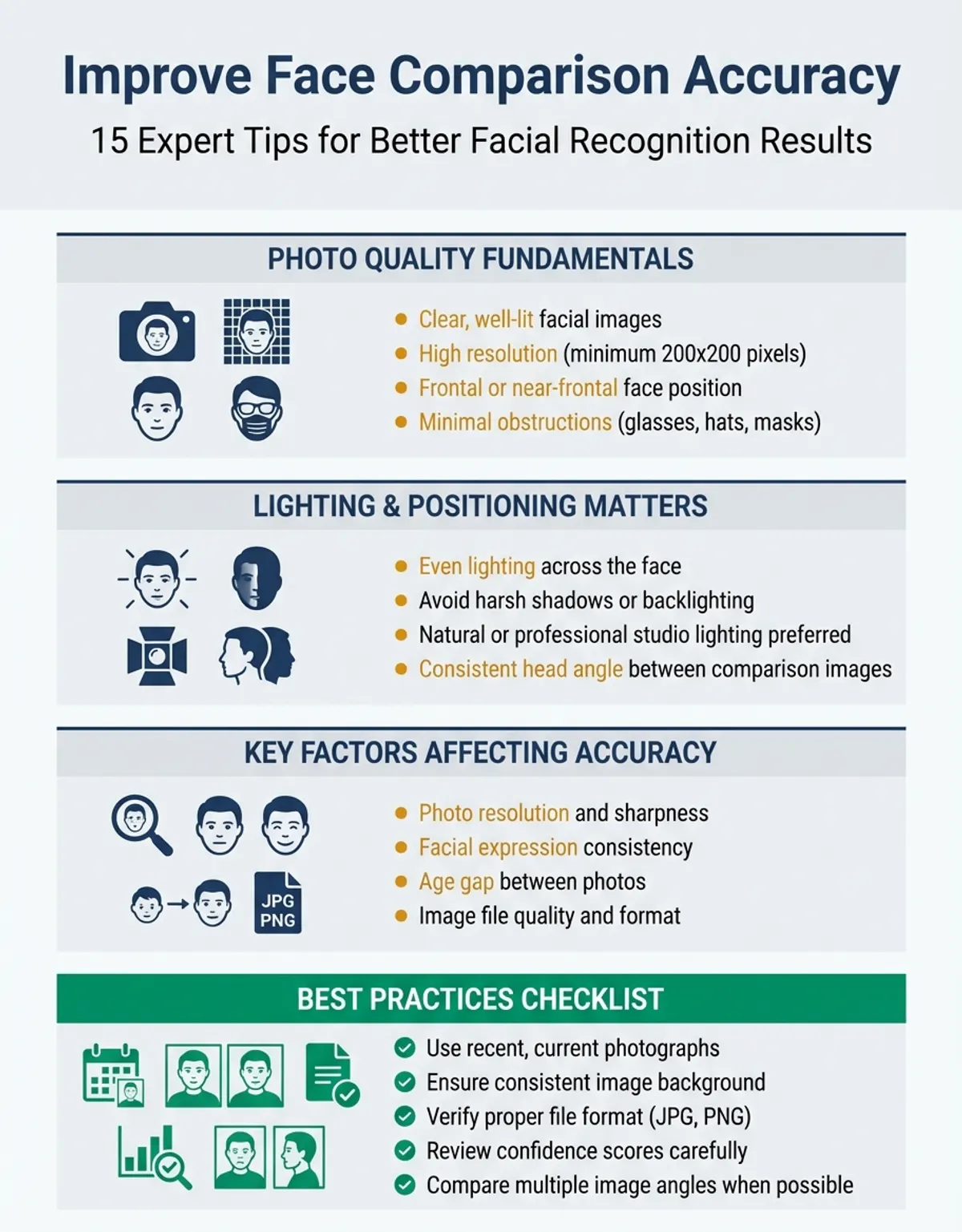
Whether you are confirming someone's identity, exploring family resemblances, or testing how much two people look alike, the quality of your results depends heavily on the photos you use. Face recognition algorithms work by mapping specific landmark points — the distance between the eyes, the shape of the jawline, the proportions of the nose and mouth — and then comparing those measurements mathematically. Feed the system a poor-quality image, and even the most advanced deep learning model will struggle to deliver meaningful results.
This guide breaks down everything that affects accuracy in face recognition, from the basics of photo quality to subtle factors most people never consider. Follow these recommendations and you will consistently get reliable, high-confidence similarity scores through recognition from any comparison tool — including CaraComp. We cover preprocessing techniques, edge detection, and training strategies that improve accuracy across every comparison.face comparison guide.p>
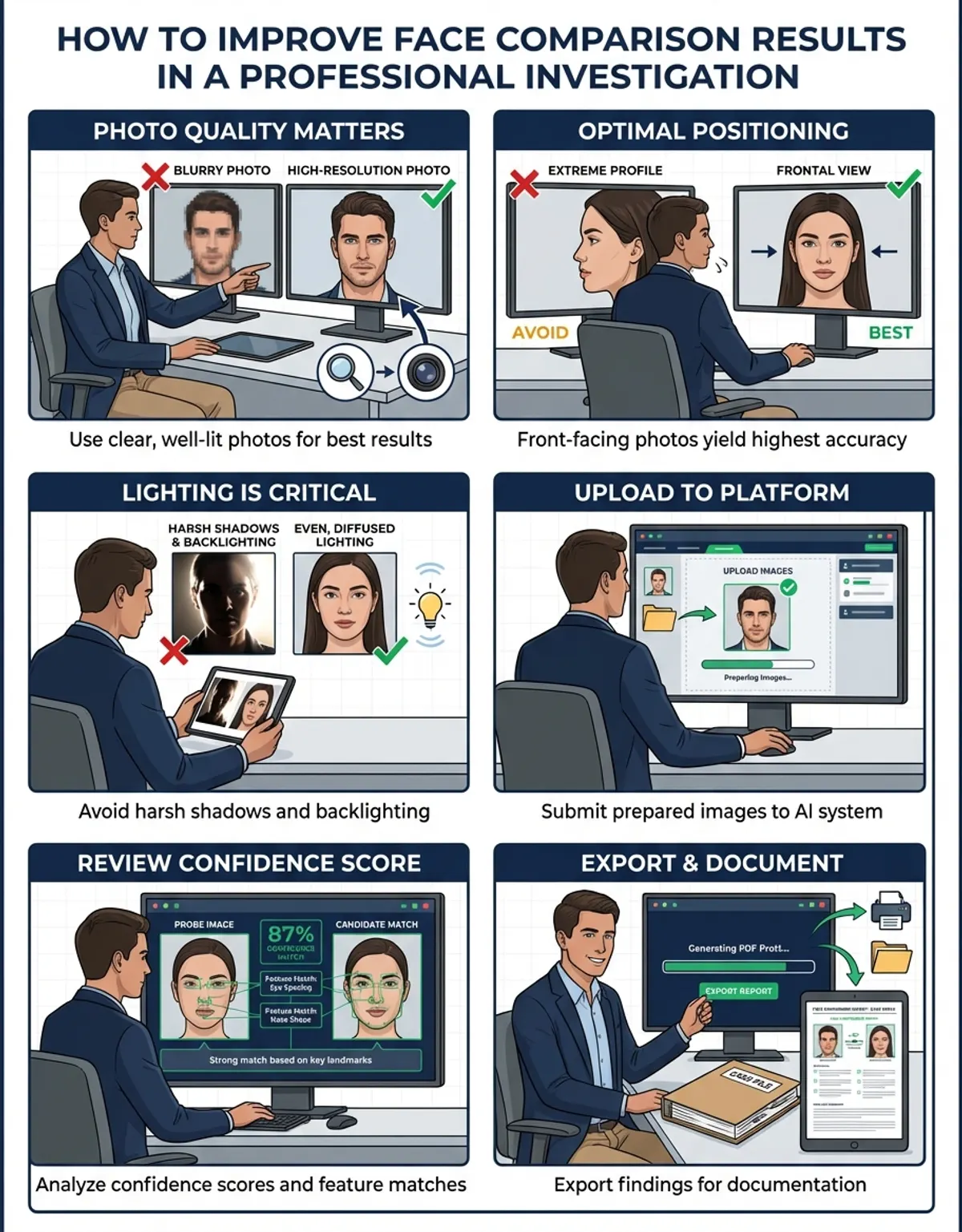
1. Use a Full, Front-Facing Photo
Face recognition algorithms measure the spatial relationships between facial landmarks — the corners of the eyes, the tip of the nose, the edges of the mouth, the contour of the jawline. These measurements require all landmarks to be visible. A profile shot or three-quarter angle hides half of the area being analyzed, cutting available data points by 40-60%. Modern face recognition relies on deep learning models that perform best with frontal images.
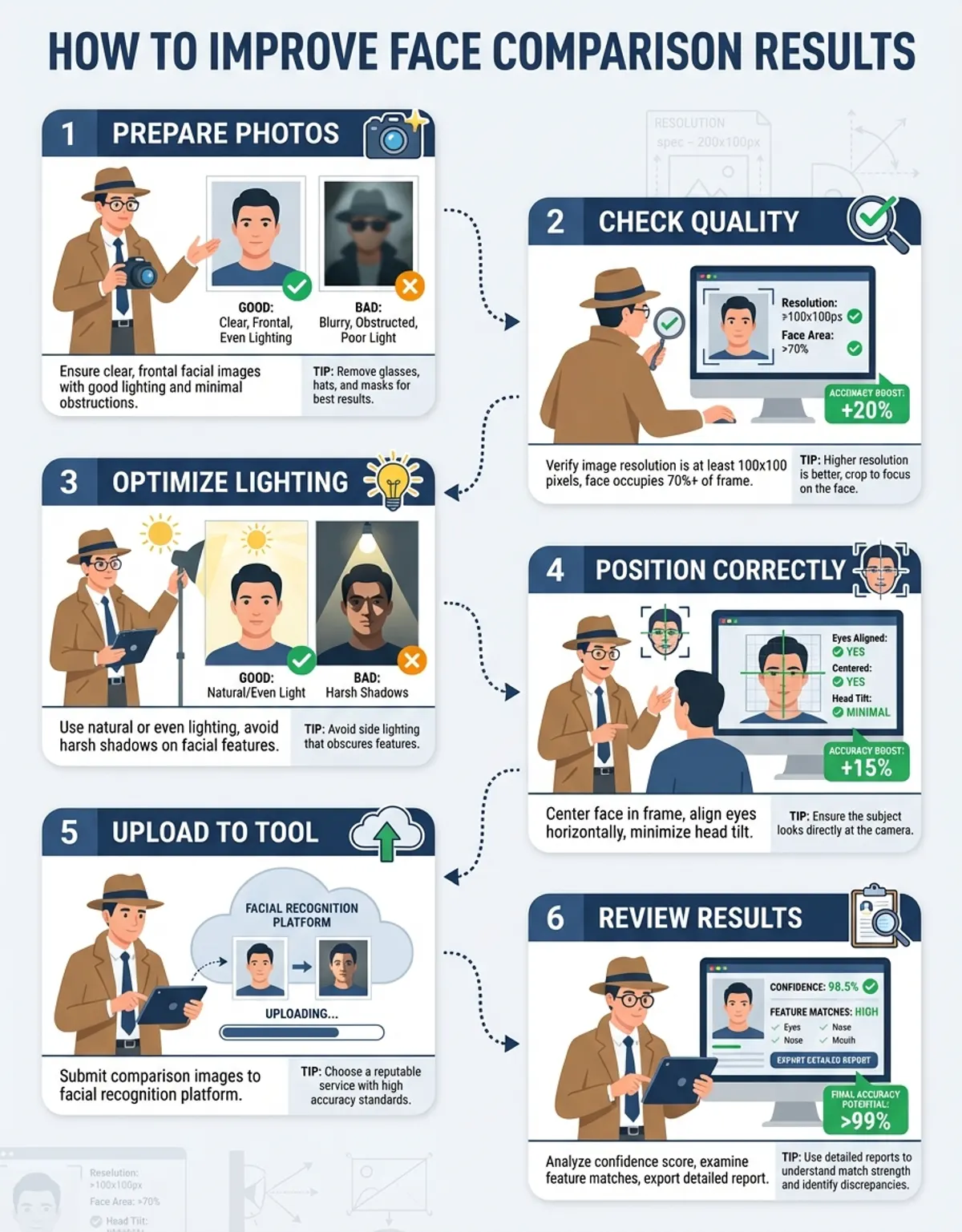
For best results, each person should look directly at the camera. Your nose should be roughly centered in the frame, and both eyes should be equally visible. A slight head tilt (under 15 degrees) is usually fine — most modern algorithms compensate for minor rotation — but anything beyond that starts degrading matching accuracy. Training data for these algorithms overwhelmingly features front-facing images, so accuracy is best when you match that orientation.
If you only have an angled photo available, it is still worth running the comparison, but understand that your confidence score will be lower than what a front-facing image would produce.
2. Get the Lighting Right
Lighting is arguably the single biggest controllable factor in comparison accuracy. Poor illumination creates shadows that obscure facial contours, while harsh overhead lighting can flatten features and create dark eye sockets that throw off landmark detection entirely. Histogram equalization is one preprocessing technique that helps normalize lighting differences, but it works better when the original image has reasonable illumination to begin with.
The ideal setup is soft, even lighting that illuminates subjects uniformly. Natural daylight from a window (not direct sunlight) is excellent. If you are using artificial light, position it at roughly eye level, slightly off-center, to create gentle dimensionality without harsh shadows. Brightness correction built into most comparison tools can compensate for moderate lighting variation, but performs best with well-lit source images.
Avoid backlighting at all costs — it silhouettes subjects and leaves the algorithm with almost nothing to measure. Similarly, avoid single-source overhead lighting (like a bare ceiling bulb), which creates raccoon-eye shadows that distort the measured distance between the brow ridge and the eye socket. Boundary-tracing algorithms that identify facial outlines struggle significantly when shadows dominate the image.
3. Ensure Both Eyes Are Clearly Visible
The eyes are the most information-dense region for face recognition and identity confirmation. The inter-pupillary distance (the exact space between the centers of your pupils), the shape of the eye opening, the position of the inner and outer corners — these measurements alone account for roughly 30-40% of most algorithms' matching confidence. Deep learning models place enormous weight on the eye region because it provides the most stable face representation across different expressions and conditions.
Regular prescription glasses are perfectly fine. Contact lenses make no difference. Even moderate eye makeup will not cause problems. What will cause problems: sunglasses (even lightly tinted ones), ski goggles, hair falling across the eyes, or heavy shadow obscuring the eye area. These obstructions reduce the ability to perform accurate detection and confirmation of identity.
If you are comparing two photos and one has partially hidden eyes, expect a noticeable drop in your similarity score — not because the faces look less alike, but because face recognition simply has less data to work with. Training these algorithms on occluded images helps, but accuracy from clear images always outperforms accuracy from partially hidden ones.
4. Use Color Photos When Possible
Color images carry significantly more facial data than black-and-white. Skin tone variations, the contrast between the iris and sclera, the subtle color differences that define lip boundaries and eyebrow edges — all of this helps map facial landmarks with greater precision. The methods that power modern face recognition extract color-channel features that monochrome images simply cannot provide.
Black-and-white photos are not unusable, but they reduce the ability to distinguish between adjacent facial features, especially in areas with low contrast. People with deep-set eyes, subtle birthmarks, or low-contrast features between their skin and hair will see the biggest accuracy drop when using monochrome images.
If you have a choice between a color photo and a black-and-white one of the same person, always go with color for better results.
5. Keep Faces Unobstructed for Recognition
Anything covering any part of the subjects being compared reduces accuracy. This includes the obvious culprits — masks, scarves, hands resting on the chin — but also less obvious ones like heavy bangs covering the forehead, a phone held near a mirror selfie, or even large dangling earrings that overlap the jawline.
The algorithm needs to see the full facial contour from the hairline to the chin, and from ear to ear. Every obstruction forces the system to estimate the position of hidden landmarks rather than measuring them directly, and estimates always carry lower confidence than direct measurements. The internal model depends on having complete facial feature data for effective face matching.
For the most accurate comparison, pull hair back, remove unnecessary accessories, and make sure nothing is casting a shadow across facial features. This maximizes detection performance.
6. Use High-Resolution Images
Resolution matters more than most people realize. When subjects occupy only a small portion of a low-resolution image, the actual pixel count dedicated to facial features can be surprisingly low. An 800x600 photo where the subject takes up 10% of the frame means the facial region is rendered in roughly 80x60 pixels — not enough for reliable landmark detection.
Aim for images where subjects are at least 200x200 pixels in size. Modern smartphone cameras (12MP+) easily exceed this when the subject is the primary focus. Problems arise with cropped group photos, security camera stills, or heavily compressed social media thumbnails. Algorithms trained with neural networks perform best with images of at least 112x112 pixel subjects, but higher resolution always improves results.
If your image is low resolution, try to find a higher-quality version before running the comparison. Upscaling a blurry photo with AI enhancement tools can sometimes help, but it is adding artificial detail — the original measurement accuracy will not match a natively sharp image. Learning algorithms cannot recover detail that was never captured.
7. Match Photo Conditions for Face Recognition
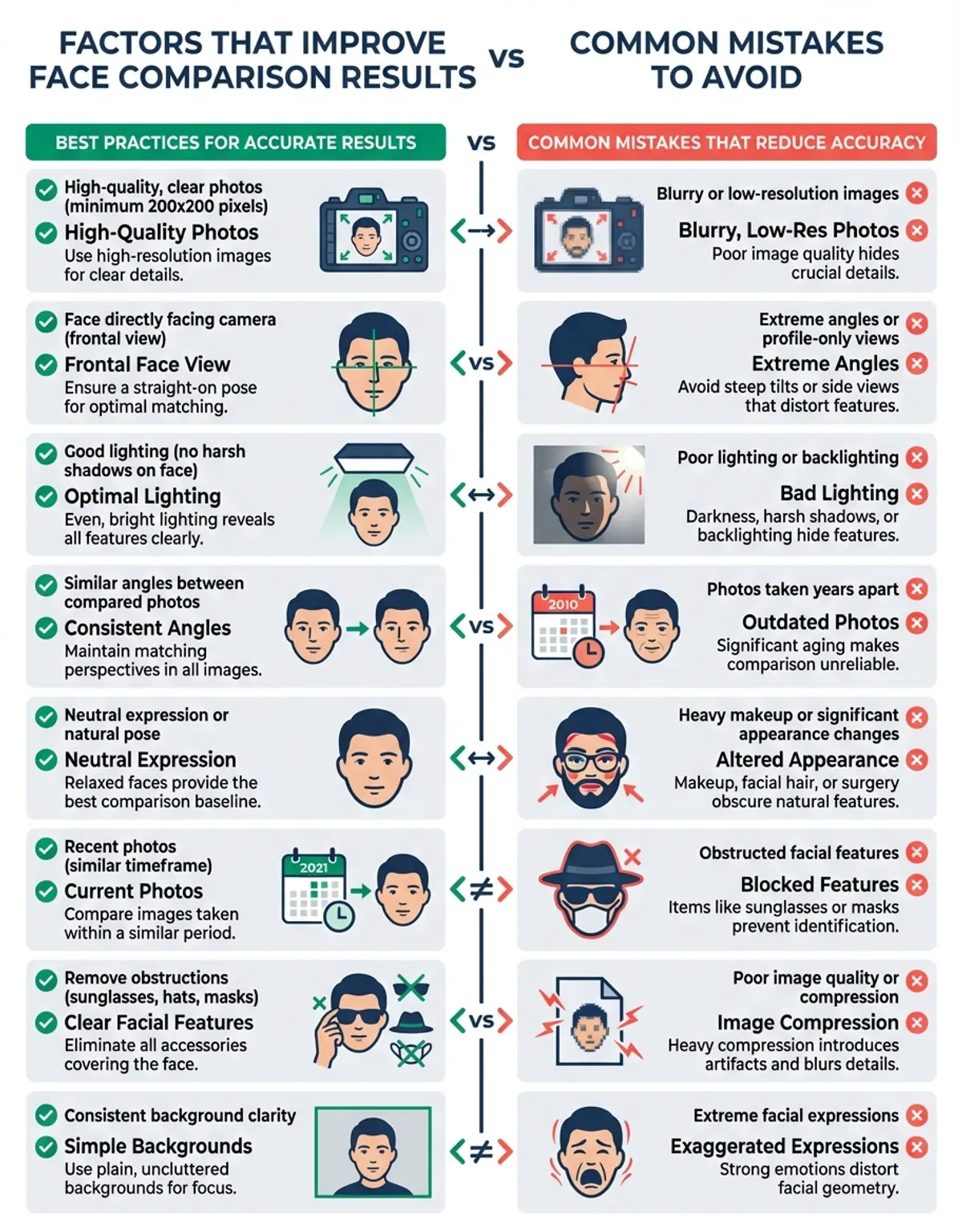
This is something most guides overlook, and it is critical for comparison specifically (as opposed to simple detection). When comparing two photos, the closer the conditions match between them, the higher your accuracy will be.
If Photo A is taken in bright daylight and Photo B is a dimly lit indoor shot, the algorithm has to compensate for how differently the same subjects render under those two lighting conditions. It can do this — modern face recognition algorithms are trained on varied conditions — but every compensation introduces a small margin of error.
For the highest-confidence comparisons, try to use photos taken in similar lighting, at similar angles, with similar distances from the camera. This is not always possible (you might be comparing a passport photo to a social media candid), but when you have a choice, matching conditions will give you the cleanest results.
8. Watch Your Background
While most modern comparison tools isolate subjects before analyzing them, busy or cluttered backgrounds can sometimes interfere with initial detection — the step that happens before face recognition begins. High-contrast patterns, other people in the background, or objects near the head can confuse the boundary-tracing step.
A clean, simple background (a plain wall, an uncluttered outdoor scene) makes the job easier. If you are taking photos specifically for comparison purposes, a neutral background is ideal. If you are working with existing photos that have busy backgrounds, most tools will still work — just be aware that detection confidence may be slightly lower.
9. File Format and Compression Matter
JPEG compression — especially at low quality settings — introduces artifacts that blur fine facial details. The block-pattern artifacts that appear in heavily compressed JPEGs can distort the precise edges relied on for landmark placement. Luminance correction helps standardize input quality, but works best when the source image has minimal compression artifacts.
PNG files preserve full image quality without compression artifacts and are ideal for comparison. If you are working with JPEGs, use the highest quality version available. Avoid screenshots of photos (which add a layer of compression), and avoid downloading images at reduced quality from social media platforms that aggressively compress uploads.
The difference matters most at lower resolutions. A high-resolution JPEG at 85% quality is usually fine. A low-resolution JPEG at 60% quality will show noticeable accuracy degradation. Modern tools apply brightness correction during preprocessing to compensate, but cleaner input always produces better outcomes.
10. Account for Age Differences Between Photos
Facial structure changes over time, which directly affects recognition accuracy and comparison scoring. The underlying bone structure remains relatively stable after the mid-20s, but soft tissue changes — skin elasticity, fat distribution, muscle tone — gradually alter how faces present. The algorithmic landmarks shift accordingly, changing the geometric profile used for matching.
Comparing photos taken 5-10 years apart will generally produce accurate face recognition results, though scores may be slightly lower than photos taken in the same time period. Gaps of 20+ years can produce noticeably lower similarity scores, even when comparing the same person, because the proportional relationships between landmarks have genuinely changed. Training data includes age-varied images to improve this, but significant age gaps remain challenging.
Comparing a child's photo to an adult photo of the same person is the hardest case. Facial proportions change dramatically from childhood through adolescence as the skull grows and the faces elongate. Expect lower confidence scores for recognition across this developmental period.
11. Keep Expressions Consistent
A wide smile pulls the corners of the mouth outward and upward, compresses the cheeks, narrows the eyes slightly, and raises the cheekbones. A neutral expression does none of these things. To face recognition algorithms, these are measurably different facial geometries.
For the most accurate comparison, use photos with similar expressions. Two neutral expressions will produce the highest-confidence match. Two smiles will also work well. But comparing a neutral photo to a laughing photo will lower your score, even for the same person, because the landmark positions genuinely differ between expressions. Training data for recognition models includes expression variation, but identical expressions always match better.
This is one of the most common reasons people get an unexpectedly low similarity score — the two photos have very different expressions, and the algorithm is correctly reporting that the facial geometry in those specific images does not match as closely.
12. Camera Distance and Lens Distortion
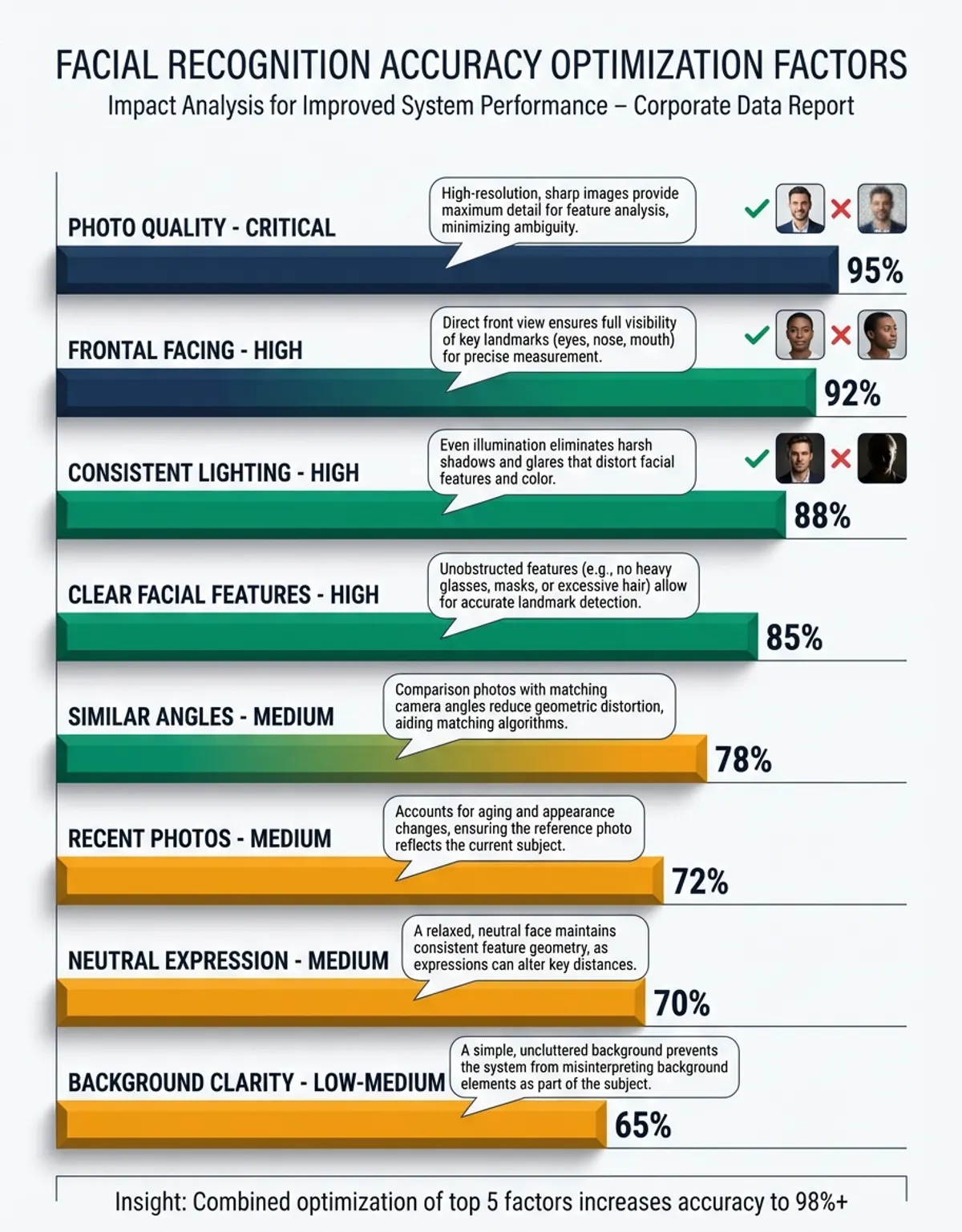
Here is a factor almost nobody talks about: the distance between the camera and the subject changes the apparent proportions of facial features due to perspective distortion. A selfie taken at arm's length (roughly 2 feet) exaggerates the nose size and compresses the ears relative to the center. A photo taken from 6-8 feet away with a moderate telephoto lens renders facial proportions much more accurately.
This means comparing a close-up selfie to a professional portrait of the same person can produce a lower similarity score than comparing two professional portraits — not because the faces look different, but because the lens distortion changed the apparent geometry. Face recognition measures what it sees, and perspective distortion alters the geometric profile that the learning model generates.
When possible, compare photos taken at similar distances. If you are comparing a selfie to a non-selfie, understand that some accuracy loss is expected due to this optical effect, not any limitation of the algorithm.
13. Use Multiple Photos for Verification
If you are trying to establish whether two people share the same person, running a single comparison gives you one data point. Running multiple comparisons using different photos of each person gives you a distribution of scores that is far more reliable for confirmation.
One comparison might catch an unflattering angle or unusual expression that produces a misleadingly low score. Averaging across 3-5 comparisons smooths out these anomalies and gives you a much more trustworthy assessment of actual facial similarity. This multi-image approach is how professional face recognition handles confirmation in security and law enforcement applications.
This is especially valuable when working with imperfect photos — old images, varying conditions, different time periods. Any single comparison might be skewed by one of the factors discussed above, but the average across multiple comparisons is remarkably robust for identity confirmation. You may also find our face similarity test helpful for understanding how different photos of the same person can produce varying similarity scores.
14. Factors That Can Affect Accuracy
Beyond the photo quality tips above, there are deeper factors that influence how comparison algorithms interpret similarity. Understanding these helps you interpret your results and get better outcomes.
Heavy Makeup and Recognition
Cosmetics can alter facial geometry in ways that directly affect algorithmic measurements, particularly around the eyes and lips. Contouring reshapes the apparent structure of the cheekbones and jawline. False eyelashes change the measured position of the upper eyelid margin. Lip liner and fillers shift the detected lip boundary positions. Dramatic eye makeup can alter the perceived distance between the brow ridge and the eye opening, confusing assessment and comparison algorithms.
This does not mean you need to remove all makeup before running a comparison — natural, everyday makeup rarely causes problems. But heavy editorial or theatrical makeup can shift landmark positions enough for recognition to noticeably affect similarity scores. If you are getting unexpected results and one photo features significantly more makeup than the other, that is likely a contributing factor to reduced accuracy.
Mathematical Similarity vs. Visual Perception
This is one of the most misunderstood aspects of comparison technology. Two individuals may have nearly identical facial proportions — the same eye spacing, nose-to-mouth distance, jaw angle, and forehead height — yet appear distinctly different to the human eye. Why? Because face recognition measures geometric relationships, while human perception integrates factors the algorithms do not weigh as heavily: skin texture, micro-expressions, hair framing, subtle facial asymmetries, and overall visual impression.
Conversely, the same person may score lower than expected if the two photos differ significantly in lighting, angle, or expression. The algorithm is reporting genuine geometric differences between those specific images, even though a human would instantly recognize both as the same person through confirmation.
The takeaway: a high similarity score means the geometric profile matches closely. It does not necessarily mean two people look alike in the way humans perceive resemblance. And a moderate score does not necessarily mean two people are different — it may mean the photos were captured under different enough conditions to shift the measured geometry.
Accessories and Occlusions
Sunglasses, masks, hats with low brims, and dense facial hair (particularly full beards) can all obscure the landmarks needed for accurate measurement. When landmarks are hidden, the algorithm estimates their positions based on the visible facial structure — inferring where the chin must be under a beard, or where the eyes sit behind sunglasses, based on the forehead and cheekbone positions it can detect.
These estimates are educated guesses, not measurements. They carry significantly reduced confidence compared to direct landmark detection. The more of the faces that are occluded, the more the algorithm is guessing, and the less reliable the comparison becomes for recognition and identity confirmation.
For the most accurate results, use photos where the full faces are visible with no accessories covering facial features. If you must use a photo with partial occlusion, understand that the resulting score reflects a best-effort estimate, not a high-confidence measurement.
15. Common Mistakes to Avoid
Here is a quick rundown of the most frequent errors people make when running comparisons:
- Using a group photo without cropping first. If there are multiple faces in the image, the detection algorithm may compare the wrong one. Always crop to show just the faces you want to compare.
- Comparing a photo to a photo of a screen. Taking a picture of a phone or computer screen adds glare, moire patterns, and color distortion. Use the original digital file whenever possible.
- Using heavily filtered photos. Instagram-style beauty filters smooth skin, enlarge eyes, slim the jawline, and alter facial proportions. These filtered proportions are what face recognition will measure — not the actual faces.
- Expecting 100% matches. Even two photos of the same person taken seconds apart will rarely score a perfect 100%. Micro-expressions, slight head movement, and minor lighting changes between frames mean there is always some variation. A score in the 85-95% range for the same person is completely normal.
- Drawing conclusions from a single comparison. One score is one data point. If the result matters, run multiple comparisons with different photos to build confidence in your conclusion through repeated recognition.
Understanding how face recognition works helps you take better photos for comparison. The recognition process begins with training the algorithm on diverse datasets, using advanced learning to build robust models. Through training, the algorithm learns to map facial landmarks regardless of minor variations. This learning enables recognition across different lighting conditions, angles, and expressions. The more training data an algorithm receives, the better its learning becomes at handling edge cases — which is why major recognition platforms achieve high accuracy even with imperfect source images.
Every face recognition comparison follows the same pipeline: detection locates the face in the image, then the algorithm extracts a mathematical facial profile, and finally compares the two profiles to produce a similarity score. Your training in proper photo techniques directly impacts how well recognition performs at each stage. Better input photos mean the learning algorithm can extract more precise measurements, which leads to more accurate matching results. Even a basic understanding of how scoring and training interact with photo quality will dramatically improve the accuracy of every comparison you run.
Summary: Quick Reference Checklist
| Factor | Best Practice | Impact on Accuracy | Easy to Control? |
|---|---|---|---|
| Angle | Front-facing, centered | Very High | Yes |
| Lighting | Soft, even, at eye level | Very High | Moderate |
| Eye Visibility | Both eyes fully visible | High | Yes |
| Color vs B&W | Color whenever possible | Moderate | Depends |
| Obstructions | Nothing covering the subject | High | Yes |
| Resolution | At least 200x200px | High | Depends |
| Matching Conditions | Similar lighting/angle in both photos | High | Sometimes |
| Background | Clean, uncluttered | Low-Moderate | Yes |
| File Format | PNG or high-quality JPEG | Moderate | Yes |
| Age Gap | Closer timeframe = better | Moderate-High | Not always |
| Expression | Match expressions between photos | Moderate | Sometimes |
| Camera Distance | Similar distance, avoid extreme selfie range | Moderate | Sometimes |
| Makeup | Minimal heavy contouring | Low-Moderate | Yes |
| Accessories | Remove sunglasses, masks, hats | High | Yes |
The Bottom Line
Modern face recognition draws on years of training in neural network methods and machine learning to deliver scoring precision that would have been impossible a decade ago. The algorithm behind every comparison tool has gone through extensive training on millions of images, learning to measure facial geometry across varied conditions. This training means the recognition algorithm can handle imperfect photos to a degree — but better input always produces better recognition output.
The accuracy of any comparison ultimately depends on how well the system can perform recognition on the images you provide. Recognition works best when both photos show clear, well-lit, front-facing subjects with no obstructions. The algorithm uses the training it received through learning to compensate for moderate variation, but cannot overcome severely degraded input. Every step in the recognition process — from initial detection through final accuracy scoring — benefits from higher-quality source images.
The good news: most of these factors are within your control. Take a moment to evaluate your photos before running a comparison. If the lighting is bad, the angle is extreme, or something is covering part of the subject, finding a better photo will give you far more reliable results than running the comparison and wondering why the score seems off. Comparison results improve dramatically with even small improvements in photo quality. For quick, free testing of these principles, try our face comparison online free tool to see how photo quality affects your results in real time.
And remember — a similarity score is a mathematical measurement of geometric facial relationships, not a judgment of whether two people look alike in the way humans perceive resemblance. Understanding that distinction is the key to interpreting your recognition results with confidence. Whether you apply better photo practices or simply follow the guidelines above, and through training yourself to capture better input always produces better outcomes from any recognition system.