
Compare Two Images for Similarity: Complete Analysis Tool Guide
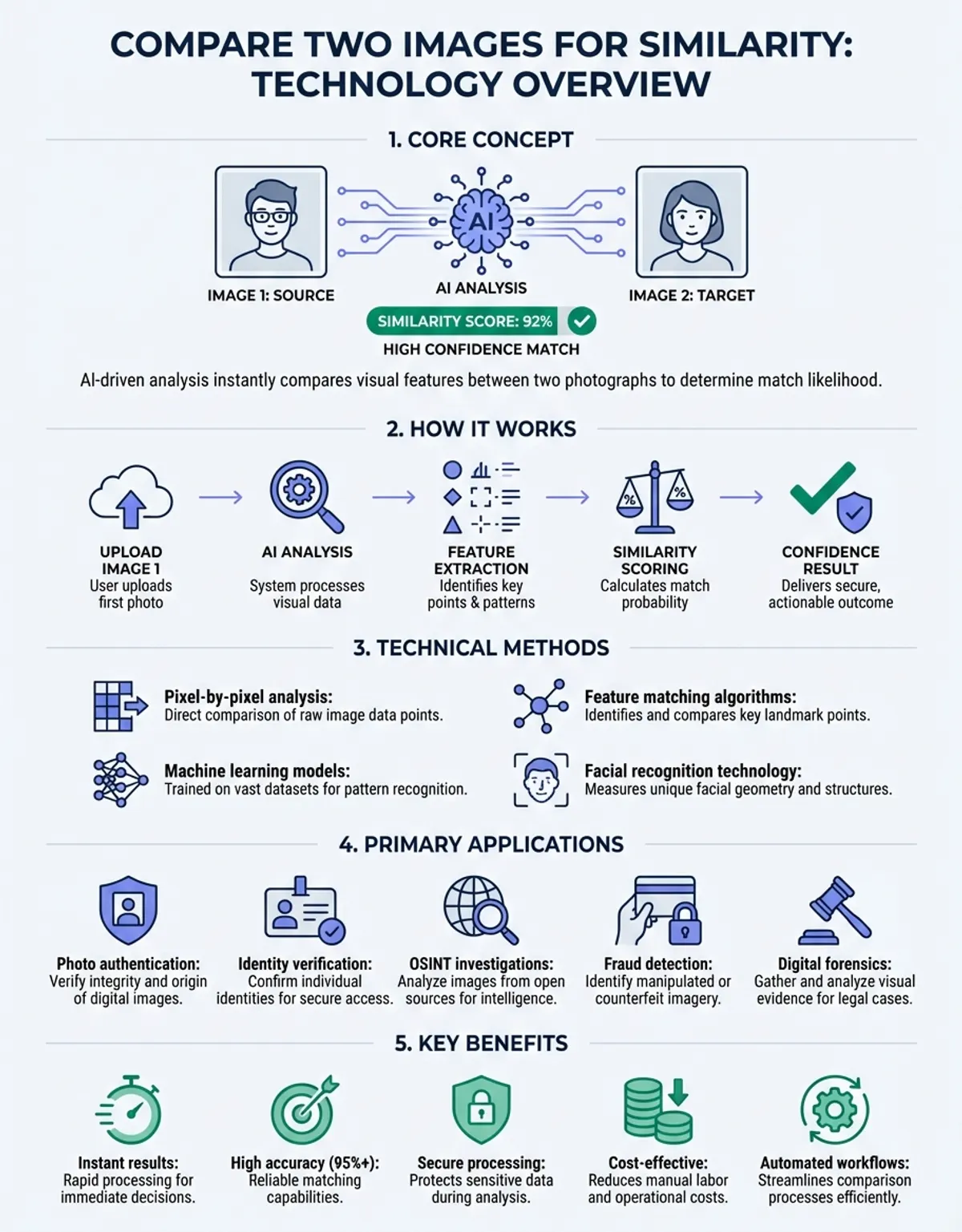
When you need to compare two images for similarity, understanding the technical methods and practical applications becomes essential. Whether you're verifying photo authenticity, detecting duplicates, or analyzing visual changes, modern image comparison techniques offer precise measurement capabilities that transform how we evaluate visual content.
Image analysis technology has evolved dramatically, enabling users to quickly compare two images through sophisticated algorithms that measure visual correspondence. These systems calculate cross-correlation values, assess spatial relationships, and generate similarity scores that quantify how closely two visuals match. The ability to compare images effortlessly has become invaluable across photography, quality control, forensic analysis, and asset management.
How to Compare Two Images for Visual Similarity
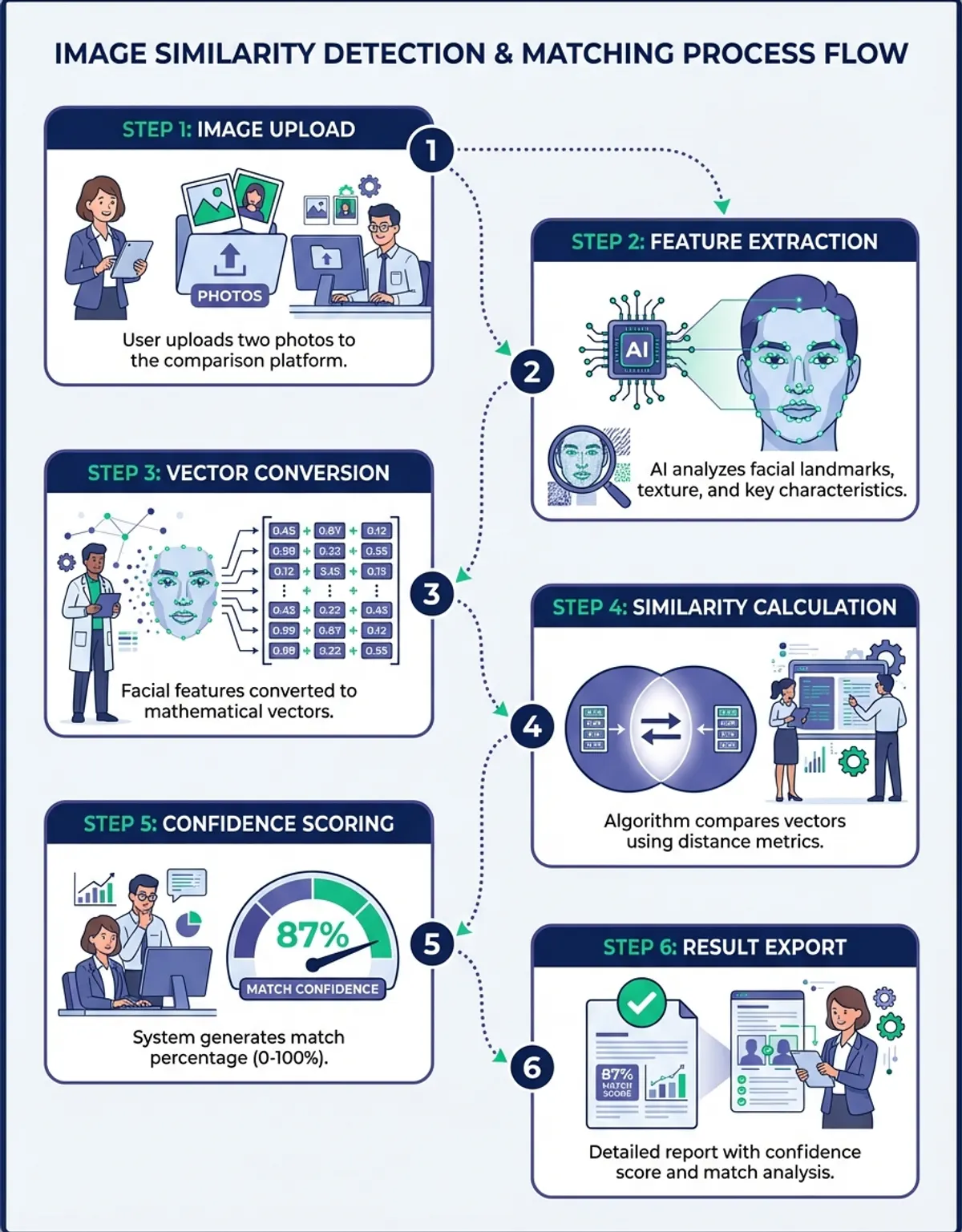
The foundation of analysis technology relies on mathematical models that analyze pixel-level data across images. When you upload two photos to a platform, the system processes both visuals through multiple analytical layers. These computational methods examine color distributions, structural patterns, and feature correspondence to determine how closely the images align. In plain terms, the engine analyzes two images pixel by pixel, then reduces those readings to a single image similarity score you can view on screen.
Structural similarity assessment examines how visual information is organized within each image. This approach considers luminance patterns, contrast relationships, and structural composition. By evaluating these elements, the system generates a comprehensive similarity metric that reflects both global and local visual characteristics.
What an Image Diff Actually Measures
An image diff is a map of what changed, not a verdict on quality. The tool records which pixels moved, which colours shifted, and which regions stayed identical, then presents that record as a heat map or a side-by-side view. Two files can share a high similarity score and still show a clear pixel diff in one corner, which is why most teams read the score and the map together.
Perceptual hashing creates fingerprints for images, enabling rapid analysis even when images have undergone minor modifications. This technique generates compact representations that capture essential visual features while remaining robust to common transformations like resizing, compression, or slight color adjustments. The resulting hash values can be evaluated to detect small differences that might otherwise go unnoticed.
Feature-based matching identifies distinctive points within images and analyzes their spatial relationships. This analytical model excels at recognizing corresponding elements even when images show the same subject from different angles, lighting conditions, or scales. The system maps feature points across both images and calculates how well these correspondences align.
How Algorithms Compare Image Data Pixel by Pixel
Modern algorithms employ multi-stage processing pipelines that extract and analyze visual information systematically. The initial stage involves preprocessing, where images are normalized to ensure consistent analysis conditions. This preparation adjusts for differences in resolution, color space, and orientation that might otherwise skew results.
The frequency domain analysis transforms spatial image data into frequency components, revealing patterns invisible in standard viewing. This transformation enables the system to identify periodic structures, textures, and repetitive elements that contribute to overall visual similarity. By evaluating frequency distributions, the algorithm can detect subtle correspondences that spatial analysis might miss.
Cross-correlation computation measures how one image relates to another across all possible alignments. This comprehensive technique slides one image across the other, calculating similarity at each position. The resulting correlation map highlights regions of high correspondence and reveals the optimal alignment between the two images.
AI Scoring and Pixel Diff Maps
AI models add a learned layer on top of the arithmetic. Instead of only counting pixel differences, a trained network weighs which changes a person would actually notice and returns a confidence value alongside the raw pixel diff. AI scoring helps most when files have been recompressed, resized, or lightly retouched, because the raw numbers alone would flag harmless edits as real changes.
Color histogram analysis examines how colors are distributed throughout each image. This method creates frequency distributions showing the prevalence of different color values. By evaluating these distributions, the system can assess color similarity independent of spatial arrangement, making it useful for detecting images with similar palettes even when content differs.
Practical Applications Across Industries
Quality control in manufacturing relies heavily on visual comparison to detect product defects. Production lines use automated systems to evaluate product images against reference standards, instantly identifying deviations that indicate quality issues. This comparison application demands high sensitivity to detect small differences in appearance, texture, or assembly.
Asset management systems employ similarity technology to organize photo libraries and eliminate duplicates. When managing thousands of images, automatic similarity detection identifies near-duplicates, variations, and related content. Photo libraries are usually stored as thousands of loose files, so an image comparison pass that groups near-identical files is often the fastest way to reclaim storage.
Forensic analysis uses techniques to verify image authenticity and detect manipulation. Investigators evaluate questioned images against known originals to identify alterations, composites, or forgeries. Each exhibit is normally recorded with its file name and hash so the same comparison can be reviewed and repeated by another examiner. The ability to detect small differences proves crucial for legal proceedings and investigative work.
Medical imaging applications assess scans taken at different times to track disease progression or treatment response. Radiologists use technology to align images from multiple sessions and highlight changes in tissue structure, lesion size, or anatomical features. Prior scans are pulled from the archive as DICOM files and viewed alongside the current study. This temporal analysis enables precise monitoring of medical conditions.
Selecting a Free Online Image Comparison Tool
Choosing an appropriate solution depends on your specific requirements and technical constraints. Web-based platforms offer convenience and accessibility, allowing users to compare images without installing software. These tools typically provide straightforward interfaces where you upload two photos and receive immediate similarity scores. A free online image difference checker suits one-off checks: you drag in two files, view the highlighted result, and close the tab.
When to Compare Two Images in the Browser
Browser tools are the right call when the files are small, the job is occasional, and nothing confidential is involved. Anything you upload leaves your machine, so sensitive files belong in desktop software or a self-hosted image comparison service instead.
Professional-grade software delivers advanced analytical capabilities for users requiring detailed reports and customizable parameters. These applications offer fine-grained control over algorithms, threshold settings, and output formats. They excel in scenarios demanding high accuracy or specialized analytical approaches.
API-based solutions enable developers to integrate functionality into custom applications. These programmatic interfaces process image pairs through specified algorithms and return structured similarity data. A single API call usually accepts two file references and returns a numeric score, so an API can sit inside an upload pipeline with no human review at all. This approach suits automated workflows and large-scale processing requirements.
Mobile applications bring capabilities to smartphones and tablets, enabling on-site analysis and field work. These tools balance processing power with portability, offering sufficient analytical capability for common tasks while maintaining responsive performance on mobile hardware.
Interpreting Similarity Scores and Metrics
Similarity scores quantify how closely two images match, but interpreting these values requires understanding what they represent. Most systems express similarity as a percentage or normalized value between 0 and 1, where higher values indicate greater correspondence. However, the specific meaning varies based on the underlying algorithm and scoring approach. Two numbers from different products rarely mean the same thing, so record which similarity tool produced a score before you view results side by side.
Threshold selection determines when images should be considered similar versus different. Setting appropriate thresholds depends on your use case—strict matching for duplicate detection requires high similarity thresholds, while related content discovery benefits from more permissive values. Understanding how threshold choice affects results helps optimize comparison accuracy.
Pixel-perfect matching represents the most stringent comparison standard, where their similarity percentage will be equal only when images are identical at every pixel location. This approach suits scenarios requiring exact correspondence but proves too restrictive for most real-world applications where minor variations are acceptable or expected.
Perceptual similarity better reflects how humans perceive visual correspondence. This metric accounts for the visual system's sensitivity to different types of changes, weighing visually significant differences more heavily than imperceptible variations. Perceptual scoring produces results that align more closely with subjective similarity judgments.
Optimizing Original Images Before Analysis
Proper image preparation significantly improves accuracy and reliability. Consistent formatting ensures both images meet the system's requirements and eliminates artificial differences caused by technical variations rather than actual content differences.
Resolution alignment standardizes image dimensions before analysis. When images have different sizes, the system must either resize them or analyze at different scales. Pre-processing images to matching dimensions eliminates this complexity and ensures fair evaluation conditions. Save the resized copies as separate files so the originals stay untouched.
Color space conversion normalizes how color information is represented. Different image sources may use various color models—RGB, CMYK, LAB, or others. Check the file format first, because a PNG file and a JPEG file of the same scene can already differ before any analysis begins. Converting both images to the same color space ensures color evaluations measure actual differences rather than representation artifacts.
Noise reduction preprocessing removes random variations that don't represent actual image content. Sensor noise, compression artifacts, and other technical imperfections can skew results. Applying appropriate filtering before analysis improves result reliability, and keeping the unfiltered file lets you review what the filter removed.
Advanced Analytical Model Techniques
Multi-scale analysis examines images at different resolution levels, capturing both fine details and broad structural patterns. This hierarchical approach begins with coarse-level evaluation to identify overall correspondence, then progressively refines analysis at finer scales. The multi-scale analytical model provides robust matching even when images show the same scene at different zoom levels.
Batch Jobs That Compare Two Images at Scale
At volume the work stops being interactive. A queue reads file pairs from a folder, runs the same algorithm on each pair, and writes one row per result to an output file; nobody views the images until something fails a threshold. Teams that compare images this way set the threshold once and then only view the exceptions.
Region-based analysis focuses on specific image areas rather than entire frames. This selective approach proves valuable when only certain portions need evaluation—for example, assessing product appearance while ignoring background variations. Spatial masking enables users to define regions of interest for targeted evaluation.
You may also find our guide on Compare Pictures helpful for deeper context on this topic. For a broader walkthrough, see our guide on how to compare images with AI-assisted analysis.
Temporal analysis evaluates image sequences to track changes over time. Video analysis and time-lapse monitoring employ this technique to identify motion, growth, or deterioration. By assessing consecutive frames, the system highlights dynamic elements while filtering static content.
Semantic analysis goes beyond pixel-level evaluation to understand image content and meaning. This advanced approach uses machine learning trained to recognize objects, scenes, and concepts. Rather than measuring visual similarity alone, semantic analysis assesses whether images depict similar subjects or convey related meanings.
Common Challenges in Analysis
Lighting variations present significant challenges for algorithms. The same scene photographed under different illumination produces images with dramatically different brightness and color characteristics. Robust methods must account for these variations without losing sensitivity to legitimate differences.
Perspective changes alter the apparent shape and position of objects within images. When evaluating photos of three-dimensional subjects taken from different viewpoints, geometric distortions complicate direct pixel analysis. Advanced techniques employ geometric transformation to compensate for perspective differences.
Compression artifacts introduce artificial differences that don't reflect actual content variations. Lossy formats like JPEG create block artifacts and color shifts that can trigger false differences in results. The same photo saved once as a high-quality file and once as a heavily compressed file will never match pixel for pixel, so understanding these artifacts helps interpret results.
Scale differences complicate analysis when images show the same content at different sizes or resolutions. Simple pixel-by-pixel evaluation fails when image dimensions don't match. Scale-invariant techniques enable meaningful assessment regardless of image size.
Tool Features to Look For When You Compare Images
Batch processing capability enables evaluation of multiple image pairs efficiently. When you need to compare two images repeatedly across large collections, automated batch operations save substantial time compared to manual pair-by-pair processing. Look for tools that support folder monitoring, queue management, and parallel processing.
Compare Image Batches Without Manual Work
Batch mode is what separates a novelty from a working image comparison tool. Point it at a folder, let it pair files by name, and read one report at the end instead of opening each view by hand.
Difference visualization highlights where and how images differ. Rather than just providing a numerical score, visual difference maps show specific regions where correspondence breaks down. Heat maps, side-by-side views, and overlay modes help users quickly identify and understand differences.
Adjustable sensitivity controls enable users to tune strictness. Some applications benefit from lenient matching that tolerates minor variations, while others require stringent standards that flag subtle differences. Quality platforms offer configurable thresholds and algorithm parameters.
Export and reporting functionality delivers results in actionable formats. Comprehensive reports documenting similarity scores, difference locations, and analytical parameters support quality assurance workflows, compliance requirements, and decision-making processes. CSV or PDF files keep those results reviewable months later.
Free vs. Professional Solutions
Free services provide basic functionality suitable for occasional use and simple tasks. These platforms typically impose limitations on image size, processing volume, or available features. Free tiers usually cap file size and daily volume, while paid tiers lift both limits and add API access. For casual users or those exploring technology, free options offer a low-risk introduction.
Professional solutions justify their cost through advanced capabilities, higher processing capacity, and specialized features. Commercial platforms invest in algorithm development, regular updates, and customer support. Organizations with demanding requirements or high-volume needs generally find professional solutions deliver better value despite higher initial costs.
Open-source alternatives offer transparency and customization potential for technically proficient users. These solutions provide access to underlying algorithms and enable modification to suit specific requirements. The trade-off involves greater technical complexity and responsibility for maintenance and support.
Enterprise platforms integrate capabilities within broader asset management or quality control systems. These comprehensive solutions offer functionality alongside related features like annotation, approval workflows, and analytics. Integration benefits often justify the substantial investment required for enterprise-class systems.
Improving Accuracy with Original Reference Images
Calibration procedures optimize settings for specific use cases. By processing sample image pairs with known similarity relationships, users can tune algorithm parameters and thresholds to match their accuracy requirements. Proper calibration reduces false positives and false negatives.
Original reference image selection significantly impacts results. Choosing high-quality, representative original reference images establishes clear standards for evaluation. Store the reference as a lossless file and reuse that same file for every run. The reference should be free from artifacts, properly exposed, and correctly focused to provide a valid baseline.
Environmental control minimizes unwanted variations between image captures. When evaluating images of physical objects or scenes, controlling lighting, camera position, and background conditions reduces artificial differences. Consistent capture conditions enable algorithms to focus on actual content differences.
Algorithm selection matches analytical approach to objectives. Different algorithms excel at different tasks—structural similarity for general-purpose use, feature matching for geometric correspondence, histogram analysis for color similarity. Understanding algorithm strengths helps users choose appropriate methods.
Tool Feature Comparison Table
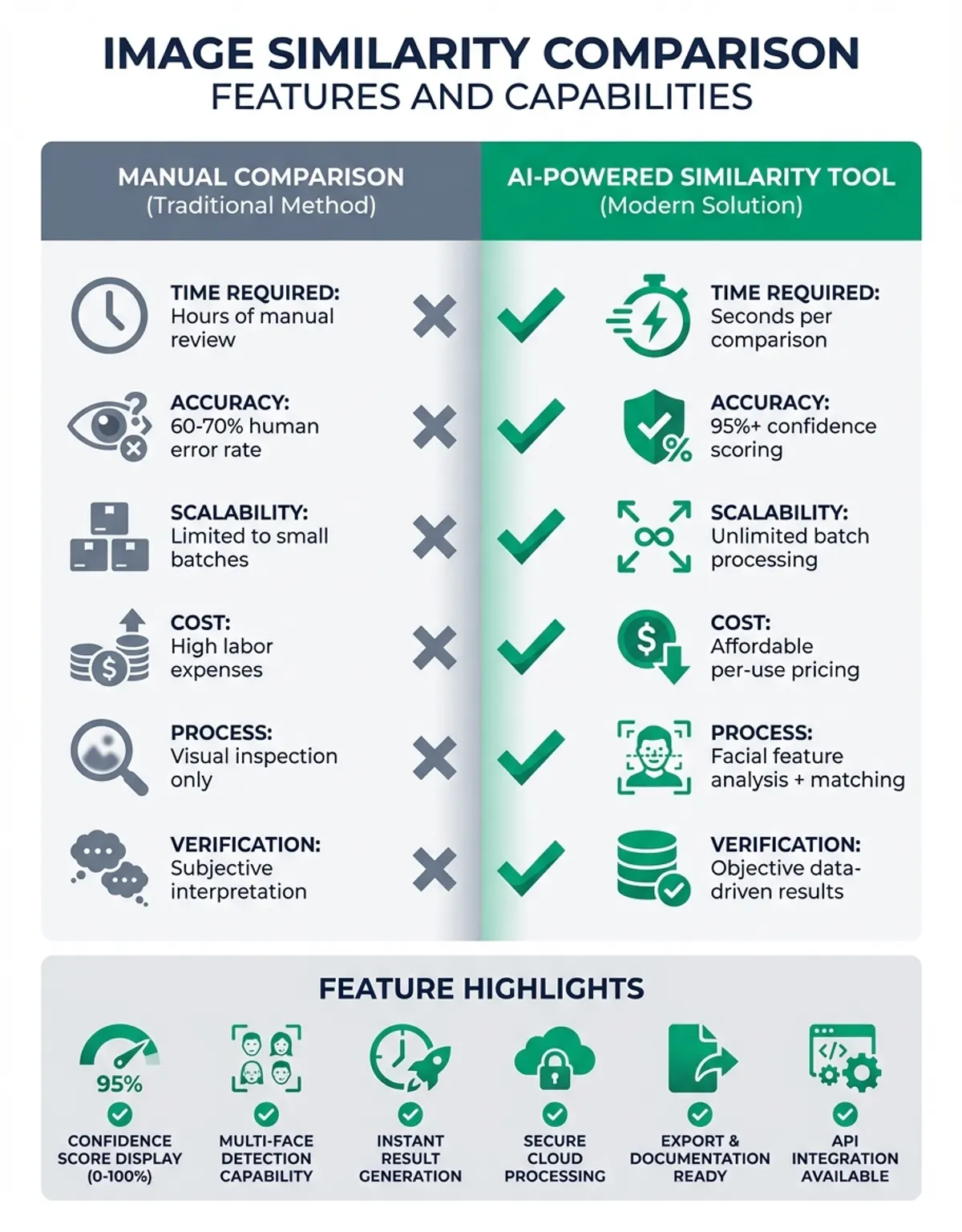
The table below sets the four tool classes against each other on ease of use, speed, cost, and the practical questions that decide most purchases: which files they accept, what view they return, and whether an API is available.
| Feature | Web Tools | Desktop Software | API Solutions | Mobile Apps | File and API Notes |
|---|---|---|---|---|---|
| Ease of Use | Very High | Medium | Low | High | Browser file upload, no install |
| Processing Speed | Medium | High | Very High | Medium | Fastest on small files |
| Batch Processing | Limited | Extensive | Unlimited | Limited | Whole folders of files via API |
| Customization | Minimal | Moderate | Extensive | Minimal | AI thresholds set in code |
| Cost | Free-Low | Medium-High | Variable | Free-Medium | Per-file or per-call pricing |
| Accuracy | Good | Excellent | Excellent | Good | AI scoring narrows false flags |
| Integration | None | Limited | Full | None | REST API endpoints |
| Supported File Types | PNG, JPEG, WebP | PNG, JPEG, TIFF, RAW | Whatever the decoder accepts | PNG and JPEG | Lossless files give the cleanest result |
| Difference View | Side-by-side view | Overlay and slider views | Returns a difference mask | Single view | Pixel diff maps speed up review |
| Offline Use | No | Yes | No | Partial | Local files never leave the device |
Frequently Asked Questions About Image Comparison
How accurate are image analysis tools?
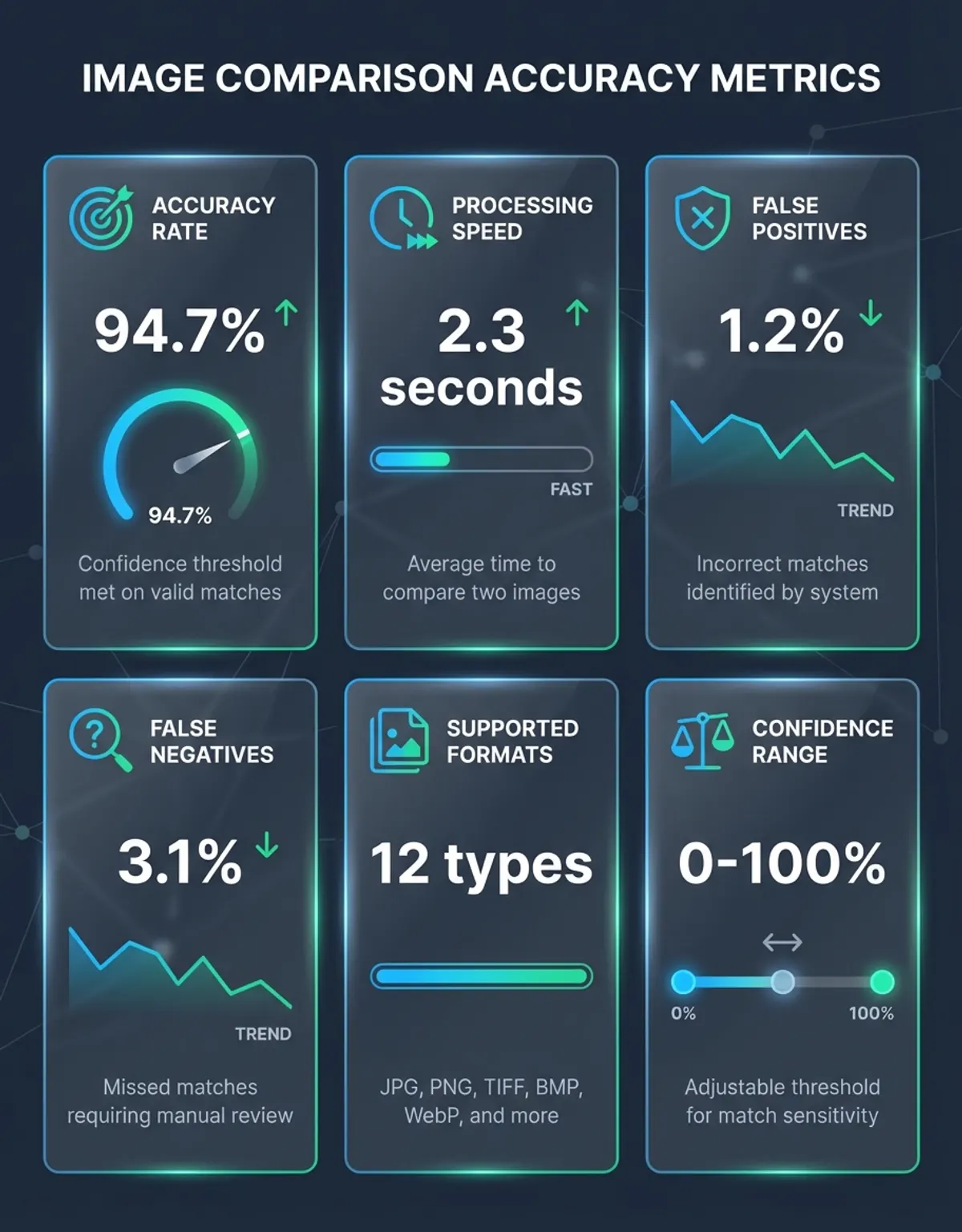
Accuracy depends on the algorithm used, image quality, and evaluation conditions. High-quality tools typically achieve accuracy above 95% for well-prepared images. However, challenging conditions like severe lighting changes or perspective shifts can reduce accuracy. Professional-grade solutions employ sophisticated approaches that maintain high accuracy across diverse conditions. Run the same file pair through two products and view both scores before trusting either one.
Can tools detect edited or manipulated images?
Technology can identify differences between an original image and an altered version. When you compare images where one has been manipulated, the tool highlights changed regions. Keep the original file and the suspect file together so the image comparison can be repeated later. However, detecting manipulation without a reference requires specialized forensic analysis tools that examine patterns, metadata inconsistencies, and statistical anomalies rather than direct visual evaluation.
What image formats work best for analysis?
Lossless formats like PNG and TIFF preserve maximum image quality and work best for precise analysis. These formats avoid artifacts that can interfere with evaluation. A TIFF file is much larger than a JPEG file of the same scene, and that extra file size is exactly the detail an accurate comparison needs. While JPEG images can be analyzed, the lossy format introduces artifacts that may affect results. When maximum accuracy matters, use lossless formats or store at highest quality settings.
How do tools handle different image sizes?
Most systems automatically resize images to matching dimensions before analysis. The tool typically scales the larger image down to match the smaller one, or scales both to a standard size. Your source file is rarely altered; the resizing happens on a working copy in memory. This resizing enables evaluation but may reduce ability to detect small differences. For best results, resize images to matching dimensions beforehand.
Can I evaluate images with different aspect ratios?
Evaluating images with different aspect ratios requires either cropping or padding to achieve matching dimensions. The tool may crop images to a common aspect ratio, potentially excluding important content, or pad the narrower image with borders. Crop and save a new file first, then view the pair together. Neither approach is ideal—when possible, crop images to matching aspect ratios before analysis to ensure relevant content is evaluated.
What's the difference between similarity and correlation?
Similarity measures overall correspondence between images using various metrics that may consider structural, perceptual, or semantic factors. Correlation specifically measures statistical relationships between pixel values across images. Correlation represents one mathematical approach to quantifying similarity, while similarity encompasses broader concepts including human perceptual judgments. Neither number tells you where the change sits; for that you need an image diff view.
How long does image analysis take?
Processing time varies based on image resolution, algorithm complexity, and available computing power. Compare photos at web resolution and results land in seconds, while full-resolution camera files take longer. High-resolution images or sophisticated analytical methods may require minutes. Batch processing large collections can take hours, though parallel processing significantly accelerates throughput. The ability to two images instantly depends on image size and tool optimization.
Conclusion
The capability to compare two images for similarity has become essential across diverse applications, from quality control to forensic analysis. Modern technology combines mathematical rigor with practical usability, enabling users to quickly compare two images and obtain reliable similarity assessments. Understanding the principles behind algorithms, selecting appropriate tools, and properly preparing images ensures accurate results that support informed decision-making.
Whether you need to verify image authenticity, organize photo collections, or monitor visual changes over time, technology provides the analytical foundation for these tasks. Pick the simplest tool that answers your question, keep the source file intact, and view the difference map next to the score. As algorithms continue advancing and computational power increases, capabilities will expand further, offering even more sophisticated analysis and broader applications across professional and personal domains.